THM | AoC 2025 | Day 12

Day-12: Phishing - Phishmas Greetings
SUMMARY
On Day-12, we move on to inspect some emails in order to identify various Phishing Attempts. Some of these make use of Email Address Spoofing techniques, others use falsely advertised - potentially malicious - attachements files. There are also some others that use Typosquatting/Punycode, but most default to some basic social engineering techniques.

Phishing - Phishmas Greetings
- TL;DR: Learn how to spot phishing emails from Malhare's Eggsploit Bunnies sent to TBFC users.
- Original Room: TryHackMe | Advent of Cyber 2025 | DAY 12 - Phishing - Phishmas Greetings
STORYLINE
"McSkidy's disappearance has disabled TBFC's email filters. The SOC Team suspects Malhare's Eggsploit Bunnies launched a phishing campaign to steal credentials. You must identify legitimate emails versus sophisticated phishing attempts disguised as routine operations or SOC-mas logistics."
Spotting Phishing Emails
Phishing is a precision-targeted cyber attack exploiting human vulnerability to steal credentials, deliver malware, exfiltrate data, or commit financial fraud. It remains highly effective because it targets people, not technology.
Phishing vs. Spam
- phishing is deliberate deception targeting specific users
- spam is bulk, low-risk marketing noise
- Goals: push exposure or engagement
- Intentions: promotion, scams, traffic generation (clickbait), data harvesting
- Defense: look for the intention behind it
Core Techniques
- Impersonation | Attackers pose as trusted individuals or departments using mismatched domains (e.g., Gmail instead of company domain).
- Defense: check if sender's email matches the expected domain
- Social Engineering | Manipulates emotions through urgency, fear, or trust; often redirects victims away from official verification channels (side channel).
- Common Techniques: Impersonation, Sense of Urgency, Side channel, Malicious intention
- Typosquatting | Typosquatting registers misspelled domains (glthub.com vs. github.com).
- Punycode | Punycode replaces ASCII letters with visually identical Unicode characters (latin "a" -> greek "α").
- Defense: check email headers' "Return-Path" field for ACE prefix encoding.
- Spoofing | Messages appear legitimate (display name and "From:") but fail authentication checks (SPF, DKIM, DMARC). Failed SPF and DMARC indicate spoofing.
- Defense: check Headers > "Authentication-Results" ("spf=fail"; "dkim=fail";"dmarc=fail"), check "Return-Path"
- SPF: Says which servers are allowed to send emails for a domain (like a list of approved senders)
- DKIM: Adds a digital signature to prove the message wasn’t changed and really came from that domain
- DMARC: Uses SPF and DKIM to decide what to do if something looks fake (for example, send it to spam or block it)
- Malicious Attachments | attaching malicious files to an email usually using some sort of social engineering technique in the body
- Common: ".html"/".hta" files execute without browser sandboxing, providing full endpoint access
Modern Tactics
Attackers now focus on stealing credentials rather than dropping malware. They exploit legitimate applications (Google Drive, OneDrive, Dropbox) to bypass filters, create fake login pages ("microsoftonline.login444123.com/signin") mimicking Office 365/Google, and use side-channel communications (SMS, WhatsApp, phone calls) to escape company security controls.
Defense
User awareness is critical. Verify sender domains, check authentication headers, recognize social engineering, and question requests creating artificial urgency.
Q & A
First thing first, let's start the target VM and then open the web-application. It seems that the "Automatic classification" function is disabled, so we have to inspect the Emails manually. There are 6 Emails in our inbox.
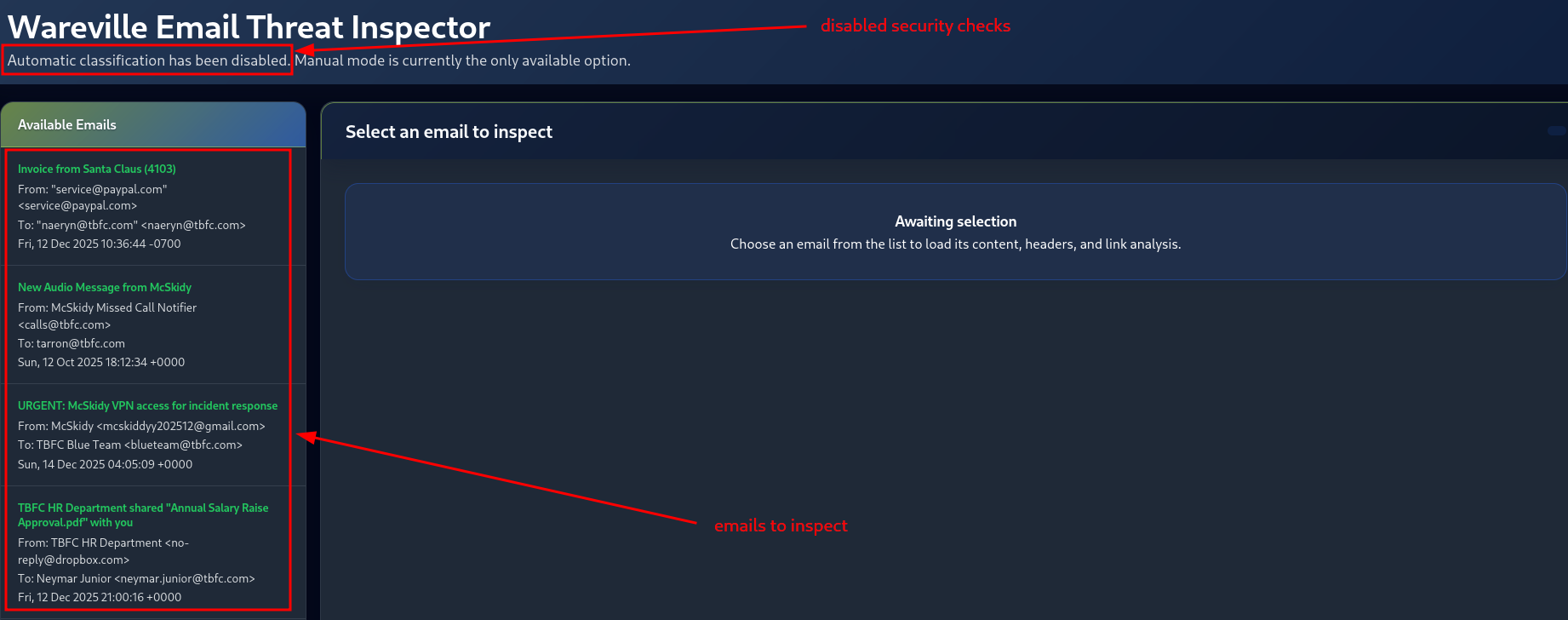
Figure 5: Emails to inspect
Let's start with the first one, by simply clicking on it under "Available Emails".
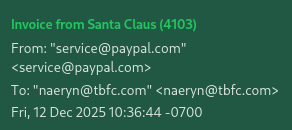
Figure 6: First Email to inspect
Question-1: Classify the 1st email, what's the flag?
[REDACTED-FLAG]
It looks like we have an Email Spoofing Attempt here. There are a couple of indicators we can turn to in order to verify it. First, under "Headers", we can check on the "AUTHENTICATION-RESULTS" Email Header. The fact that all authentication checks - SPF, DKIM and DMARC - report FAIL's, is a good indicator for a spoofing attempt.
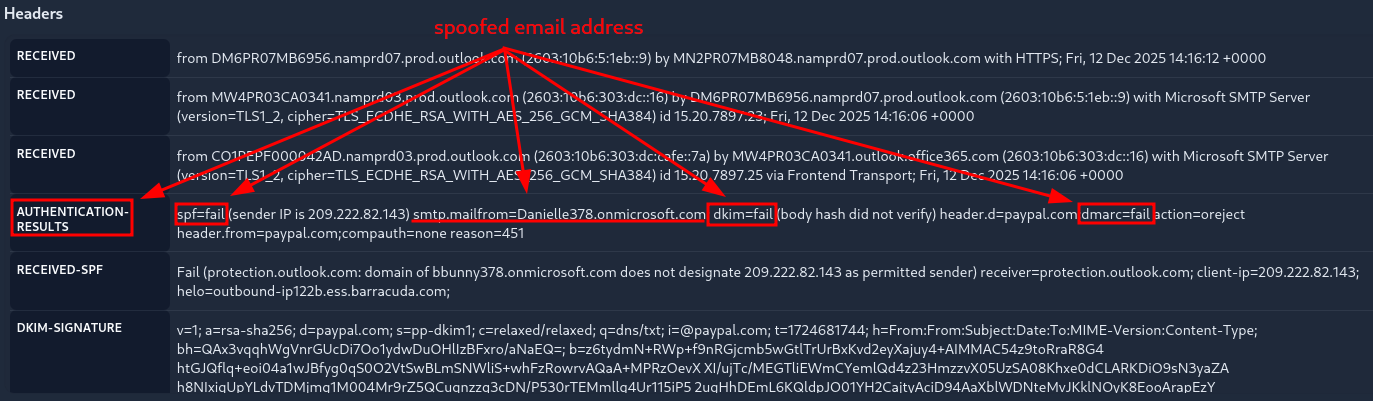
Figure 7: First Email - Failed Authentication Checks
Moreover, once we check on the "RETURN-PATH" Header, we notice the mismatch between the sender-,the advertised-, and the real return-email-address.
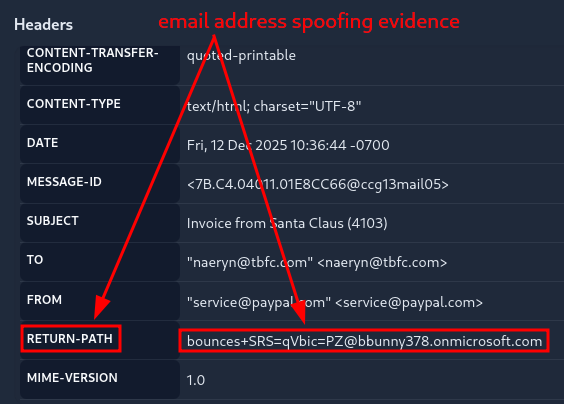
Figure 8: First Email - Mismatch in Return Path
Once we identified the issue, we need to classify the Email. Once we "Submit" the correct Classification, we are returned with the flag for the 1st question.
- CLASSIFICATION: Phishing | Spoofing, Sense of Urgency, Fake Invoice
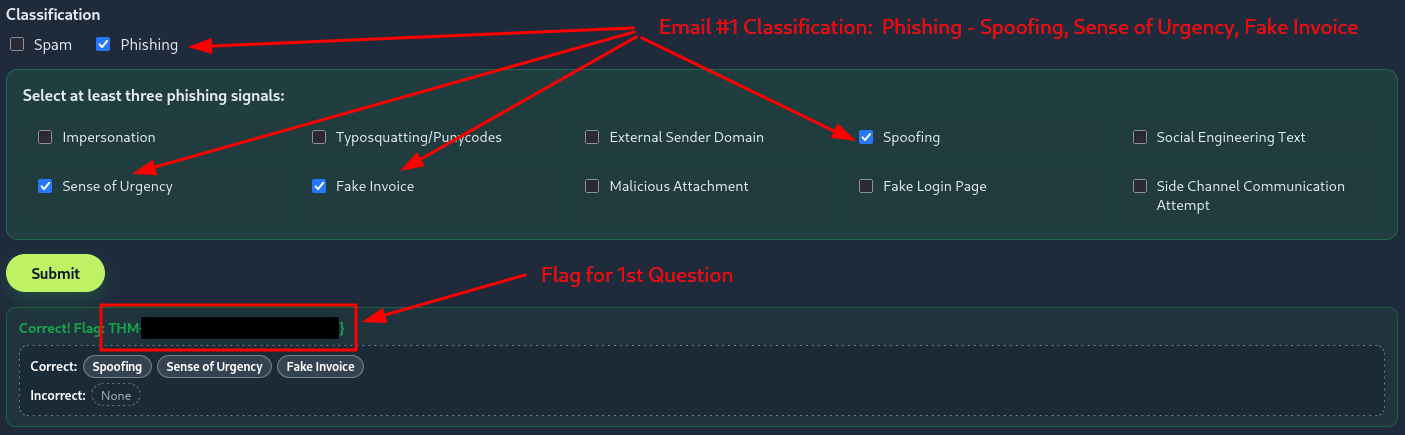
Figure 9: First Email - Returned Flag after Successful Classification
Question-2: Classify the 2nd email. What's the flag?
[REDACTED-FLAG]
Here we notice a potentially malicious Attachement file, which is advertised as an MP3 file, when in fact it is an HTML file. Moreover, just like before, there is an issue with both the Authentication-Results, as well as with the Return-Path Header.
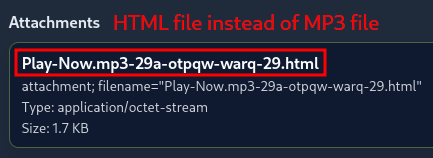
Figure 10: Second Email - Potentially Malicious Attachement
- Indicators
- AUTHENTICATION-RESULTS Header | "spf=fail"; "dkim=fail"; "dmarc=fail"
- RETURN-PATH Header | "[email protected]" instead of "[email protected]"
- Attachements | HTML file ("Play-Now.mp3-29a-otpqw-warq-29.html") instead of MP3 file
- CLASSIFICATION: Phishing | Impersonation, Spoofing, Malicious Attachment
Question-3: Classify the 3rd email. What's the flag?
[REDACTED-FLAG]
- Indicators
- Sense of Urgency text | "immediately", "urgent"
- Side Channel Communication attempt | "personal email"
- CLASSIFICATION: Phishing | Impersonation, Social Engineering Text, Sense of Urgency
Question-4: Classify the 4th email. What's the flag?
[REDACTED-FLAG]
Here we notice a Domain Mismatch in the Body of the Email. The account that shares the document with us via Dropbox is "[email protected]" of the OUTLOOK.COM domain, instead of our company domain which is TBFC.COM.
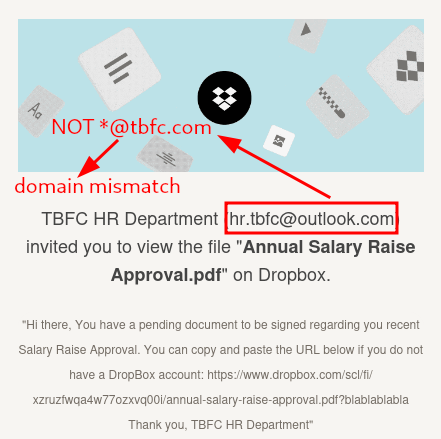
Figure 11: Fourth Email - Domain Mismatch
- Indicators | Domain Mismatch
- CLASSIFICATION: Phishing | Impersonation, External Sender Domain, Social Engineering Text
Question-5: Classify the 5th email. What's the flag?
[REDACTED-FLAG]
- Indicators
- Authentiation-Results Headers pass
- Return-Path Header matches with sender
- no attachement and no links
- CLASSIFICATION: Spam
Question-6: Classify the 6th email. What's the flag?
[REDACTED-FLAG]
Here we notice a Punycode attempt with the ASCII letter "f".
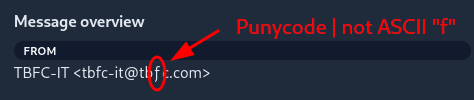
Figure 12: Sixth Email - Punycode attempt with letter 'f'
For the real - correct ASCII encoded sender address - we check out the "Return-Path" Header which identifies it as "[email protected]" instead of "[email protected]".
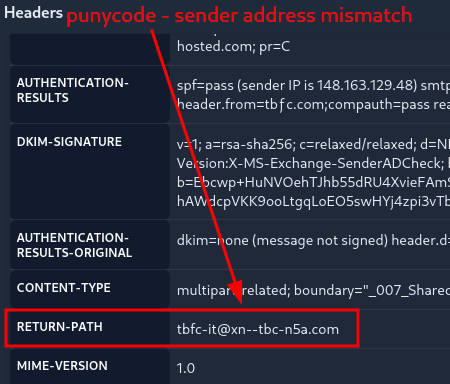
Figure 13: Sixth Email - Punycode Attempt - True Address
- Indicators
- Punycode in sender email address "ƒ" instead of ASCII "f"
- "Return-Path" Header: "[email protected]" instead of "[email protected]"
- CLASSIFICATION: Phishing | Impersonation, Typosquatting/Punycodes, Social Engineerng Text
Question-7: If you enjoyed today's room, you can explore the Phishing Analysis Tools room in detail!
No answer needed