THM | AoC 2025 | Day 13-14

Day-13: YARA Rules - YARA mean one! | Day-14: Containers - DoorDasher's Demise
SUMMARY
On Day 13 we start out with a quick YARA 101, where we discuss what Yara Rules are, what are they used for, what problem they solve and lastly, how to exactly build and used them.
In the practical part we build a Yara Rule to identify files with a specific hidden String in them, and then assemble the hidden pieces to find McSkidy's hidden message and potential location.
Moving on, on Day 14, we start with a quick Container theory, then we investigate a defaced website and discover it to be hosted in a Docker container with a critical vulnerability: the Docker socket is exposed to the container, giving us full access to the Docker Engine.
Using this, we escalate privileges to a more privileged container, recover the original website by running a recovery script, and grab the flag. As a bonus, we find a hardcoded password on another service and use it to take over the "deployer" user account.

D-13 | YARA Rules - YARA mean one!
- TL;DR: Learn how YARA rules can be used to detect anomalies.
- Original Room: TryHackMe | Advent of Cyber 2025 | DAY 13 - YARA Rules - YARA mean one!
STORYLINE
"McSkidy, missing from TBFC, sent a hidden message to the blue team embedded in Easter-themed images. The team must create a YARA rule to scan the directory, detect a keyword paired with code words, and extract those code words in ascending order to decode her message."
THEORY
YARA is a malware detection tool that identifies threats by searching for unique patterns and digital fingerprints in code, files, and memory.
Advantages
- Speed | Quickly scans large file sets
- Flexibility | Detects text, binary patterns, and complex logic
- Control | Analysts define what's malicious
- Shareability | Rules reusable across organizations
- Visibility - Connects scattered clues into attack patterns
Common Use Cases
- Post-incident analysis | Verify malware presence across environment
- Threat hunting | Search for known/related malware families
- Intelligence scans | Apply shared rules to detect new indicators
- Memory analysis | Examine active processes for malicious code
YARA Rules
- 3 key elements:
- Metadata | info about the rule itself; who created it, when, why
- Strings | what to search for (text, byte sequences, regular expressions)
- Conditions | logic deciding when the rule triggers
- Yara Rule Example - looking for specific URLs and executable names
rule TBFC_KingMalhare_Trace
{
    meta:
        author = "Defender of SOC-mas"
        description = "Detects traces of King Malhare’s malware"
        date = "2025-10-10"
    strings:
        $s1 = "rundll32.exe" fullword ascii
        $s2 = "msvcrt.dll" fullword wide
        $url1 = /http:\/\/.*malhare.*/ nocase
    condition:
        any of them
} - Yara Rule Example - specific header binary, malicious binary fragment, restrict by file size
rule TBFC_Simple_MZ_Detect
{
    meta:
        author = "TBFC SOC L2"
        description = "IcedID Rule"
        date = "2025-10-10"
        confidence = "low"

    strings:
        $mz   = { 4D 5A }                        // "MZ" header (PE file)
        $hex1 = { 48 8B ?? ?? 48 89 }            // malicious binary fragment
        $s1   = "malhare" nocase                 // story / IOC string

    condition:
        all of them and filesize < 10485760      // < 10MB size
} - Execution |
yara -r icedid_starter.yar C:\-r| scan directories recursively and follow symlinks-s| prints the strings found within files that match the rule
- Rule Extension | ".yar"
Strings
- represent the signatures of malicious activity in fragments of text, byte, or patterns
- Text Strings
// TEXT STRINGS - words or short text fragments

// ASCII and case-sensitive (default)
$TBFC_string = "Christmas"

// Case-insensitive
$xmas = "Christmas" nocase

// Wide-character - searching for both here
// many windows executables use two-byte Unicode characters - ***ascii*** enforces single-byte search
$xmas = "Christmas" wide ascii

// XOR strings - checks all possible single-byte XOR variations of the string
$hidden = "Malhare" xor

// Base64 strings - decodes the content and searches for the original pattern even if hidden in encoded form
$b64 = "SOC-mas" base64 - Hexadecimal strings
// Hexadecimal strings - search for specific byte patterns written in hexadecimal notion
// - useful for file headers, shellcode, binary signatures

rule TBFC_Malhare_HexDetect
{
    strings:
        $mz = { 4D 5A 90 00 }   // MZ header of a Windows executable
        $hex_string = { E3 41 ?? C8 G? VB }

    condition:
        $mz and $hex_string
} - Regular expression strings
// Regular expression strings - flexible search patterns, spotting URLs, encoded commands, dynamic filenames
// - BEWARE: can match wide range of data > SLOW down scans if too broad

rule TBFC_Malhare_RegexDetect
{
    strings:
        $url = /http:\/\/.*malhare.*/ nocase
        $cmd = /powershell.*-enc\s+[A-Za-z0-9+/=]+/ nocase

    condition:
        $url and $cmd
}
Conditions
- match single string |
$xmas - match any string |
any of them - match all strings |
all of them- trigger only if every indicator matches - combined logic | and, or, not -
($s1 or $s2) and not $benign - comparisons - check file properties not just contents | filesize, entrypoint, hash -
any of them and (filesize < 700KB)
Q & A
So, first thing first, let's head over to the /home/ubuntu/Downloads/easter directory on the VM and take a quick look around.
ubuntu@tryhackme:~$ cd /home/ubuntu/Downloads/
ubuntu@tryhackme:~/Downloads$ ls -hla easter/
total 130M
drwxr-xr-x 2 ubuntu ubuntu  4.0K [REDACTED-TIME] .
drwxr-xr-x 3 ubuntu ubuntu  4.0K [REDACTED-TIME] ..
-rw-r--r-- 1 ubuntu ubuntu  695K [REDACTED-TIME] easter1.jpg
-rw-r--r-- 1 ubuntu ubuntu  1.3M [REDACTED-TIME] easter10.jpg
[...SNIP...]
-rw-r--r-- 1 ubuntu ubuntu   462 [REDACTED-TIME] embeds
ubuntu@tryhackme:~/Downloads$
That a lot of pictures, 61 to be exact:
ubuntu@tryhackme:~/Downloads/easter$ ls | wc -l
61
ubuntu@tryhackme:~/Downloads/easter$
Let's create a YARA Rule named "tbfc-string_detect.yar" with a bare-bone Yara Rule structure, then add one-simple text-string search with $keyword = "TBFC:" ascii:
rule TBFC_STRING_DETECT
{
    meta:
        author = "DefinitelyNotTheEasterBunny"
        decription = "Detect keywords 'TBFC:' followed by an ASCII alphanumeric keyword"
        date = "Once-Upon-A-Time"
        confidence = "very-low"

    strings:
        $keyword = "TBFC:" ascii

    condition:
        $keyword
}
The rule is very simple, looks simply for the string "TBFC:" and assumes that it is ASCII encoded, which is the default setting. As for condition, it only has to match that simple keyword we defined - therefore will only trigger when the searched object (text, file, etc.) contains the specified keyword. Let's try and run it:
ubuntu@tryhackme:~/Downloads$ ls -hla
total 16K
drwxr-xr-x  3 ubuntu ubuntu 4.0K [REDACTED-TIME] .
drwxr-xr-x 20 ubuntu ubuntu 4.0K [REDACTED-TIME] ..
drwxr-xr-x  2 ubuntu ubuntu 4.0K [REDACTED-TIME] easter
-rw-r--r--  1 ubuntu ubuntu  320 [REDACTED-TIME] tbfc-string-detect.yar
ubuntu@tryhackme:~/Downloads$ yara -s -r tbfc-string-detect.yar easter/
TBFC_STRING_DETECT easter//easter46.jpg
0x2f78a:$keyword: TBFC:
TBFC_STRING_DETECT easter//embeds
0x18f:$keyword: TBFC:
0x1bf:$keyword: TBFC:
TBFC_STRING_DETECT easter//easter10.jpg
0x137da8:$keyword: TBFC:
TBFC_STRING_DETECT easter//easter16.jpg
0x3bb7f7:$keyword: TBFC:
TBFC_STRING_DETECT easter//easter52.jpg
0x2a2ad2:$keyword: TBFC:
TBFC_STRING_DETECT easter//easter25.jpg
0x42c778:$keyword: TBFC:
ubuntu@tryhackme:~/Downloads$
Great, it worked. Let us move on to the questions.
Question-1: How many images contain the string TBFC?
5
We are almost already there to answer this question. Yeah, we could simply count them... But we can do better, let's play with linux a bit:
ubuntu@tryhackme:~/Downloads$ yara -r tbfc-string-detect.yar easter/
TBFC_STRING_DETECT easter//easter46.jpg
TBFC_STRING_DETECT easter//embeds
TBFC_STRING_DETECT easter//easter16.jpg
TBFC_STRING_DETECT easter//easter10.jpg
TBFC_STRING_DETECT easter//easter52.jpg
TBFC_STRING_DETECT easter//easter25.jpg
ubuntu@tryhackme:~/Downloads$ yara -r tbfc-string-detect.yar easter/ | grep .jpg
TBFC_STRING_DETECT easter//easter46.jpg
TBFC_STRING_DETECT easter//easter16.jpg
TBFC_STRING_DETECT easter//easter10.jpg
TBFC_STRING_DETECT easter//easter52.jpg
TBFC_STRING_DETECT easter//easter25.jpg
ubuntu@tryhackme:~/Downloads$ yara -r tbfc-string-detect.yar easter/ | grep .jpg | wc -l
5
ubuntu@tryhackme:~/Downloads$
First we remove the unnecessary string outputs that come with -s, then we focus only on .jpg files. Lastly, we count them.
Question-2: What regex would you use to match a string that begins with TBFC: followed by one or more alphanumeric ASCII characters?
/TBFC:[A-Za-z0-9]+/
Let's modify our keyword from $keyword = "TBFC:" ascii to $keyword = /TBFC:[A-Za-z0-9]+/ ascii. The part [A-Za-z0-9] denotes an alphanumeric letter, + indicates that there is at least one or more of them, and ascii makes sure that this regular expression will search for one-byte ascii encoded versions of the the specified keyword.
This is how our new modified rule might look like:
rule TBFC_STRING_DETECT
{
    meta:
        author = "DefinitelyNotTheEasterBunny"
        decription = "Detect keywords 'TBFC:' followed by an ASCII alphanumeric keyword"
        date = "Once-Upon-A-Time"
        confidence = "very-low"

    strings:
        $keyword = /TBFC:[A-Za-z0-9]+/ ascii

    condition:
        $keyword
}
Question-3: What is the message sent by McSkidy?
Find me in Hopsec Island
Running our new rule, specified in the previous question brings us closer to this question.
ubuntu@tryhackme:~/Downloads$ yara -s -r tbfc-string-detect.yar easter/
TBFC_STRING_DETECT easter//easter46.jpg
0x2f78a:$keyword: TBFC:HopSec
TBFC_STRING_DETECT easter//easter10.jpg
0x137da8:$keyword: TBFC:Find
TBFC_STRING_DETECT easter//easter52.jpg
0x2a2ad2:$keyword: TBFC:Island
TBFC_STRING_DETECT easter//easter16.jpg
0x3bb7f7:$keyword: TBFC:me
TBFC_STRING_DETECT easter//easter25.jpg
0x42c778:$keyword: TBFC:in
ubuntu@tryhackme:~/Downloads$
As we can see, there is a secret message hidden here. Let's try to cut away all the unnecessary words and focus on the hidden message, starting with excluding lines that contain image extensions (".jpg").
ubuntu@tryhackme:~/Downloads$ yara -s -r tbfc-string-detect.yar easter/ | grep -v .jpg
0x2f78a:$keyword: TBFC:HopSec
0x137da8:$keyword: TBFC:Find
0x2a2ad2:$keyword: TBFC:Island
0x3bb7f7:$keyword: TBFC:me
0x42c778:$keyword: TBFC:in
ubuntu@tryhackme:~/Downloads$
Focusing only on the secret words, and trying to sort them brings us to the following words: "Find", "HopSec", "Island", "in", "me"
ubuntu@tryhackme:~/Downloads$ yara -s -r tbfc-string-detect.yar easter/ | grep -v .jpg | cut -d " " -f 2
TBFC:HopSec
TBFC:me
TBFC:Find
TBFC:Island
TBFC:in
ubuntu@tryhackme:~/Downloads$ yara -s -r tbfc-string-detect.yar easter/ | grep -v .jpg | cut -d " " -f 2 | cut -d ":" -f 2
HopSec
me
Find
Island
in
ubuntu@tryhackme:~/Downloads$ yara -s -r tbfc-string-detect.yar easter/ | grep -v .jpg | cut -d " " -f 2 | cut -d ":" -f 2 | sort
Find
HopSec
Island
in
me
ubuntu@tryhackme:~/Downloads$
Assembling them in the correct order gives us the secret message: "Find me in Hopsec Island".

D-14 | Containers - DoorDasher's Demise
- TL;DR: Continue your Advent of Cyber journey and learn about container security.
- Original Room: TryHackMe | Advent of Cyber 2025 | DAY 14 - Containers - DoorDasher's Demise
STORYLINE
"DoorDasher, a Wareville food delivery service, has been hijacked and rebranded as "Hopperoo" by King Malhare. The takeover replaced menu items with bizarre ingredients (including Santa's beard fragments), causing choking incidents and health violations. When a security engineer attempted to restore the system, Sir CarrotBaine locked him out. The SOC team must now escape their monitoring container, escalate privileges, and restore the site."
THEORY
Containers are isolated packages bundling applications with their dependencies, solving installation, troubleshooting, and version conflict problems. They share the host OS kernel (unlike VMs with full guest OSs), making them lightweight and fast.
Why Containers Matter
Microservices architecture breaks applications into independently scalable components. Containers' lightweight nature makes scaling specific parts efficient without scaling the entire application.
Docker
Docker is the popular container engine that builds, runs, and manages containers using Dockerfiles—text scripts defining app environments and dependencies for consistent deployment across systems.
Security Risk
Container escape is an attack where code inside a container exploits vulnerabilities to access the host kernel or other containers. This occurs when attackers communicate with the container runtime's Unix sockets, which expose the API server managing containers.
CHALLENGE
Let's start with checking out the defaced website running on the target on port 5001.
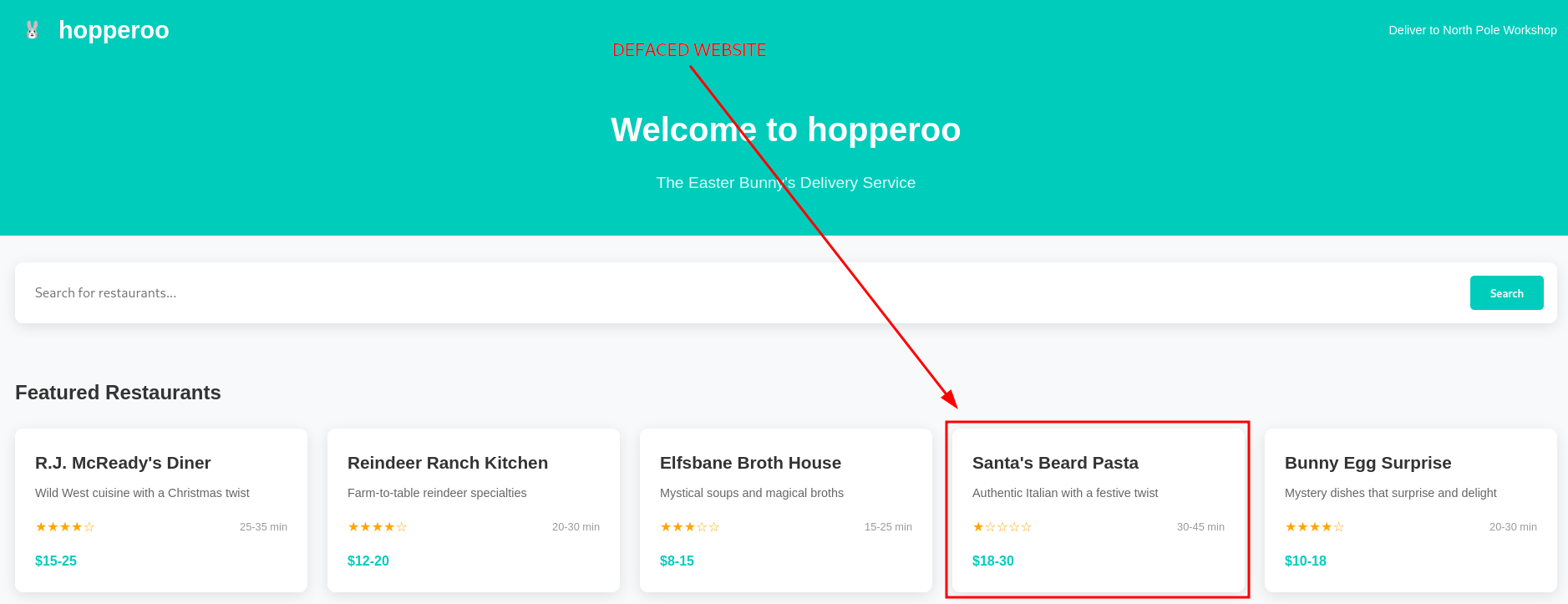
Figure 1: Defaced Website
As we can see, the bening "DoorDasher" website was replaced by a malicious "Hopperoo" website. Given our access to the target system, let's check on the running docker containers with docker ps.

Figure 2: Running Docker Containers
The guide nudges us towards the "uptime-checker service which has access to port mapping 0.0.0.0:5003->80/tcp, so let's try and access it via our browser on port 5003.
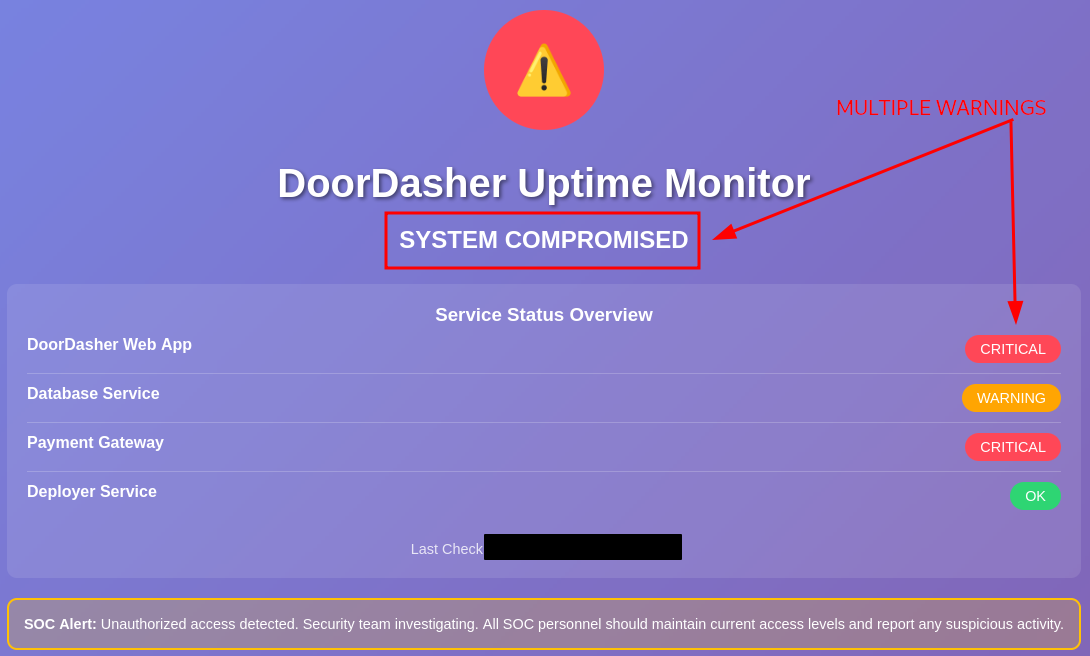
Figure 3: Uptime-Checker Web Interface
Oh, the web interface reports multiple warnings and a system compromise for the "DoorDasher" service. Let's try to access the container and see if we can get execution inside the container with docker exec -it uptime-checker sh.
To break it down, docker exec executes a command in a running container, -i makes it interactive, -t allocates a pseudo-TTY, uptime-checker is the container we want to run the command in, and lastly, sh is the basic shell and is the binary/command we want to run.
Once we run it, we are welcomed with "root" access and dropped into the "root" directory /.

Figure 4: Uptime-Checker Container Initial Recon
The next thing to check out is the socket access, which we can do by running ls -la /var/run/docker.sock. To simplify it, the Docker socket is a file that allows communication with the Docker Engine through an API. When a container has access to this socket, it can create, manage, and control other containers.

Figure 5: Socket Access within the Uptime-Checker Container
By default, Docker's Enhanced Container Isolation feature blocks socket access, meaning, the socket file is NOT mounted into the container. But in this instance, the socket file was mounted and we should have manager access to the Docker Engine from within the "uptime-checker" container.
Given our elevated privileges, let's try to access and run commands in the privileged "deployer" container. Let's use bash this time, instead of the basic sh: docker exec -it deployer bash. We got it, it worked and now we have command execution inside the "deployer" container.
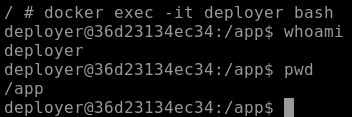
Figure 6: Command Execution within the "deployer" Container
Once we did a quick recon,
whoamito check who we are logged in aspwdto get the full path to our current working directory
we follow up by taking a look around the root directory (/) with ls -hla.
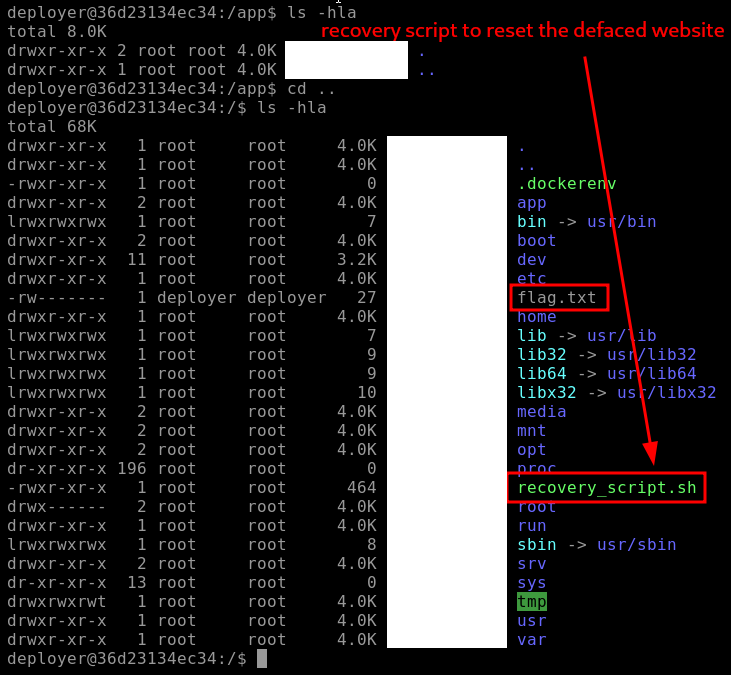
Figure 7: Root Directory Enumeration - Flag and Recovery Script
There are two notable discoveries/findings here:
- "flag.txt" | probably the flag for one of the questions below
- "recovery_script.sh" | the recovery script which hopefully can fully restore the "DoorDashes" original website
Let's first grab the flag with cat flag.txt and then try to restore the website by running sudo ./recovery_script.sh which runs the recovery script with sudo privileges.
If we take a closer look at the script and it's privileges, we can note that "sudo" owns the script both in user and group, but everybody (other) has the permission to execute it - EVEN we logged in as the "deployer" user.
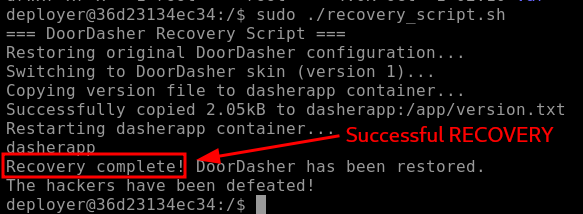
Figure 8: Recovery Script reporting Successful Recovery
The script reports a successful recovery, and when we check again on the website (port 5001) via browser, indeed, it has been fully restored.
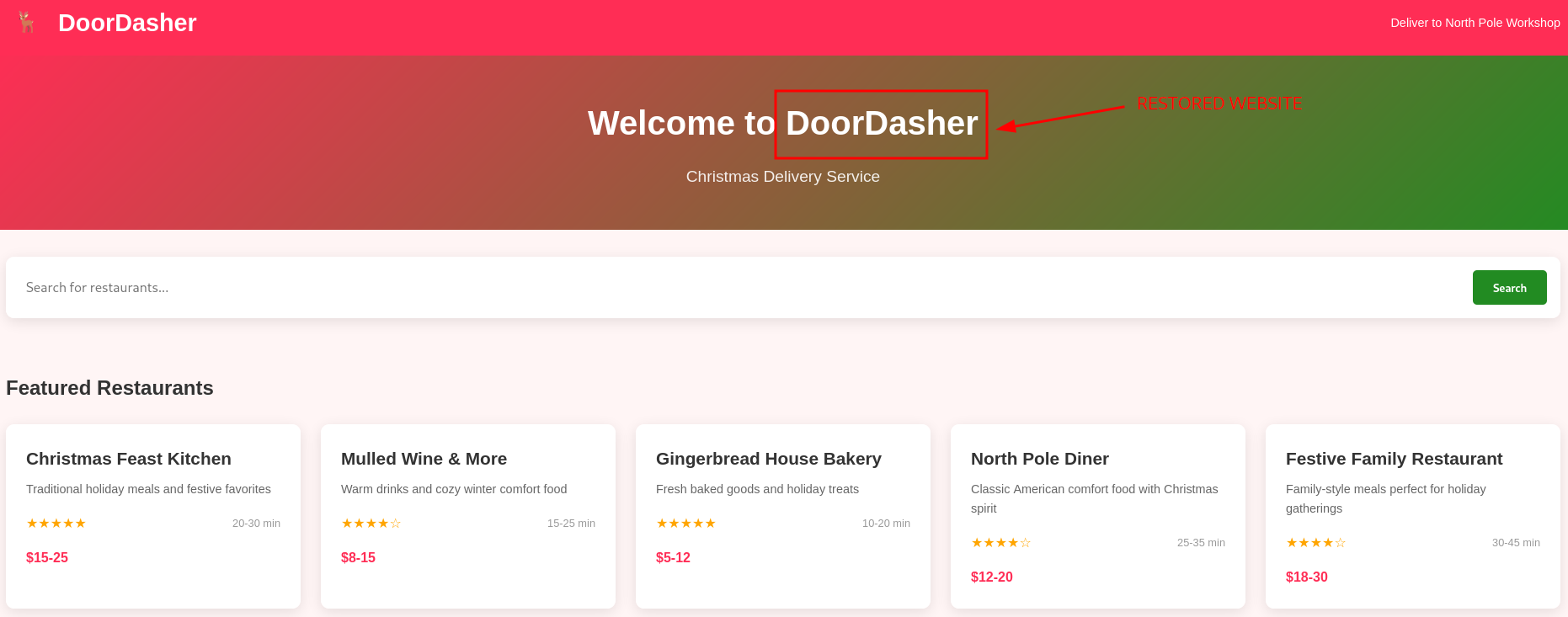
Figure 9: Restored "DoorDasher" Website
Lastly, the Bonus Question mentions a news website running on port 5002. Let's check it out.
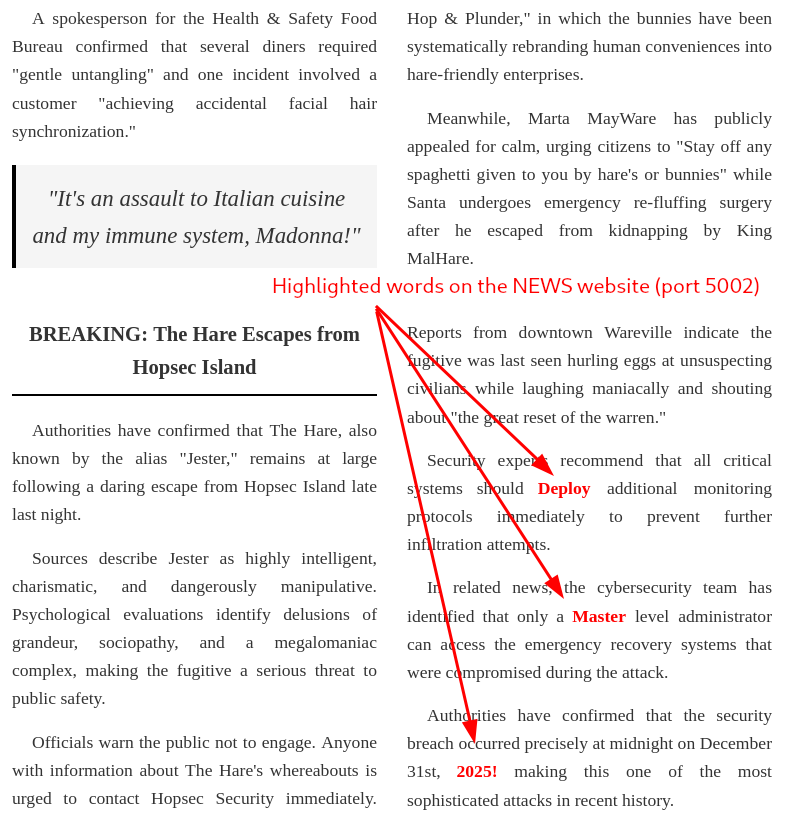
Figure 10: Suspiciously highlighted words
There are a couple of words highlighted here: "Deploy", "Master", "2025!". If we concatenate them, it looks like a password, which could be potentially very dangerous. Let's verify it by attempting a password change with passwd:
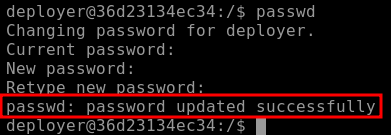
Figure 11: Successful Password Change
Wow, it worked, "DeployMaster2025!" was trully the "deployer" user's password and we changed it to a password that now WE control.
Q & A
Question-1: Continue your Advent of Cyber journey and learn about container security.
docker ps
Question-2: What file is used to define the instructions for building a Docker image?
Dockerfile
Question-3: What's the flag?
[REDACTED-FLAG]
Question-4: Liked the content? We have plenty more where this came from! Try our Container Vulnerabilities room.
No answer needed
Bonus
Bonus-Question: There is a secret code contained within the news site running on port 5002; this code also happens to be the password for the deployer user! They should definitely change their password. Can you find it?
DeployMaster2025!