THM | AoC 2025 | Day 15-16

Day-15: Web Attack Forensics - Drone Alone | Day-16: Forensics - Registry Furensics
SUMMARY
Day 15 is about analyzing a web server compromise in Splunk by examining multiple log sources to trace an attack from initial access to post-exploitation activity. We first search web access logs and find Base64-encoded PowerShell payloads targeting a vulnerable CGI script ("hello.bat") from attacker IP 10.9.0.217. Decoding reveals a gloating message ("This is now Mine!"), confirming successful exploitation.
We then check Apache error logs to determine if attacks reached the backend or were blocked at the web layer. Next, we examine Sysmon process logs and discover child processes ("cmd.exe", "powershell.exe") spawned by Apache ("httpd.exe"), proving successful command injection at the OS level.
Lastly, we identify post-exploitation reconnaissance with "whoami.exe" commands, showing the attacker probing their privilege level. Finally, we search for encoded PowerShell commands in Sysmon logs and find none, indicating defenses successfully blocked further encoded payload execution.
Moving on, on Day 16 we investigate a compromised system using Registry Explorer to analyze offline registry hives. We start by loading the registry hives from
dispatch-srv01and navigate through key forensic locations. We check the "SOFTWARE" hive's "Uninstall" keys and identify that "DroneManager Updater" was installed before the abnormal activity began.
We then examine the "UserAssist" registry and find where the user launched the malicious installer from. Finally, we check the "Run" registry key and discover the persistence mechanism that the attacker configured to maintain startup access.

D-15 | Web Attack Forensics - Drone Alone
- TL;DR: Explore web attack forensics using Splunk.
- Original Room: TryHackMe | Advent of Cyber 2025 | DAY 15 - Web Attack Forensics - Drone Alone
STORYLINE
"TBFC's drone scheduler web UI is compromised by Base64-encoded malicious payloads in HTTP requests that trigger remote code execution on vulnerable endpoints. Splunk detected Apache spawning suspicious processes, revealing obfuscated shell code hidden within the payloads."
Preparation
Open up the Splunk Enterprise web interface/dashboard by visiting the provided link after starting the target VM. Be aware, that I might take a while for the setup to be ready, (~5+ min).
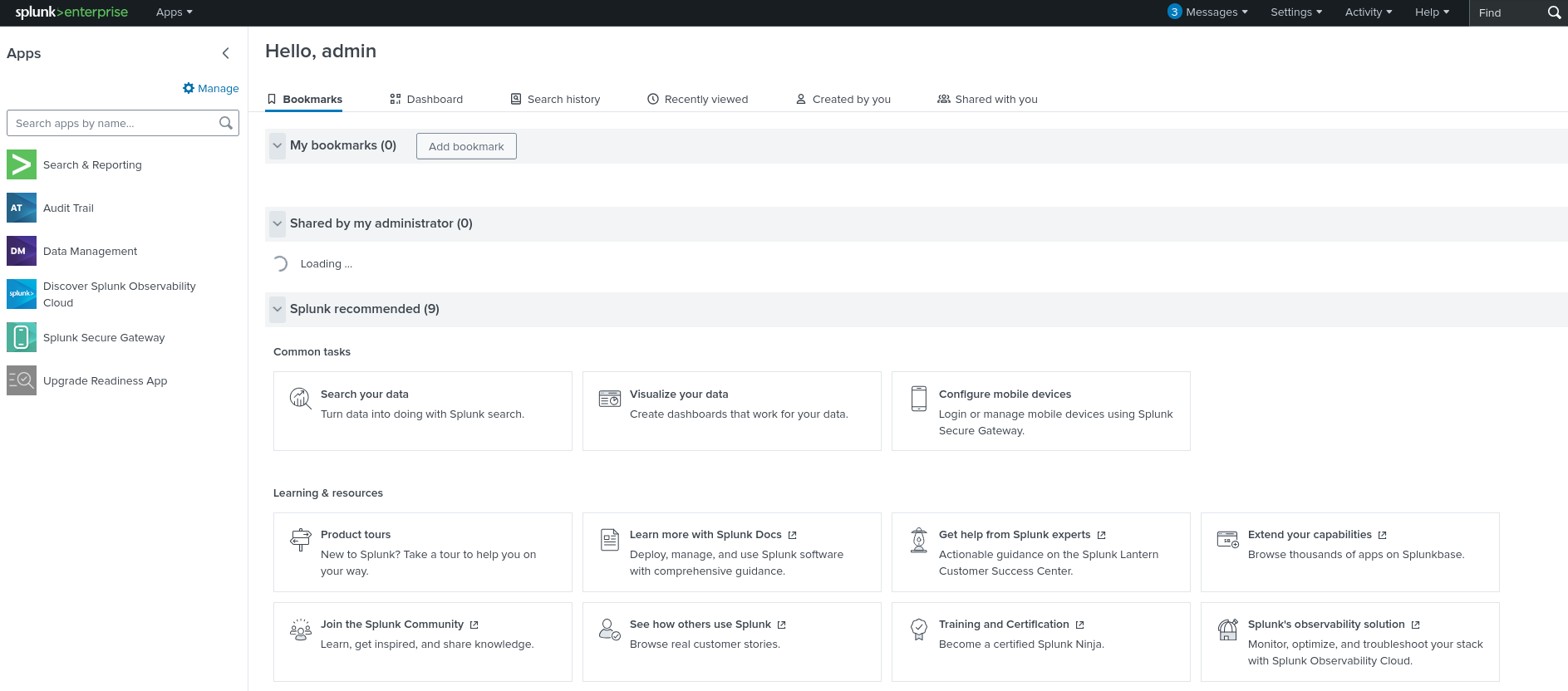
Figure 1: Splunk Enterprise Dashboard
Once the web interface is loaded, let's head over to "Search & Reporting".
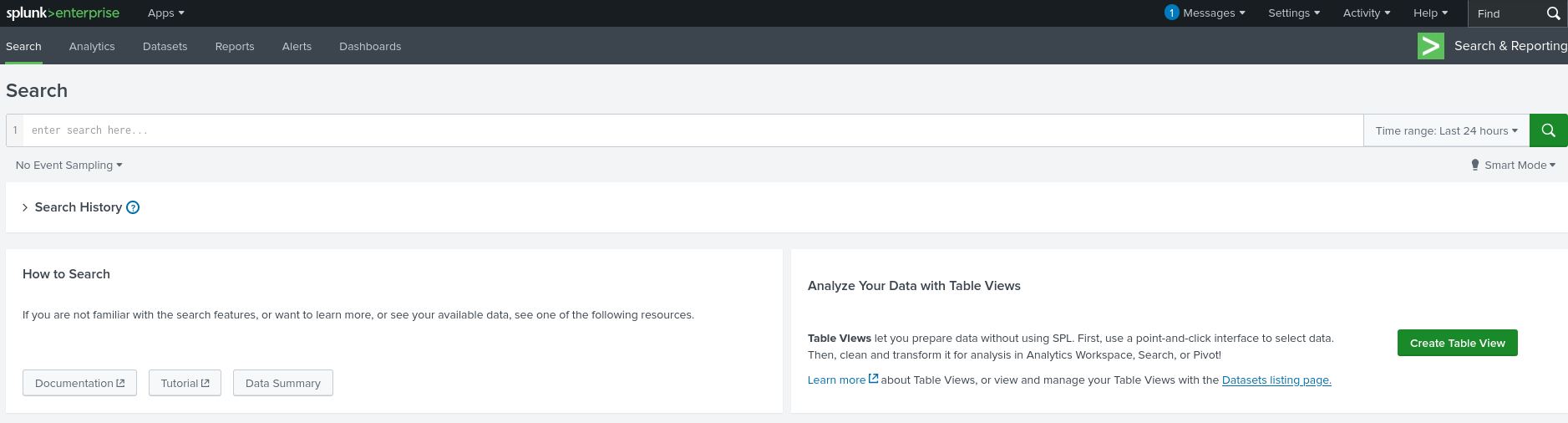
Figure 2: Splunk Enterprise Search & Reporting
Adjust the "Time range" for Searches to inlcude all the events that were reported by selecting "All time".
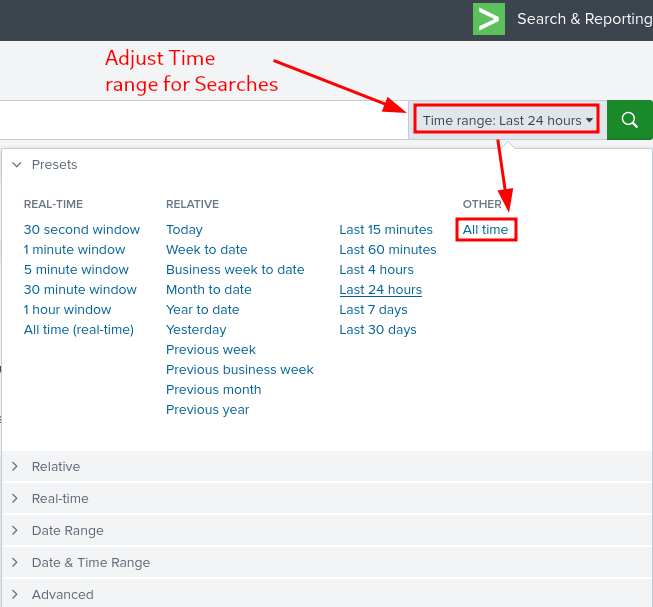
Figure 3: Splunk Enterprise - Adjusting Time range for Seaches
Web Logs
Web Access Logs
Search Web Access Logs for any HTTP requests including signs of command execution attempts like cmd.exe, PowerShell, Invoke-Expression and possible Command Injection attacks, where system command execution is done through a vulnerable CGI script (hello.bat)
index=windows_apache_access (cmd.exe OR powershell OR "powershell.exe" OR "Invoke-Expression") | table _time host clientip uri_path uri_query status

Figure 4: Looking for command execution attempts
Taking a closer look at the reported events we notice in the "uri_query" field some suspicious Base64 encoded PowerShell payloads. It's the same payload that's been tried 3 times: VABoAGkAcwAgAGkAcwAgAG4AbwB3ACAATQBpAG4AZQAhACAATQBVAEEASABBAEEASABBAEEA.

Figure 5: Base64 Encoded PowerShell payload
Let's try to decode it by heading over to our attacker Kali Machine, and using the -d (decode) option with base64:
┌──(user㉿KALI-THM)-[~]
└─$ echo -n "VABoAGkAcwAgAGkAcwAgAG4AbwB3ACAATQBpAG4AZQAhACAATQBVAEEASABBAEEASABBAEEA" | base64 -d
This is now Mine! MUAHAAHAA
┌──(user㉿KALI-THM)-[~]
└─$
Oh, the results are discouraging, we find a gloating message - "This is now Mine! MUAHAAHAA" - indicating a possibility that somebody already had some level of success penetrating our systems.
There is some other interesting data we can glean accompanying the encoded payload:
- Time Range: 2025-10-26 21:47:59 - 2025-10-27 04:39:10
- Host: "WebAppServer"
- Client IP: 10.9.0.217
- URI Path:
/cgi-bin/hello.bat - Response Status Codes: all 200
Web Error Logs
Looking for Server-Side Errors or Command Execution in Apache Error Logs
- looking for signs of execution attempts or internal failures by malicious requests
index=windows_apache_error ("cmd.exe" OR "powershell" OR "Internal Server Error")
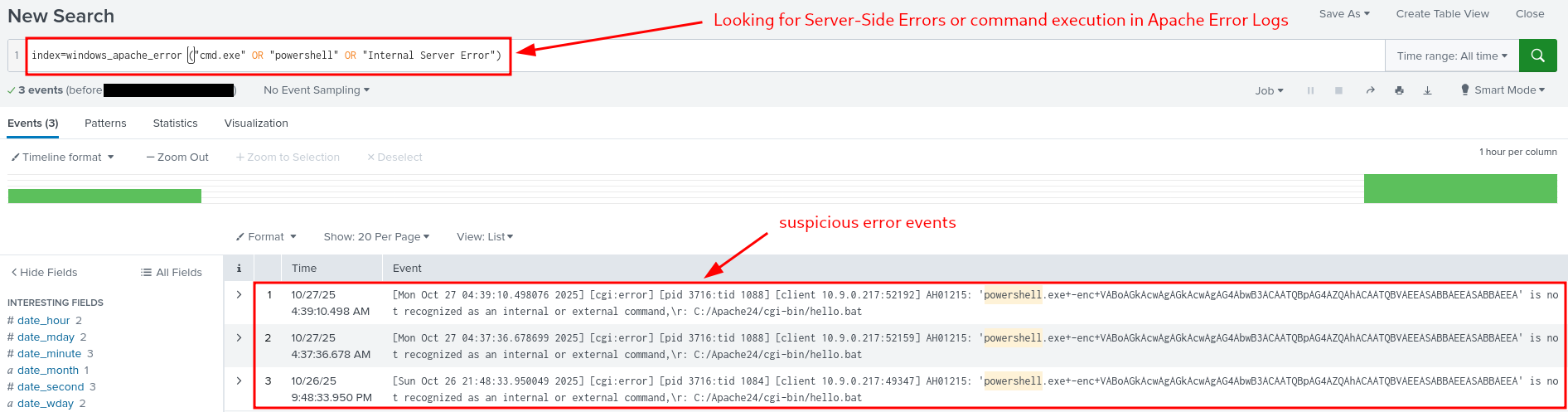
Figure 6: Failed Command Execution Attempts
Select "Raw" View instead of the default "List" View, by clicking on "View: List" and selecting "Raw" from the dropdown list.

Figure 7: Selecting Raw View for better Readability
The Idea behind checking the errors is that some exploit attempts fail, get blocked - for example a request /cgi-bin/hello.bat?cmd=powershell triggering a 500 "Internal Server Error" could indicate that the attacker's input was processed by the server but failed during execution - which would indicate a clear exploitation attempt.
Simply put, checking the error logs help us confirm whether an attack reached the backend or remained blocked at the web layer.
Sysmon Data
Command Injection Attempts
Check Sysmon logs for processes spawn by "httpd.exe" (web-server):
index=windows_sysmon ParentImage="*httpd.exe"
There are 14 entries here, let's change our view from "List" to "Table" to get a better picture of the happenings.
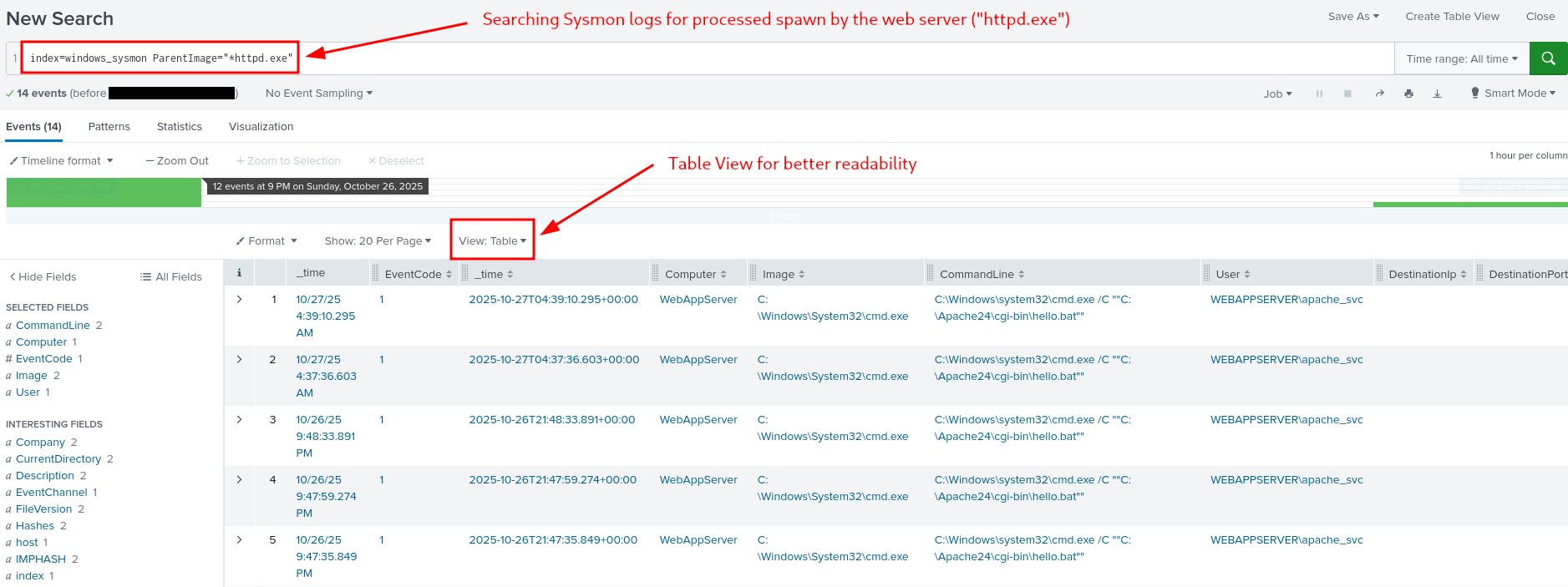
Figure 8: Processes spawn by the web server
To get some idea of what's happening here, keep in mind, that the Apache process should only spawn worker threads, not system processes like cmd.exe or powershell.exe. Therefore any results showing a child processes like Image = C:\Windows\System32\cmd.exe with Apache as the parent process (ParentImage = C:\Apache24\bin\httpd.exe) indicates successful command injection, where a system command was executed by Apache.
To sum it up, this finding indicates that the web attack penetrated the operating system.
Enumerating suspicious Activity
Searching for Indicators for post-exploitation reconnaissance: like the attacker running whoami in cmd to determine which user account their malicious process is running as
index=windows_sysmon *cmd.exe* *whoami*
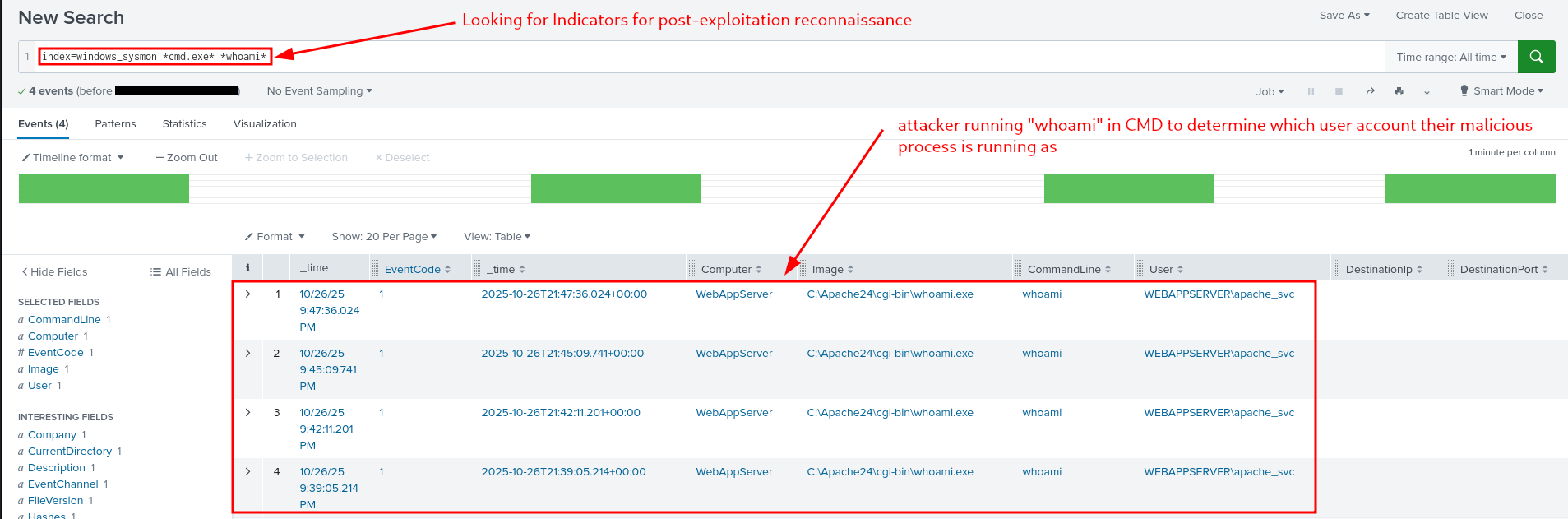
Figure 9: Indicators for Post-Exploitation Reconnaissance
Encoded Payloads
Searching for Encoded Strings/Commands successfully run by PowerShell within Sysmon Data
index=windows_sysmon Image="*powershell.exe" (CommandLine="*enc*" OR CommandLine="*-EncodedCommand*" OR CommandLine="*Base64*")
The idea behind: If your defenses were up to the tasks, such an execution was blocked and nothing is shown here. If on the other hand something is shown, you can check when and exactly what was run and getting an idea behind the attacker intensions.
Luckily, nothing is shown us here, meaning that today, our defenses were enough.
Q & A
Question-1: What is the reconnaissance executable file name?
whoami.exe
Question-2: What executable did the attacker attempt to run through the command injection?
PowerShell.exe

D-16 | Forensics - Registry Furensics
- TL;DR: Learn what the Windows Registry is and how to investigate it.
- Original Room: TryHackMe | Advent of Cyber 2025 | DAY 16 - Forensics - Registry Furensics
STORYLINE
"TBFC is under attack. McSkidy's well-trained team is conducting forensic analysis on
dispatch-srv01, a critical drone-delivery system compromised by attackers. The team is splitting into specialized groups to investigate logs, memory dumps, file systems, and registry data — our focus is the registry analysis."
THEORY
Overview and Core Function
The Windows Registry is the operating system's configuration database, functioning as the "brain" of Windows by storing all essential system and user information needed for proper OS operation. Unlike the human brain's single physical location, the Registry is distributed across multiple separate files called Hives, each storing different categories of configuration data.
Registry Hives
- SYSTEM | Services, mounted devices, boot configuration, drivers, hardware setting
C:\Windows\System32\config\SYSTEM
- SECURITY | Local security policies, audit policy settings
C:\Windows\System32\config\SECURITY
- SOFTWARE | Installed programs, OS version info, autostarts, program settings
C:\Windows\System32\config\SOFTWARE
- SAM | Usernames, password hashes, group memberships, account statuses
C:\Windows\System32\config\SAM
- NTUSER.DAT | Recent files, user preferences, user-specific autostarts
C:\Users\username\NTUSER.DAT
- USRCLASS.DAT | Shellbags, jump lists
C:\Users\username\AppData\Local\Microsoft\Windows\USRCLASS.DAT
Registry Root Keys
Windows organizes Registry Hives into structured Root Keys displayed in the Registry Editor. The mapping between hives and root keys is as follows:
- SYSTEM → HKEY_LOCAL_MACHINE\SYSTEM or
HKLM\SYSTEM - SECURITY → HKEY_LOCAL_MACHINE\SECURITY or
HKLM\SECURITY - SOFTWARE → HKEY_LOCAL_MACHINE\SOFTWARE or
HKLM\SOFTWARE - SAM → HKEY_LOCAL_MACHINE\SAM or
HKLM\SAM - NTUSER.DAT → HKEY_USERS<SID> and HKEY_CURRENT_USER or
HKU\<SIDandHKCU - USRCLASS.DAT → HKEY_USERS<SID>\Software\Classes or
HKU\<SID>\Software\Classes
Key organizational points:
- HKLM (HKEY_LOCAL_MACHINE) contains most system-wide hives SYSTEM, SOFTWARE, SECURITY, SAM
- HKU/HKCU (HKEY_USERS)/(HKEY_CURRENT_USER) contain user-specific hives NTUSER.DAT, USRCLASS.DAT
- HKCR/HKCC HKEY_CLASSES_ROOT and HKEY_CURRENT_CONFIG are dynamically populated during Windows runtime and are not backed by separate hive files
Accessing Registry Data
Registry Hives contain binary data and cannot be opened directly by double-clicking their files. Windows provides the built-in Registry Editor tool (accessible via search bar) to view registry data in a human-readable hierarchical format organized by root keys and subkeys.
Navigation Examples
- Connected USB Devices
- Navigate to
HKEY_LOCAL_MACHINE\SYSTEM\CurrentControlSet\Enum\USBSTOR - Displays: USB device information including make, model, device ID, manufacturer identification, and unique device identifiers
- Navigate to
- User-Run Programs
- Navigate to
HKEY_CURRENT_USER\Software\Microsoft\Windows\CurrentVersion\Explorer\RunMRU - Displays: Commands executed via Win+R Run dialog
- Navigate to
Registry Forensics
Registry forensics is the process of extracting and analyzing evidence from the Registry for Windows digital forensic investigations, where analysts examine registry data alongside event logs, file system data, and memory data to construct incident timelines.
Key Forensic Registry Locations
- Recently accessed GUI-launched applications
HKCU\Software\Microsoft\Windows\CurrentVersion\Explorer\UserAssist
- Paths and locations typed in Explorer address bar
HKCU\Software\Microsoft\Windows\CurrentVersion\Explorer\TypedPaths
- Paths Application file paths
HKLM\Software\Microsoft\Windows\CurrentVersion\App
- Search terms entered in Explorer search bar
HKCU\Software\Microsoft\Windows\CurrentVersion\Explorer\WordWheelQuery
- Startup programs configured for automatic launch
HKLM\Software\Microsoft\Windows\CurrentVersion\Run- Recently accessed files
HKCU\Software\Microsoft\Windows\CurrentVersion\Explorer\RecentDocs
- Computer hostname
HKLM\SYSTEM\CurrentControlSet\Control\ComputerName\ComputerName- Installed programs inventory
HKLM\SOFTWARE\Microsoft\Windows\CurrentVersion\Uninstall
Registry Editor (built-in) limitations
- Cannot open offline hives (required for forensic analysis to prevent system modification)
- Displays some key values in unreadable binary format
Specialized registry forensics tools (such as Registry Explorer) parse binary data and enable offline analysis without risk of modifying the original system evidence.
Dirty Hives
Registry Hives that were collected from live systems and may have incomplete transactions. Use clean loading on them:
- Reistry Explorer > File > Load hive > Load Hives pop-up > Select desired hive file > HOLD SHIFT then press Open
PRACTICAL
- Tool: Registry Explorer
- Hives: "C:\Users\Administrator\Desktop\Registry Hives"
- Investigated Host:
dispatch-srv01 - Time Range: from 2025.11.21 on
Preparation
Start the target VM, open up up Registry Explorer, load the registry hives for dispatch-srv01 by
- Registry Explorer > "File" tab > "Load hive" > Select ALL files in "C:\Users\Administrator\Desktop\Registry Hives" > Press SHIFT and "Open".
Q & A
Question-1: What application was installed on the dispatch-srv01 before the abnormal activity started?
DroneManager Updater
Head over to "Available bookmarks", under the loaded "SOFTWARE" hive entries ("C:\Users\Administrator\Desktop\Registry Hives\SOFTWARE") select "Uninstall".
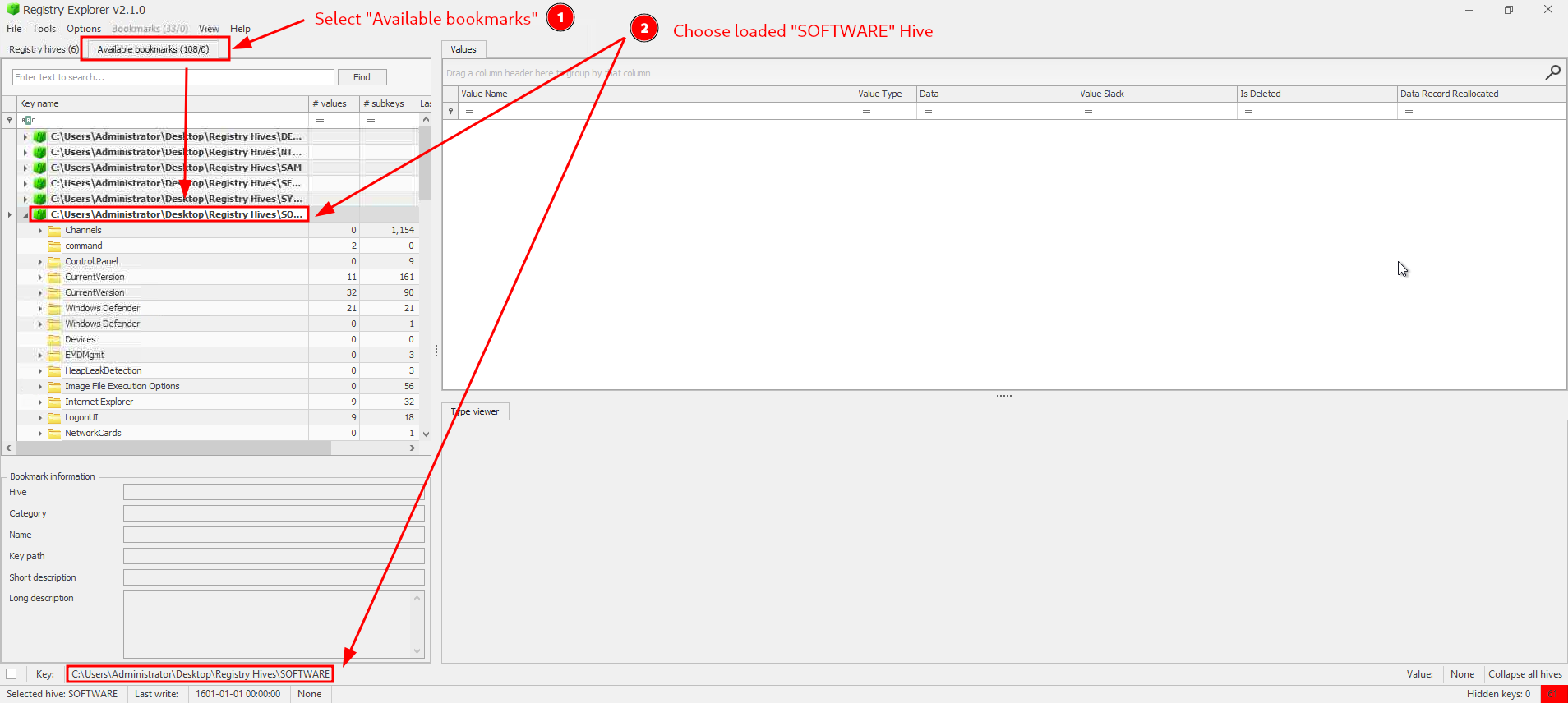
Figure 1: Loading the SOFTWARE hive and it's keys
Note, there are TWO "Uninstall" keys:
- one with the last timestamp entry on 2025-10-20 20:16:40 with "Microsoft EdgeWebView" and an other
- with the timestamp entry of 2025-10-21 20:52:37 by "DroneManager Updater (64bit)".
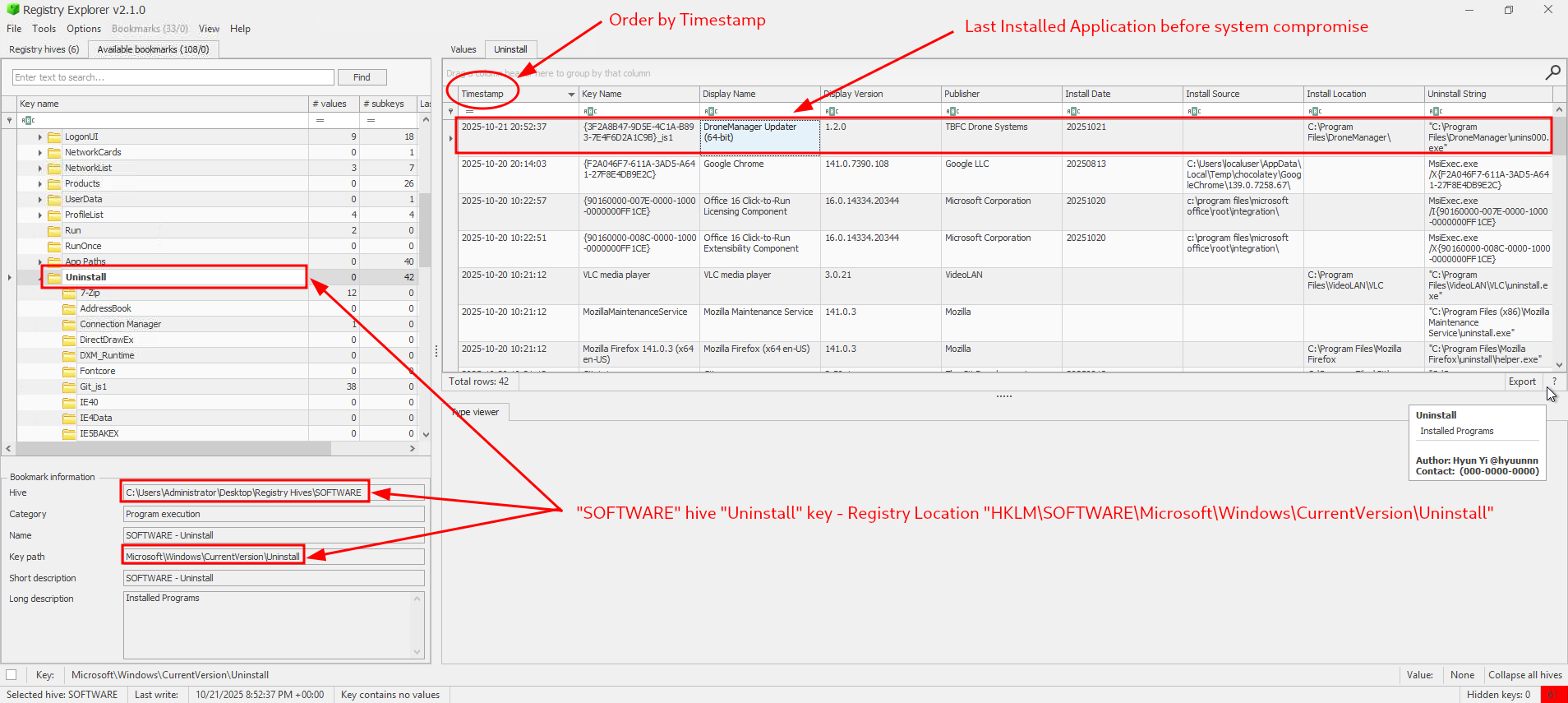
Figure 2: Last installed application before System Compromise
Given that the exercise EXPLICITLY notes, that the time range starts only from 2025.11.21 on, the one on 2025-10-21 20:52:37 by "DroneManager Updater (64bit)" must be the clear answer here.
Question-2: What is the full path where the user launched the application (found in question 1) from?
C:\Users\dispatch.admin\Downloads\DroneManager_Setup.exe
We can check the recently accessed GUI-launched applications via "HKCU\Software\Microsoft\Windows\CurrentVersion\Explorer\UserAssist", orient ourself by the "Program Name" and the "Last Executed" columns to further narrow down our search.
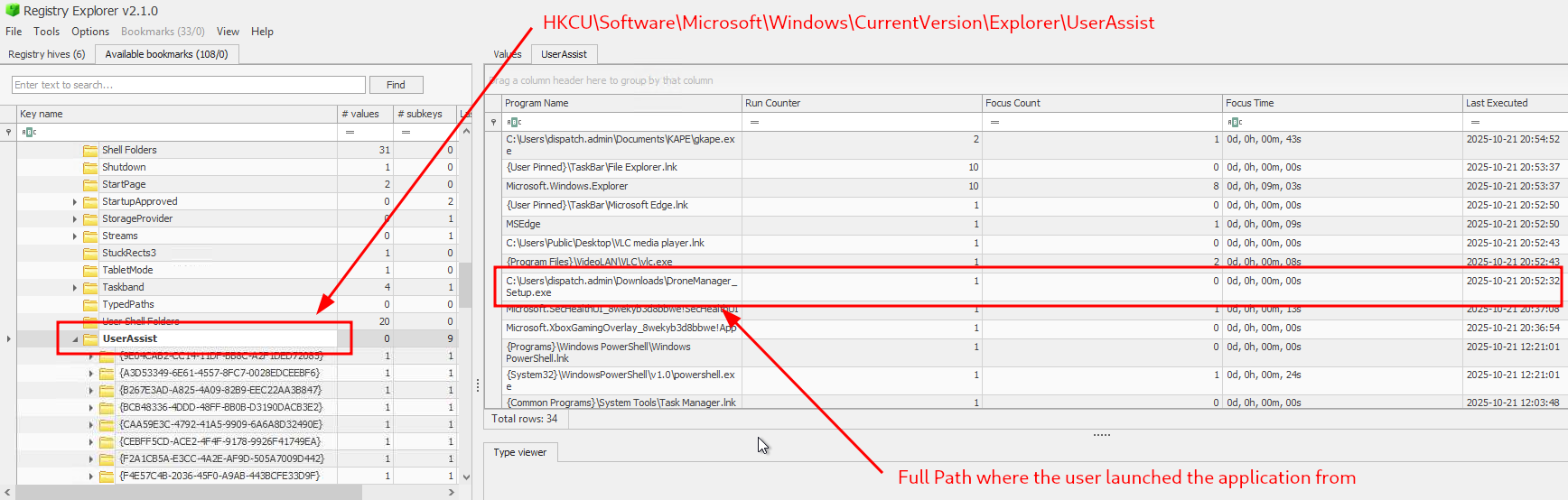
Figure 3: Full Path where the user launched the appliation from
Question-3: Which value was added by the application to maintain persistence on startup?
"C:\Program Files\DroneManager\dronehelper.exe" --background
First, we know that the keys for startup programs that are configured for automatic launch is stored in "HKLM\Software\Microsoft\Windows\CurrentVersion\Run", so let's head over there:
- "C:\Users\Administrator\Desktop\Registry Hives\SOFTWARE" > "CurrentVersion" > "Run"
There are only two entries configured here and the one with the name "drone_helper" should be the clear winner.
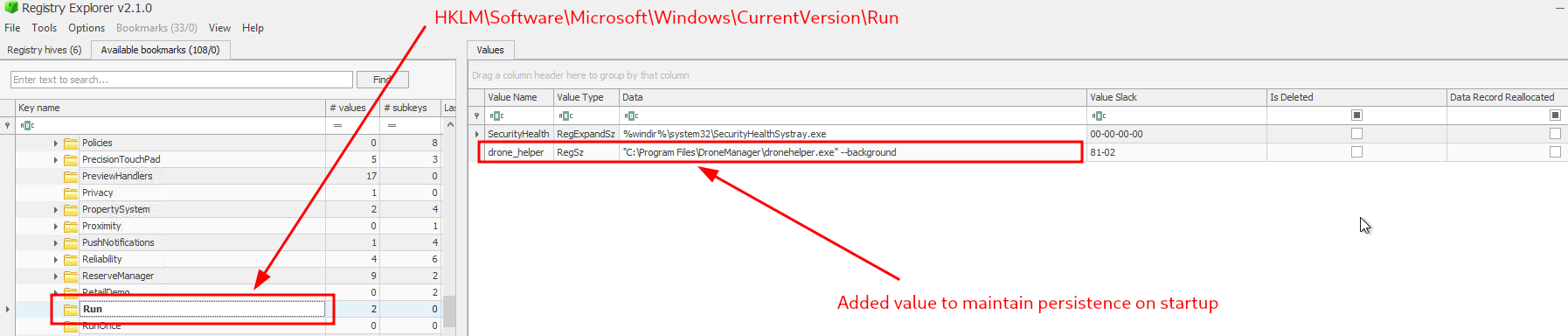
Figure 4: Configured to maintain persistance on startup
Question-4: If you enjoyed today's room, feel free to check out the Expediting Registry Analysis room.
No answer needed