THM | AoC 2025 | Day 17

Day-17: CyberChef - Hoperation Save McSkidy
SUMMARY
We tackle a multi-level CTF challenge called King Malhare's Fortress, where we systematically break through five locked gates to free McSkidy from prison. The challenge revolves around encoding and decoding techniques, with each level introducing increasingly complex cryptographic operations. We leverage CyberChef as our primary tool to transform and decode data at each stage.
We systematically break through five fortress gates using a consistent process: Base64 encode the guard name for username, extract the magic question from HTTP headers, send it to the guard for an encoded password, examine the Debugger to understand the encryption logic, reverse the transformations in CyberChef, and login.

CyberChef - Hoperation Save McSkidy
- TL;DR: The story continues, and the elves mount a rescue and will try to breach the Quantum Fortress's defenses and free McSkidy.
- Original Room: TryHackMe | Advent of Cyber 2025 | DAY 17 - CyberChef - Hoperation Save McSkidy
STORYLINE
"McSkidy is imprisoned in King Malhare's Quantum Warren, secured by five locks. He's secretly sent clues to his team revealing that the locks can be broken by analyzing their logic and exploiting a guards' chat system to extract passwords and vital details."
Important Concepts
Encoding is a method that transforms data to ensure compatibility between different systems. It differs from encryption in that encoding prioritizes usability and compatibility using standardized processes, while encryption prioritizes security using algorithms and keys. Encoding is fast but provides no security, whereas encryption is slower but secure.
Decoding is the reverse process — converting encoded data back to its original, readable form.
CyberChef | web-based tool that allows you to encode, decode, and transform data by chaining together various operations in a user-friendly interface
Preparation
Things to keep in mind:
- Chat is Base64 encoded
- The guard name differs on each level
- Network headers contain the question (e.g. "X-Magic-Question: What is the password for this level?")
- Hints and Login logic inside "Debugger tab
Steps for opening the Gates on the different levels
- Step-1 | Identify the guard name and encode it to Base64 - use it as username input
- Step-2 | Encode (base64) the magic question from the page headers
- Step-3 | Send the encoded magic question in the chat and wait for the guard to answer with the encoded level password
- Step-4 | Identify the login logic with "Debugger"
- Step-5 | Decode the answer from the guard by applying the necessary modifications with CyberChef
- Step-6 | Login with credentials - username: encoded username (step-1); password: the plaintext password (step-5)
Launch the target VM and the attacker box, open the web site for King Malhare's Fortress to free McSkidy from prison. There are five levels, starting with "Outer Gate", "Outer Wall", "Guard House", "Inner Castle" and lastly the "Prison Tower".
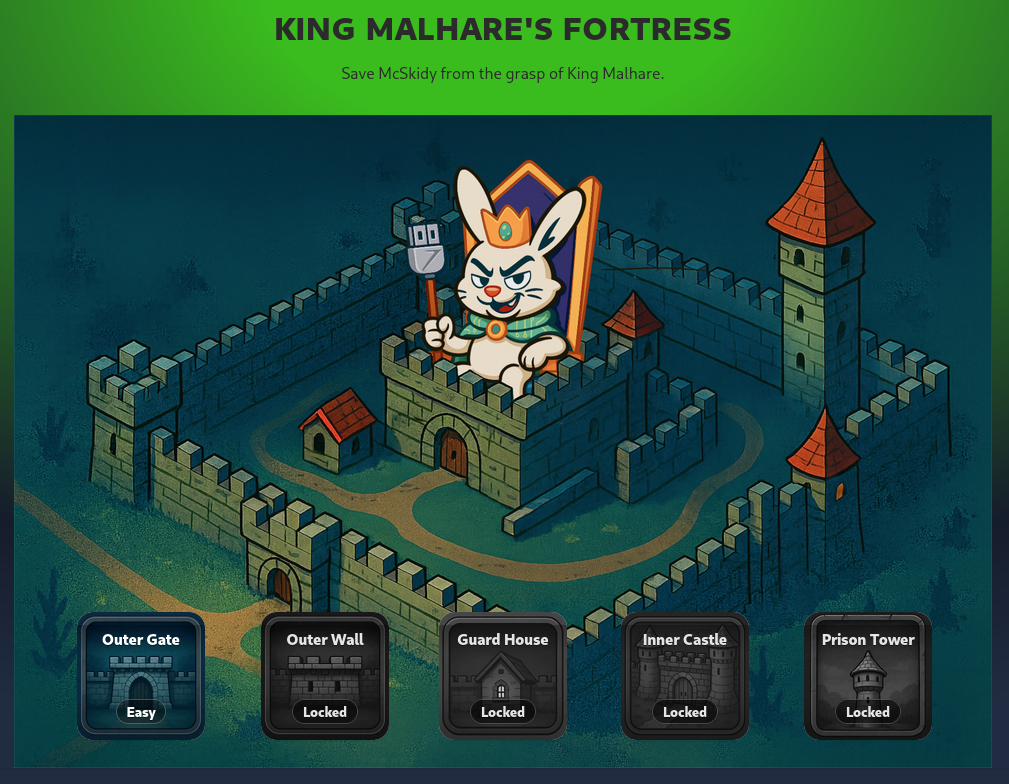
Figure 1: Five Levels of King Malhare's Fortress
Here is the full Login Logic for all the different Levels:
[...SNIP...]
    // User login logic
    userOk = atob(usr) === guardName;

    // Password login logic
    try {
      if (level === 1) {
        // CyberChef: From Base64
        passOk = btoa(pwd) === expectedConst;
      } else if (level === 2) {
        // CyberChef: Double From Base64
        passOk = btoa(btoa(pwd)) === expectedConst;
      } else if (level === 3) {
        // CyberChef: From Base64 => XOR(key=recipeKey)
        const bytes = xorWithKey(toBytes(pwd), toBytes(recipeKey));
        const b64 = bytesToBase64(bytes);
        passOk = b64 === expectedConst;
      } else if (level === 4) {
        // CrackStation: Hash lookup
        passOk = (md5(pwd) === expectedConst);
      } else if (level === 5) {
        const recipe =  recipeId || "R1";
        let tp = pwd;

        switch (recipe){
          case "R1":
            // CyberChef: From Base64 => Reverse => ROT13
            tp = btoa(reverse(rot13(tp)));
            break;
          case "R2":
            // CyberChef: From Base64 => FromHex => Reverse
            tp = btoa(strToHex(reverse(tp)));
            break;
          case "R3":
            // CyberChef: ROT13 => From Base64 => XOR(key=recipeKey)
            const exed = bytesToBase64(xorWithKey(toBytes(tp), toBytes(recipeKey || "hare")));
            tp = rot13(exed);
            break;
          case "R4":
            // CyberChef: ROT13 => From Base64 => ROT47
            tp = rot13(btoa(rot47(tp)));
            break;
          default:
            tp = btoa(reverse(rot13(tp)));
        }
        passOk = (tp === expectedConst);
      }
    } catch (_) {
      userOk = passOk = false;
    }
[...SNIP...]
First Lock - Outer Gate
Question-1: What is the password for the first lock?
Iamsofluffy
Step-1 | Identify the guard name and encode it to Base64 - use it as username input
Let's pick the "Outer Gate" option (the only unlocked one) and note down the Guard name below the chat: "CottonTail". Since all guard names need to be Base64 encoded, let's head over to CyberChef and use the "To Base64" recipe which can be found under "Favourites". As for "Input", we specify the guard name "CottonTail" and we receive the encoded guard name under "Output".
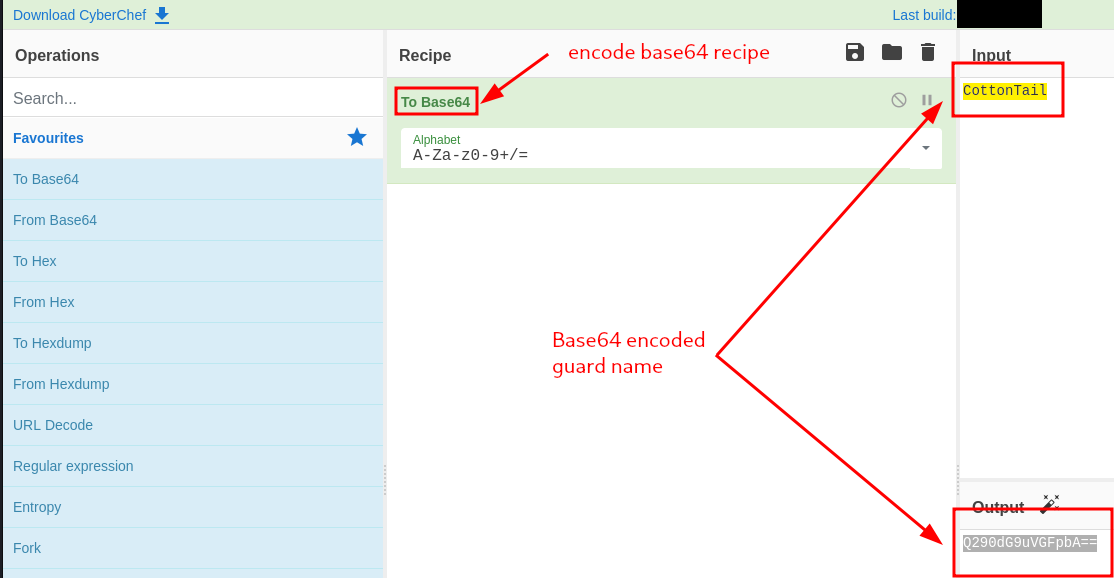
Figure 2: Base64-encoded Guard Name
So to summarize, we have:
- Plaintext Guard-Username: "CottonTail"
- Base64-Encoded Guard-Username: "Q290dG9uVGFpbA=="
Step-2 | Encode (base64) the magic question from the page headers
In Firefox, we use the Hamburger button on the right-top corner, select "More Tools", and under "Browser Tools" select "Web Developer Tools". We click on the "Network" tab and refresh the page.
There is a web request sent out to "http://TARGET-BOX-IP:8080/level1", and it's respective "Response Headers" contains a custom Header named "X-Magic-Question" with a value "What is the password for this level?".
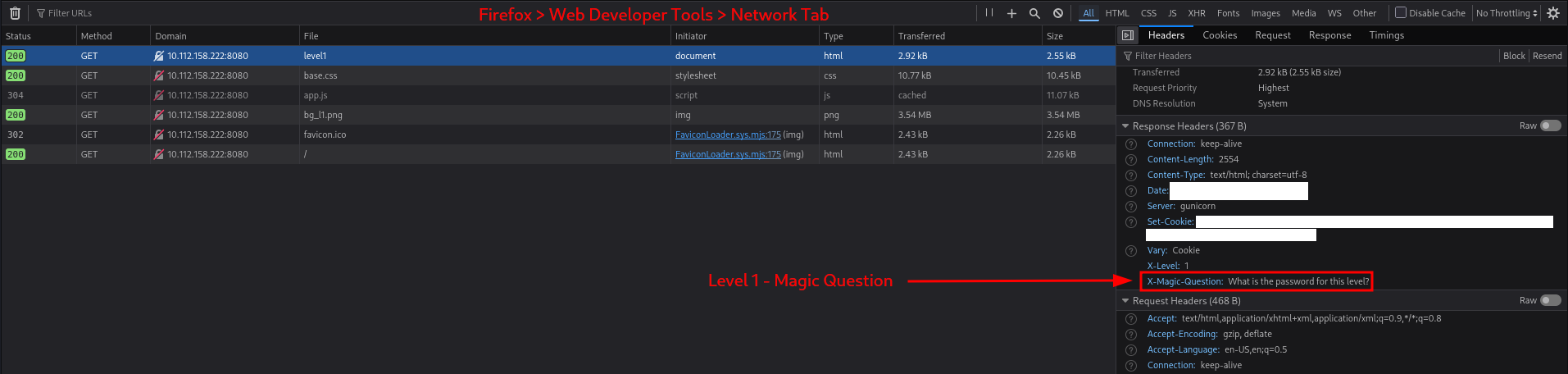
Figure 3: Magic Question within Response Headers
Let's copy this value and base64 encode it with CyberChef:
- "What is the password for this level?" (Plaintext) → "V2hhdCBpcyB0aGUgcGFzc3dvcmQgZm9yIHRoaXMgbGV2ZWw/" (Base64-Encoded)
Step-3 | Send the encoded magic question in the chat and wait for the guard to answer with the encoded level password
Before going any further, we note that the chat is already populated with one base64-encoded message: "QWxsIGhhaWwgS2luZyBNYWxoYXJlIQ==". To avoid any mishaps, let's decode it first with the "From Base64" recipe:
- "QWxsIGhhaWwgS2luZyBNYWxoYXJlIQ==" (Base-64-encoded message) → "All hail King Malhare!" (Plaintext message)
Now that we know the context, let's enter our base64 encoded magic question (step-2) into the chat and "Send" it.
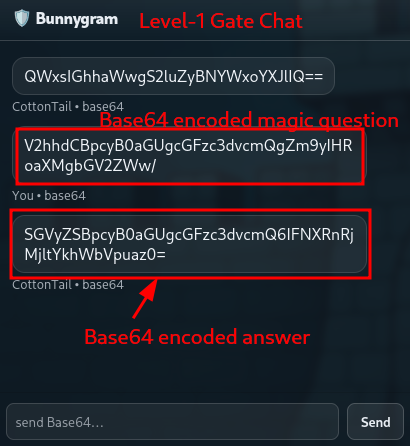
Figure 4: Chatting with the Guard
We immediately receive a base64 encoded answer: "SGVyZSBpcyB0aGUgcGFzc3dvcmQ6IFNXRnRjMjltYkhWbVpuaz0=". Let's decode it with CyberChef with the "From Base64" recipe.
The decoded chat answer is the following:
- "Here is the password: SWFtc29mbHVmZnk=".
Step-4 | Identify the login logic with "Debugger"
We can check on the Login Logic by heading over to the "Debugger" tab within "Web Developer Tools" and looking at the source code of "app.js".
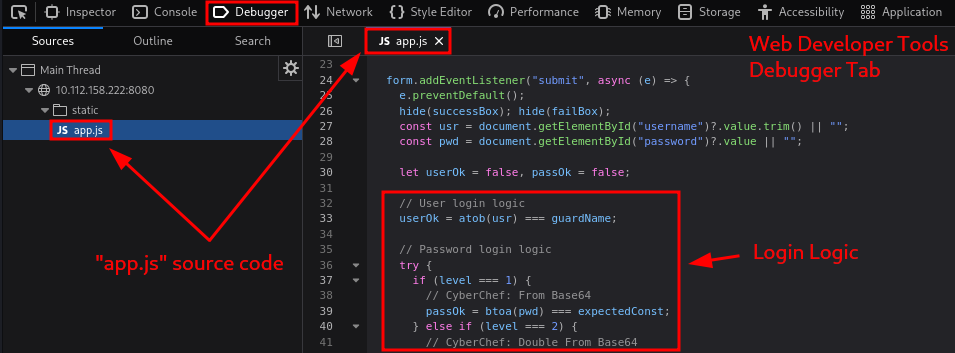
Figure 5: Debugger - Login Logic
For level 1, these snippets of code are of interest to us:
Username
// User login logic
userOk = atob(usr) === guardName;
- JavaScript Function "atob()" | decodes a string that has been Base64 encoded.
Meaning, the guard name (username) need to be base64 encoded when inputting the credentials.
Password
if (level === 1) {
  // CyberChef: From Base64
  passOk = btoa(pwd) === expectedConst;
- JavaScript Function "btoa()" | encodes a string in Base64 format.
Meaning, we need to input the password in plain text format, which will then be base64 encoded and compared to the hardcoded password.
Step-5 | Decode the answer from the guard by applying the necessary modifications with "CyberChef"
We already decoded the answer in Step-3:
- "Here is the password: SWFtc29mbHVmZnk=".
But "SWFtc29mbHVmZnk=" (the password) is still in Base64 encoded format, so let's use again the "From Base64" recipe to decode it:
- "SWFtc29mbHVmZnk=" (base64-encoded password) → "Iamsofluffy" (plaintext password)
Step-6 | Login Credentials are the encoded username (step-1) and the plaintext password (step-5)
So, everything should be ready,
- we have the username ("Q290dG9uVGFpbA==") from Step-1
- and the password ("Iamsofluffy") from Step-5.
Let's try to log in with these creadentials. Great, it worked and now the "Outer Gate" door is broken.
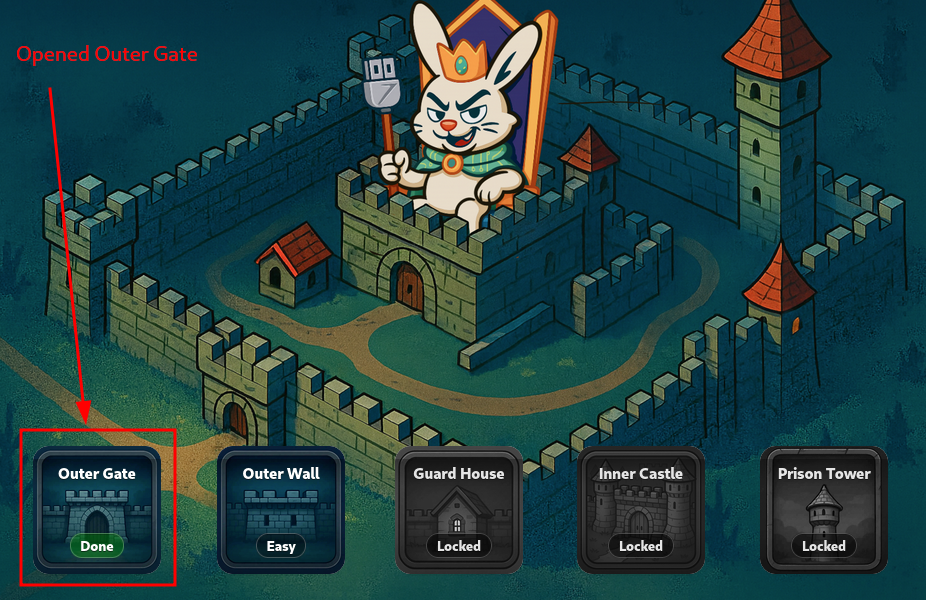
Figure 6: Opened Outer Gate
Second Lock - Outer Wall
Question-2: What is the password for the second lock?
Itoldyoutochangeit!
Step-1 | Identify the guard name and encode it to Base64 - use it as username input
- Plaintext Guard Name: "CarrotHelm"
- Base64 encoded Guard Name: "Q2Fycm90SGVsbQ=="
Step-2 | Encode (base64) the magic question from the page headers
- Plaintext Magic Question: "Did you change the password?"
- Base64 encoded Magic Question: "RGlkIHlvdSBjaGFuZ2UgdGhlIHBhc3N3b3JkPw=="
Step-3 | Send the encoded magic question in the chat and wait for the guard to answer with the encoded level password
- Base64 encoded Answer: "SGVyZSBpcyB0aGUgcGFzc3dvcmQ6IFUxaFNkbUpIVWpWaU0xWXdZakpPYjFsWE5XNWFWMnd3U1ZFOVBRPT0="
- Plaintext Answer: "Here is the password: U1hSdmJHUjViM1YwYjJOb1lXNW5aV2wwSVE9PQ=="
Step-4 | Identify the login logic with "Debugger"
} else if (level === 2) {
  // CyberChef: Double From Base64
  passOk = btoa(btoa(pwd)) === expectedConst;
- JavaScript Function "btoa()" | encodes a string in Base64 format.
- Meaning, double base64 encoding is applied.
Step-5 | Decode the answer from the guard by applying the necessary modifications with CyberChef
- Double Base64 encoded password: "U1hSdmJHUjViM1YwYjJOb1lXNW5aV2wwSVE9PQ=="
- Base64 encoded password (one-time base64 decoded): "SXRvbGR5b3V0b2NoYW5nZWl0IQ=="
- Plaintext password (two time base64 decoded): "Itoldyoutochangeit!"
Step-6 | Login with credentials - username: encoded username (step-1); password: the plaintext password (step-5)
- Username (step-1): "Q2Fycm90SGVsbQ=="
- Password (step-5): "Itoldyoutochangeit!"
Third Lock - Guard House
Question-3: What is the password for the third lock?
BugsBunny
Step-1 | Identify the guard name and encode it to Base64 - use it as username input
- Plaintext Guard Name: "LongEars"
- Base64 encoded Guard Name: "TG9uZ0VhcnM="
Step-2 | Encode (base64) the magic question from the page headers
- Instead of a magic question header, we have a new one: "X-Recipe-Key" with "cyberchef" as the value.
Step-3 | Send the encoded magic question in the chat and wait for the guard to answer with the encoded level password
- There is no magic question so let's keep polite and ask the guard with "Password please."
- Plaintext Question: "Password please."
- Base64 encrypted Question: "UGFzc3dvcmQgcGxlYXNlLg=="
- Base64 encrypted Answer: "SGVyZSBpcyB0aGUgcGFzc3dvcmQ6IElRd0ZGakFXQmdzZg=="
- Plaintext Answer: "Here is the password: IQwFFjAWBgsf"
Step-4 | Identify the login logic with "Debugger"
} else if (level === 3) {
  // CyberChef: From Base64 => XOR(key=recipeKey)
  const bytes = xorWithKey(toBytes(pwd), toBytes(recipeKey));
  const b64 = bytesToBase64(bytes);
  passOk = b64 === expectedConst;
- Custom JavaScript Function "toBytes()" | converts a string into a byte array (Unicode/ASCII code points)
toBytes() function
  function toBytes(str) {
    const out = new Uint8Array(str.length);
    for (let i = 0; i < str.length; i++) out[i] = str.charCodeAt(i) & 0xff;
    return out;
} - Custom JavaScrip Function "xorWithKey()" | XORs a byte buffer with a repeating key
xorWithKey() function
  function xorWithKey(buf, key) {
    if (!key || key.length === 0) return buf;
    const out = new Uint8Array(buf.length);
    for (let i = 0; i < buf.length; i++) out[i] = buf[i] ^ key[i % key.length];
    return out;
} - Custo JavaScript Function "bytesToBase64(bytes)" | converts a byte array into a Base64-encoded string
bytesToBase64() function
function bytesToBase64(bytes) {
  let bin = "";
  for (let i = 0; i < bytes.length; i++) bin += String.fromCharCode(bytes[i]);
  return btoa(bin);
} - Meaning, the key and the password are first converted into byte arrays, then an XOR (with repeating key) was applied to them. Lastly, this resulting byte array is converted into a Base64-encoded string.
Step-5 | Decode the answer from the guard by applying the necessary modifications with CyberChef
- Base64 encoded password: "IQwFFjAWBgsf"
- Applying recipies
- 1st - "From Base64" on Input: "IQwFFjAWBgsf"
- 2nd - XOR with Key: "cyberchef" with UTF8 encoding
- Output: "BugsBunny"
Step-6 | Login with credentials - username: encoded username (step-1); password: the plaintext password (step-5)
- Username: "TG9uZ0VhcnM="
- Password: "BugsBunny"
Fourth Lock - Inner Castle
Question-4: What is the password for the fourth lock?
passw0rd1
Step-1 | Identify the guard name and encode it to Base64 - use it as username input
- Plaintext Guard Name: "Lenny"
- Base64 encoded Guard Name: "TGVubnk="
Step-2 | Encode (base64) the magic question from the page headers
- No magic question this time around, moving on.
Step-3 | Send the encoded magic question in the chat and wait for the guard to answer with the encoded level password
- There is no magic question so let's keep polite and ask the guard with "Password please."
- Plaintext Question: "Password please."
- Base64 encrypted Question: "UGFzc3dvcmQgcGxlYXNlLg=="
- Base64 encrypted Answer: "SGVyZSBpcyB0aGUgcGFzc3dvcmQ6IGI0YzBiZTdkN2U5N2FiNzRjMTMwOTFiNzY4MjVjZjM5"
- Plaintext Answer: "Here is the password: b4c0be7d7e97ab74c13091b76825cf39"
Step-4 | Identify the login logic with "Debugger"
} else if (level === 4) {
  // CrackStation: Hash lookup
  passOk = (md5(pwd) === expectedConst);
- Meaning, MD5 is applied on the password, so we will need to crack the one we got to find a matching plaintext password.
Step-5 | Decode the answer from the guard by applying the necessary modifications with CyberChef
- MD5 password hash: "b4c0be7d7e97ab74c13091b76825cf39"
- We crack it with CrackStation
- Cracked plaintext password: "passw0rd1"
Step-6 | Login with credentials - username: encoded username (step-1); password: the plaintext password (step-5)
- Username: "TGVubnk="
- Password: "passw0rd1"
Fifth Lock - Prison Tower
Question-5: What is the password for the fifth lock?
51rBr34chBl0ck3r
Step-1 | Identify the guard name and encode it to Base64 - use it as username input
- Plaintext Guard Name: "Carl"
- Base64 encoded Guard Name: "Q2FybA=="
Step-2 | Encode (base64) the magic question from the page headers
- Custom Header "X-Recipe-ID": "R3"
- Custom Header "X-Recipe-Key": "cyberchef"
Step-3 | Send the encoded magic question in the chat and wait for the guard to answer with the encoded level password
- There is no magic question so let's keep polite and ask the guard with "Password please."
- Plaintext Question: "Password please."
- Base64 encrypted Question: "UGFzc3dvcmQgcGxlYXNlLg=="
- Base64 encrypted Answer: "SGVyZSBpcyB0aGUgcGFzc3dvcmQ6IEl4dERXak9ES05MQlZFSUZPdXlEVHQ9PQ=="
- Plaintext Answer: "Here is the password: IxtDWjODKNLBVEIFOuyDTt=="
Step-4 | Identify the login logic with "Debugger"
} else if (level === 5) {
  const recipe =  recipeId || "R1";
  let tp = pwd;

  switch (recipe){
    case "R1":
      // CyberChef: From Base64 => Reverse => ROT13
      tp = btoa(reverse(rot13(tp)));
      break;
    case "R2":
      // CyberChef: From Base64 => FromHex => Reverse
      tp = btoa(strToHex(reverse(tp)));
      break;
    case "R3":
      // CyberChef: ROT13 => From Base64 => XOR(key=recipeKey)
      const exed = bytesToBase64(xorWithKey(toBytes(tp), toBytes(recipeKey || "hare")));
      tp = rot13(exed);
      break;
    case "R4":
      // CyberChef: ROT13 => From Base64 => ROT47
      tp = rot13(btoa(rot47(tp)));
      break;
    default:
      tp = btoa(reverse(rot13(tp)));
  }
  passOk = (tp === expectedConst);
}
- Meaning, given that Recipe-ID=3 was allocated to use (see response Header from step-2), the following logic is applied to us: "ROT13 => From Base64 => XOR(key=recipeKey)".
Step-5 | Decode the answer from the guard by applying the necessary modifications with CyberChef
- This is the logic that is applied to the password, the one we need to reverse: "ROT13 => From Base64 => XOR(key=recipeKey)"
- So let's apply the recipes accordingly:
- 1st recipe: "ROT13" with "IxtDWjODKNLBVEIFOuyDTt==" as the Input
- 2nd recipe: "From Base64"
- 3rd recipe: "XOR" with Key "cyberchef" in UTF8 encoding - Output: "51rBr34chBl0ck3r"
Step-6 | Login with credentials - username: encoded username (step-1); password: the plaintext password (step-5)
- Username: "Q2FybA=="
- Password: "51rBr34chBl0ck3r"
Once the last gate is breached and the fortress taken, we are provided with the flag.
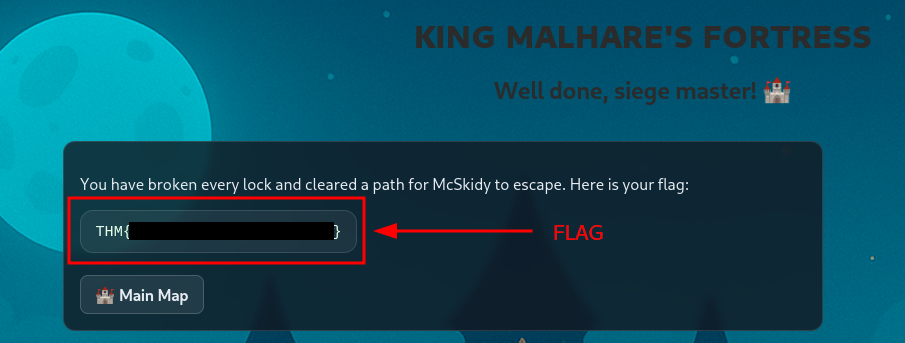
Figure 7:
Question-6: What is the retrieved flag?
[REDACTED-FLAG]
Epilogue
Question-7: If you found decoding secrets interesting, you can also check out the Introduction to Cryptography, which dives into the world of cryptography.
No answer needed