THM | AoC 2025 | Day 20

Day-20: Race Conditions - Toy to The World
SUMMARY
We exploit race conditions where multiple simultaneous requests access shared resources before the system updates them. We configure Burp Suite to duplicate a checkout request 15 times and send all copies in parallel, triggering a timing flaw that processes multiple orders before inventory updates. We successfully oversell limited items and obtain the challenge flags.

Race Conditions - Toy to The World
- TL;DR: Learn how to exploit a race condition attack to oversell the limited-edition SleighToy.
- Original Room: TryHackMe | Advent of Cyber 2025 | DAY 20 - Race Conditions - Toy to The World
STORYLINE
"The Best Festival Company oversold a limited-edition SleighToy due to a checkout system timing flaw that allowed simultaneous purchases of only ten available pieces. Sir Carrotbane's Bandit Bunnies exploited the vulnerability with rapid clicks, and investigator McSkidy uncovered how milliseconds of delay caused the inventory crisis."
THEORY
Race conditions occur when multiple simultaneous actions compete to access or modify shared resources, and the system's outcome depends on their execution order. In web applications, this can lead to duplicate transactions, oversold inventory, or unauthorized data changes.
Three Main Types
| Type | Description | Example |
|---|---|---|
| Time-of-Check to Time-of-Use (TOCTOU) | Data changes between when it's checked and when it's used | Two users buy the same last item simultaneously because stock was checked before updating |
| Shared Resource | Multiple users modify the same data without proper controls; the last update wins | Two cashiers updating the same spreadsheet, one overwriting the other's work |
| Atomicity Violation | Part of a process completes while another request interrupts, causing inconsistency | Payment records but order confirmation fails due to a price change mid-transaction |
Mitigation Strategies
- Use atomic database transactions to bundle stock deduction and order creation as a single operation
- Validate stock availability immediately before committing transactions
- Implement idempotency keys to prevent duplicate request processing
- Apply rate limiting and concurrency controls to block rapid repeated attempts
PRACTICE
Steps to exploit a Race Condition
Steps to exploit a race condition in a shopping cart application:
- Step-1 - Setup | Configure Firefox to route traffic through Burp Suite or use it's default browser
- Step-2 - Capture | Make a legitimate checkout request and capture it - view it in Burp's HTTP history
- "Proxy" > "HTTP history" > select the specific POST request > right-click then "Send to Repeater"
- Step-3 - Duplicate | Create 15 identical copies of the checkout request
- In "Repeater" > right click then "Add tab to group > "Create tab group" > name it > right click then "Duplicate tab" > enter the number of copies you want
- Step-4 - Execute | Send all requests simultaneously using "Send group in parallel"
- "Send" dropdown in "Repeater" > "Send group in parallel (last-byte sync)" | sets the "Send" configuration to launch all copies at once and to wait for the final byte from each response which maximizes the timing overlap to trigger race conditions
- "Send" dropdown in "Repeater" > "Send group (parallel)" | actually launch all requests simultaneously - server attempting to handle the simultaneously triggers timing bug (multiple orders being processed at once)
- Step-5 - Result | The server processes multiple orders before updating inventory, allowing overselling and driving stock into negative values
Attacking the TBFC Shop
Regarding the questions, for Step-1, let's use the Burp Suite's built-in Chromium Browser. Launch Burp Suite, head over to the "Proxy" tab, use the "Intercept" sub-tab and then click on "Open browser". Make sure intercept is turned off.
For Step-2, we use the credentials:
- username: "attacker"
- password: "attacker@123"
Once logged-in, make the sample purchase ("Add to cart" > "Checkout" > "Confirm & Pay") and then head over to the "Proxy tab in Burp Suite, select the specific post request and send it to "Repeater":
- "Proxy" > "HTTP history" > select the specific POST request > right-click then "Send to Repeater"
Moving on to Step-3, use the following guide to create 15 copies of the specific post request:
- In "Repeater" > right click then "Add tab to group > "Create tab group" > name it > right click then "Duplicate tab" > enter 15 as the number of copies you want
Then, in Step-4, it's time to finally send the requests and exploit the race condition vulnerability:
- "Send" dropdown in "Repeater" > "Send group in parallel (last-byte sync)" will select the desired "Send" configuration
- "Send" dropdown in "Repeater" > "Send group (parallel)" will actually send them in parallel
As for Step-5, let's move back to our browser and let's refresh the shopping web application. We are provided with a flag if the race condition for that specific item was successfully exploited.
This is how it looks like for the "SleighToy Limited Edition" item, which provides us with the first flag:
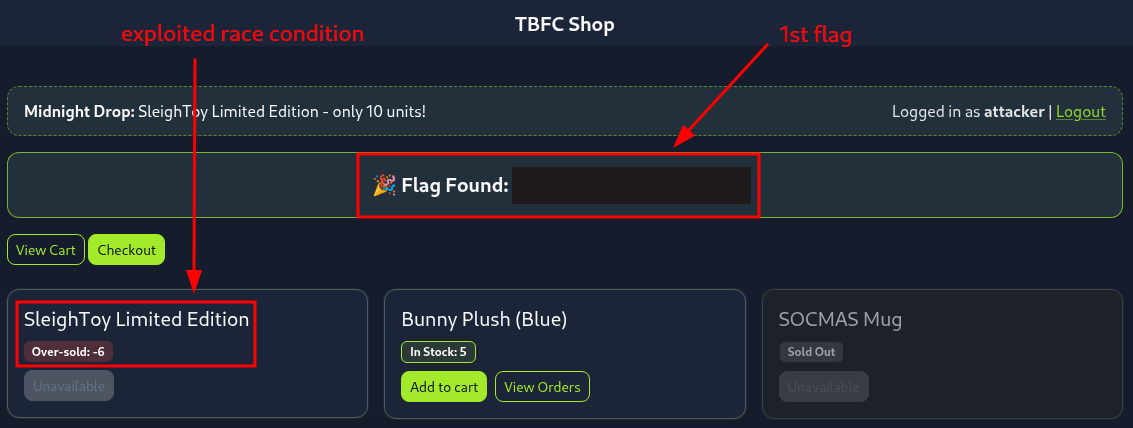
Figure 1: Successfully exploited race condition on the "SleighToy Limited Edition" Item
Then we repeat the same steps (1-5) again for the "Bunny Plush (Blue)" item, landing us the second flag:
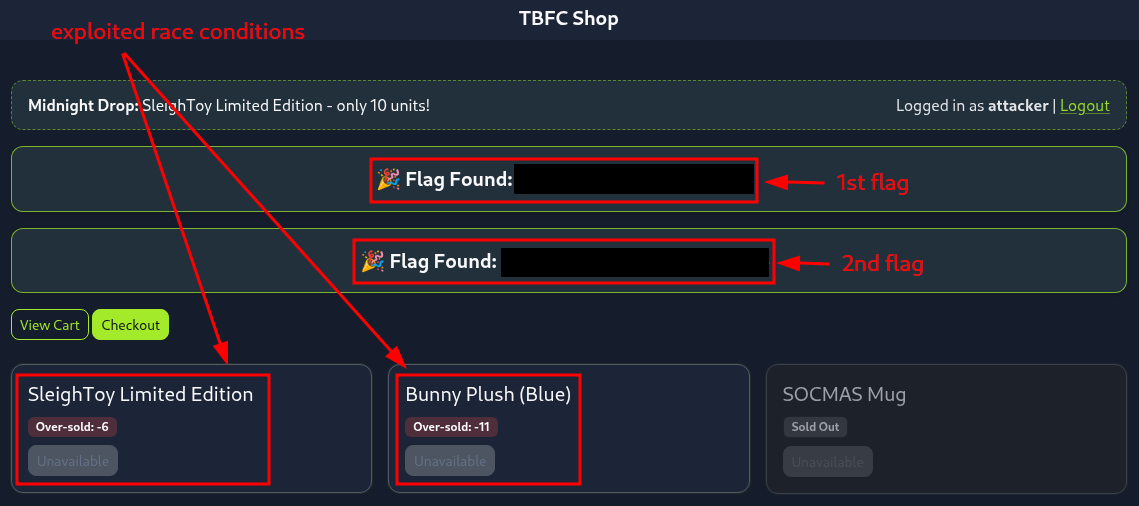
Figure 2: Successfully exploited race condition on the "Bunny Plush (Blue)" Item
Q & A
Question-1: What is the flag value once the stocks are negative for SleighToy Limited Edition?
[REDACTED-FLAG]
Question-2: Repeat the same steps as were done for ordering the SleighToy Limited Edition. What is the flag value once the stocks are negative for Bunny Plush (Blue)?
[REDACTED-FLAG]
Question-3: Feel free to check out the Race Conditions room if you enjoyed this task.
No answer needed